BASIC OPERATION
II
To
play from the beginning of the
track following the one now playing
II
To
play from the beginning of the
track now playing
II
To
play from the beginning of the
track before the one now playing
I<J<]
g(TWiCe)
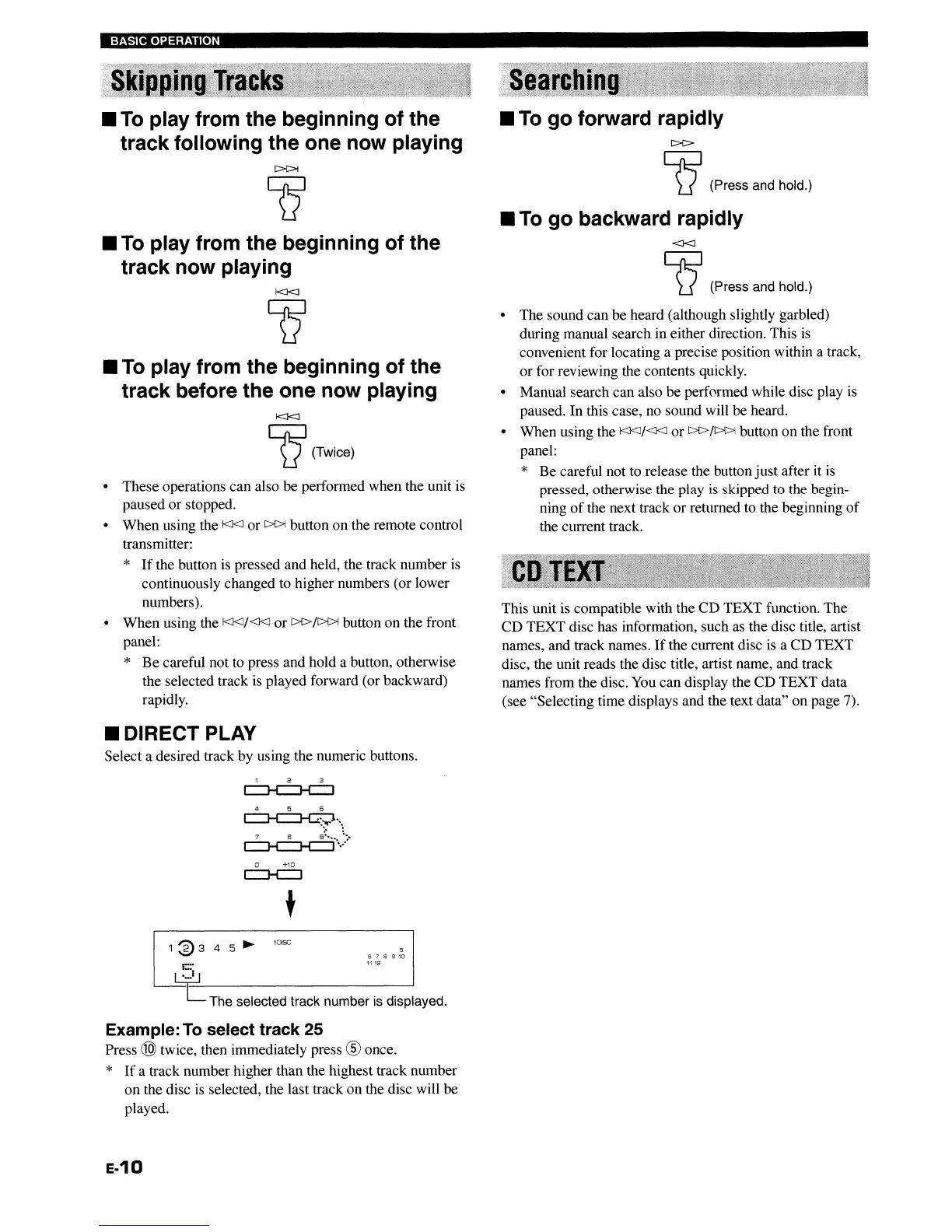
• These operations can also be performed when the unit
is
paused or stopped.
• When using the
I<J<J
or
[>{>j
button on the remote control
transmitter:
*
If
the button
is
pressed and held, the track number
is
continuously changed to higher numbers (or lower
numbers).
• When using the
I<J<J/<J<J
or
C>C>/[>{>j
button on the front
panel:
*
Be
careful not to press and hold a button, otherwise
the selected track
is
played forward (or backward)
rapidly.
II
DIRECT PLAY
Select a desired track by using the numeric buttons.
4 5 6
~.\
7 8
9~
••••
~:.
c:::J--e:::]--t
....
o
+10
~
t
10lSC
5
6 7 8 9
10
1112
~-------'
The selected track number
IS
displayed.
Example:
To
select track 25
Press @ twice, then immediately press ® once.
*
If
a track number higher than the highest track number
on the disc
is
selected, the last track on the disc will be
played.
E-10
II
To
go forward rapidly
C>C>
g (Press and hold.)
II
To
go backward rapidly
<J<J
g (Press and hold.)
• The sound can be heard (although slightly garbled)
during manual search in either direction. This
is
convenient for locating a precise position within a track,
or for reviewing the contents quickly.
• Manual search can also be performed while disc play
is
paused. In this case, no sound will be heard.
• When using the
I<J<J/<J<J or
[>[>/~
button on the front
panel:
* Be careful not to release the button just after it
is
pressed, otherwise the play
is
skipped to the begin-
ning
of
the next track or returned to the beginning
of
the current track.
This unit
is
compatible with the CD TEXT function. The
CD TEXT disc has information, such as the disc title, artist
names, and track names.
If
the current disc
is
a CD TEXT
disc, the unit reads the disc title, artist name, and track
names from the disc. You can display the CD TEXT data
(see "Selecting time displays and the text data" on page 7).
BASIC OPERATION
II
To
play from the beginning of the
track following the one now playing
II
To
play from the beginning of the
track now playing
II
To
play from the beginning of the
track before the one now playing
I<J<]
g(TWiCe)
• These operations can also be performed when the unit
is
paused or stopped.
• When using the
I<J<J
or
[>{>j
button on the remote control
transmitter:
*
If
the button
is
pressed and held, the track number
is
continuously changed to higher numbers (or lower
numbers).
• When using the
I<J<J/<J<J
or
C>C>/[>{>j
button on the front
panel:
*
Be
careful not to press and hold a button, otherwise
the selected track
is
played forward (or backward)
rapidly.
II
DIRECT PLAY
Select a desired track by using the numeric buttons.
4 5 6
~.\
7 8
9~
••••
~:.
c:::J--e:::]--t
....
o
+10
~
t
10lSC
5
6 7 8 9
10
1112
~-------'
The selected track number
IS
displayed.
Example:
To
select track 25
Press @ twice, then immediately press ® once.
*
If
a track number higher than the highest track number
on the disc
is
selected, the last track on the disc will be
played.
E-10
II
To
go forward rapidly
C>C>
g (Press and hold.)
II
To
go backward rapidly
<J<J
g (Press and hold.)
• The sound can be heard (although slightly garbled)
during manual search in either direction. This
is
convenient for locating a precise position within a track,
or for reviewing the contents quickly.
• Manual search can also be performed while disc play
is
paused. In this case, no sound will be heard.
• When using the
I<J<J/<J<J or
[>[>/~
button on the front
panel:
* Be careful not to release the button just after it
is
pressed, otherwise the play
is
skipped to the begin-
ning
of
the next track or returned to the beginning
of
the current track.
This unit
is
compatible with the CD TEXT function. The
CD TEXT disc has information, such as the disc title, artist
names, and track names.
If
the current disc
is
a CD TEXT
disc, the unit reads the disc title, artist name, and track
names from the disc. You can display the CD TEXT data
(see "Selecting time displays and the text data" on page 7).


 To Next Page