TRACK PROGRAMMING FOR RECORDING
II
Display information during pro-
gramming
2,5
8
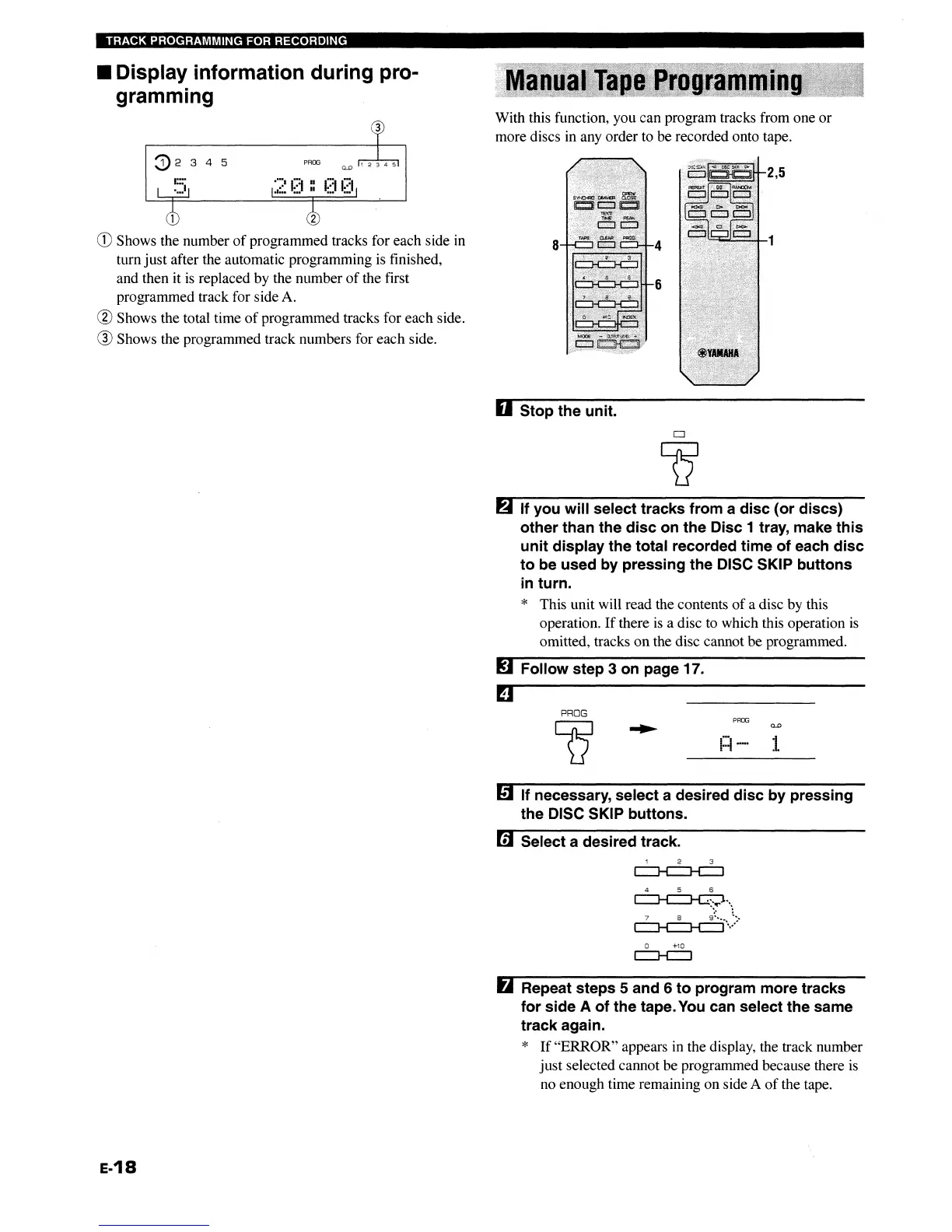
With this function, you can program tracks from one
or
more discs in any order to be recorded onto tape.
PROO
G)2
345
1 2
CD
Shows the number
of
programmed tracks for each side in
turn
just
after the automatic programming is finished,
and then it
is
replaced by the number
of
the first
programmed track for side A.
® Shows the total time
of
programmed tracks for each side.
® Shows the programmed track numbers for
each
side.
U Stop the unit.
6 If you
will
select tracks from a
disc
(or
discs)
other than the
disc
on the Disc 1 tray, make
this
unit
display the total recorded time
of
each
disc
to
be used by pressing the DISC SKIP buttons
in turn.
* This unit will read the contents
of
a disc by this
operation.
If
there
is
a disc to which this operation
is
omitted, tracks
on
the disc cannot
be
programmed.
mFollow step 3 on page 17.
PROG
Q
PROG
mIf necessary, select a desired
disc
by
pressing
the DISC SKIP buttons.
mSelect a desired track.
4 5 6
~'"
~">
o +10
c::::J-C:]
6 Repeat steps 5 and 6
to
program more tracks
for
side A
of
the tape.
You
can select the same
track again.
*
If
"ERROR"
appears in the display, the track number
just
selected cannot be programmed because there is
no enough time remaining on side A
of
the tape.
E-18
TRACK PROGRAMMING FOR RECORDING
II
Display information during pro-
gramming
2,5
8
With this function, you can program tracks from one
or
more discs in any order to be recorded onto tape.
PROO
G)2
345
1 2
CD
Shows the number
of
programmed tracks for each side in
turn
just
after the automatic programming is finished,
and then it
is
replaced by the number
of
the first
programmed track for side A.
® Shows the total time
of
programmed tracks for each side.
® Shows the programmed track numbers for
each
side.
U Stop the unit.
6 If you
will
select tracks from a
disc
(or
discs)
other than the
disc
on the Disc 1 tray, make
this
unit
display the total recorded time
of
each
disc
to
be used by pressing the DISC SKIP buttons
in turn.
* This unit will read the contents
of
a disc by this
operation.
If
there
is
a disc to which this operation
is
omitted, tracks
on
the disc cannot
be
programmed.
mFollow step 3 on page 17.
PROG
Q
PROG
mIf necessary, select a desired
disc
by
pressing
the DISC SKIP buttons.
mSelect a desired track.
4 5 6
~'"
~">
o +10
c::::J-C:]
6 Repeat steps 5 and 6
to
program more tracks
for
side A
of
the tape.
You
can select the same
track again.
*
If
"ERROR"
appears in the display, the track number
just
selected cannot be programmed because there is
no enough time remaining on side A
of
the tape.
E-18


 To Next Page