PREPARATIONS
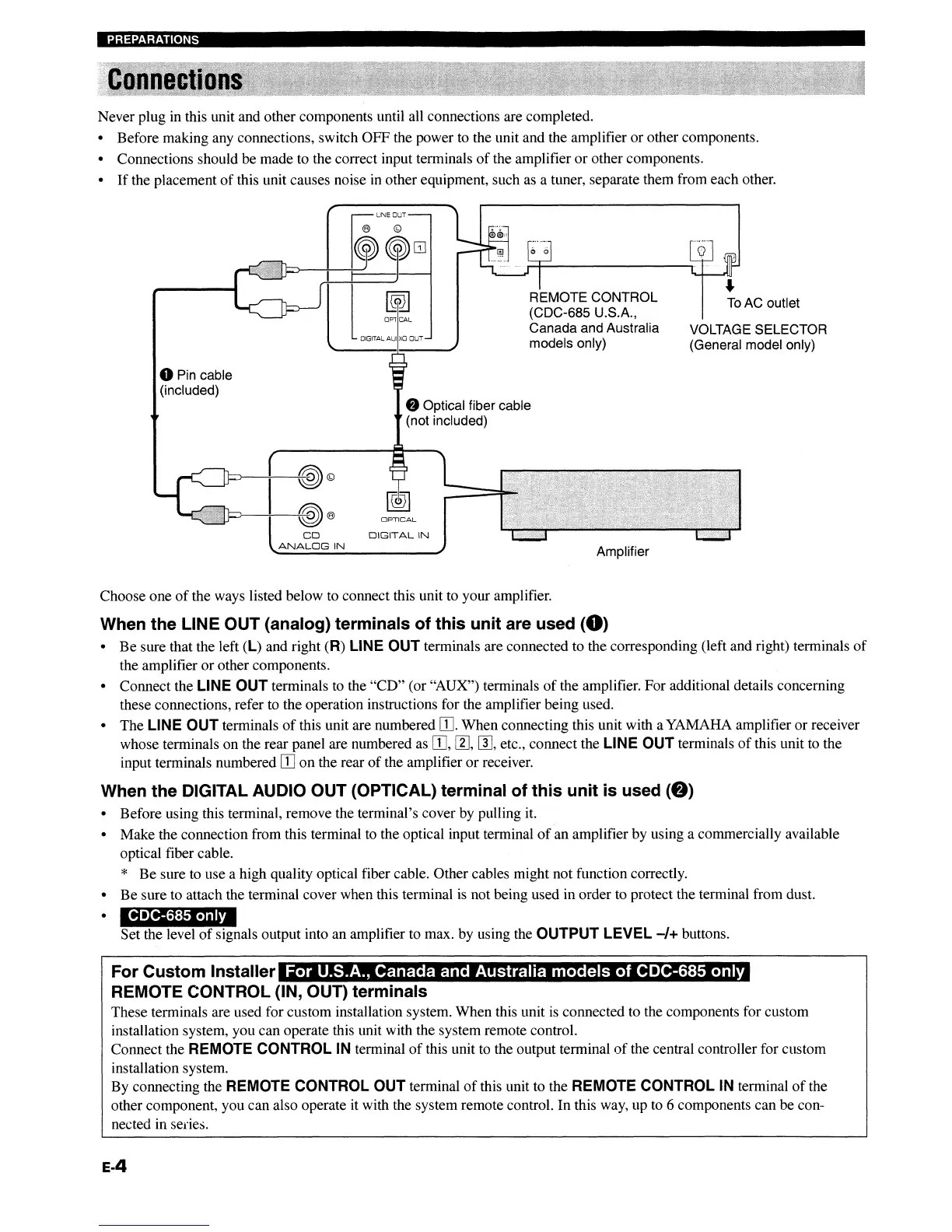
Never plug in this unit and other components until all connections are completed.
• Before making any connections, switch OFF the power to the unit and the amplifier or other components.
• Connections should be made to the correct input terminals
of
the amplifier or other components.
•
If
the placement
of
this unit causes noise
in
other equipment, such
as
a tuner, separate them from each other.
J
ToAC outlet
VOLTAGE SELECTOR
(General model only)
Amplifier
REMOTE CONTROL
(CDC-685 U.S.A.,
Canada and Australia
models only)
OPTICAL
~'iw
~)---+----+-~-
l
!JL
DIGITAL AUI
)10
OUT
CD
DIGITAL
IN
ANALOG
IN
CJ--~(@)©
'-J----~(@)
®
oPin cable
(included)
Choose one
of
the ways listed below to connect this unit to your amplifier.
When the LINE OUT (analog) terminals of this unit are used
(8)
•
Be
sure that the left (L) and right (R) LINE
OUT
terminals are connected to the corresponding (left and right) terminals
of
the amplifier or other components.
• Connect the
LINE
OUT
terminals to the "CD" (or "AUX") terminals
of
the amplifier. For additional details concerning
these connections, refer to the operation instnlctions for the amplifier being used.
• The
LINE
OUT
terminals
of
this unit are numbered
ITJ.
When connecting this unit with a YAMAHA amplifier or receiver
whose terminals on the rear panel are numbered as
[IJ,
[1],
W,
etc., connect the LINE
OUT
terminals
of
this unit to the
input terminals numbered
[IJ
on
the rear
of
the amplifier or receiver.
When the DIGITAL AUDIO OUT (OPTICAL) terminal of this unit is used
(f)
• Before using this terminal, remove the terminal's cover by pulling it.
• Make the connection from this terminal to the optical input terminal
of
an amplifier by using a commercially available
optical fiber cab
Ie.
* Be sure to use a high quality optical fiber cable. Other cables might not function correctly.
• Be sure to attach the terminal cover when this terminal
is
not being used in order to protect the terminal from dust.
CDC-685 only
Set the level
of
signals output into an amplifier to max. by using the
OUTPUT
LEVEL
-/+
buttons.
For Custom Installer
REMOTE CONTROL (IN, OUT) terminals
These terminals are used for custom installation system. When this unit
is
connected to the components for custom
installation system, you can operate this unit with the system remote control.
Connect the
REMOTE
CONTROL
IN terminal
of
this unit to the output terminal
of
the central controller for custom
installation system.
By connecting the
REMOTE CONTROL
OUT
terminal
of
this unit to the REMOTE CONTROL IN terminal
of
the
other component, you can also operate it with the system remote control. In this way, up to 6 components can be con-
nected in series.
E-4
PREPARATIONS
Never plug in this unit and other components until all connections are completed.
• Before making any connections, switch OFF the power to the unit and the amplifier or other components.
• Connections should be made to the correct input terminals
of
the amplifier or other components.
•
If
the placement
of
this unit causes noise
in
other equipment, such
as
a tuner, separate them from each other.
J
ToAC outlet
VOLTAGE SELECTOR
(General model only)
Amplifier
REMOTE CONTROL
(CDC-685 U.S.A.,
Canada and Australia
models only)
OPTICAL
~'iw
~)---+----+-~-
l
!JL
DIGITAL AUI
)10
OUT
CD
DIGITAL
IN
ANALOG
IN
CJ--~(@)©
'-J----~(@)
®
oPin cable
(included)
Choose one
of
the ways listed below to connect this unit to your amplifier.
When the LINE OUT (analog) terminals of this unit are used
(8)
•
Be
sure that the left (L) and right (R) LINE
OUT
terminals are connected to the corresponding (left and right) terminals
of
the amplifier or other components.
• Connect the
LINE
OUT
terminals to the "CD" (or "AUX") terminals
of
the amplifier. For additional details concerning
these connections, refer to the operation instnlctions for the amplifier being used.
• The
LINE
OUT
terminals
of
this unit are numbered
ITJ.
When connecting this unit with aYAMAHA amplifier or receiver
whose terminals on the rear panel are numbered as
[IJ,
[1],
W,
etc., connect the LINE
OUT
terminals
of
this unit to the
input terminals numbered
[IJ
on
the rear
of
the amplifier or receiver.
When the DIGITAL AUDIO OUT (OPTICAL) terminal of this unit is used
(f)
• Before using this terminal, remove the terminal's cover by pulling it.
• Make the connection from this terminal to the optical input terminal
of
an amplifier by using a commercially available
optical fiber cab
Ie.
* Be sure to use a high quality optical fiber cable. Other cables might not function correctly.
• Be sure to attach the terminal cover when this terminal
is
not being used in order to protect the terminal from dust.
CDC-685 only
Set the level
of
signals output into an amplifier to max. by using the
OUTPUT
LEVEL
-/+
buttons.
For Custom Installer
REMOTE CONTROL (IN, OUT) terminals
These terminals are used for custom installation system. When this unit
is
connected to the components for custom
installation system, you can operate this unit with the system remote control.
Connect the
REMOTE
CONTROL
IN terminal
of
this unit to the output terminal
of
the central controller for custom
installation system.
By connecting the
REMOTE CONTROL
OUT
terminal
of
this unit to the REMOTE CONTROL IN terminal
of
the
other component, you can also operate it with the system remote control. In this way, up to 6 components can be con-
nected in series.
E-4


 To Next Page