TRACK PROGRAMMING FOR RECORDING
PROG
~2 3 4 5
:::1·
• Because the programmed data changes every time the
RANDOM button is pressed, the amount
of
time remaining
at the end
of
the tape also changes accordingly.
•
It
is recommended that you use a tape that is slightly longer
in length than the
CD
you are recording, because the
programmed tracks on a
CD
may not fit properly into the
time allowed on each half
of
the tape.
•
CD
synchronized recording function can be used if your tape
deck is compatible with it.
In this case, in steps 3 and 4, press the SYNCHRO button
and then press the
C>
button. Recording automatically begins.
(For details, refer to page 16.)
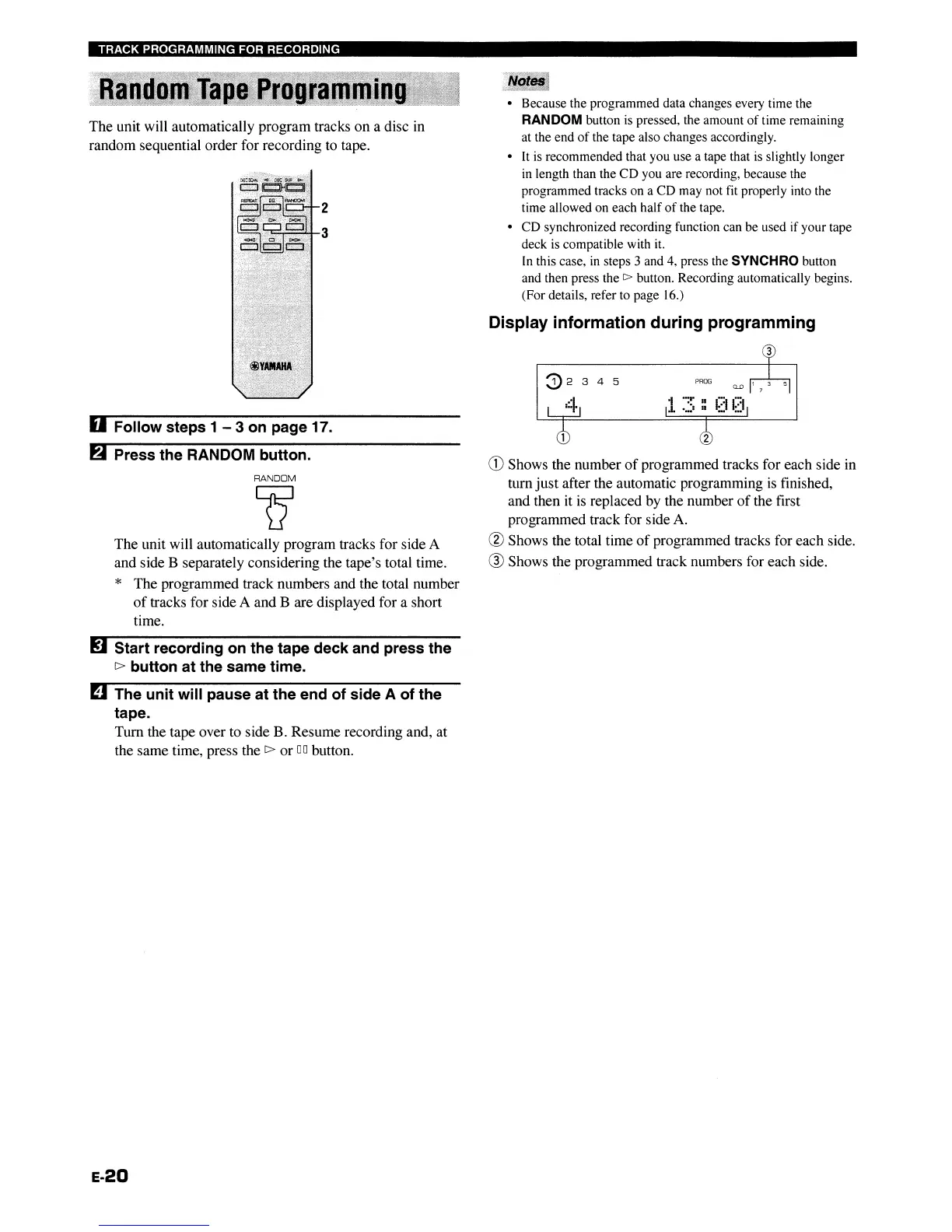
Display information during programming
CD
Shows the number
of
programmed tracks for each side in
turn just after the automatic programming
is
finished,
and then it
is
replaced by the number
of
the first
programmed track for side
A.
WShows the total time
of
programmed tracks for each side.
® Shows the programmed track numbers for each side.
I.R2
3
The unit will automatically program tracks for side A
and side B separately considering the tape's total time.
* The programmed track numbers and the total number
of
tracks for side A and B are displayed for a short
time.
RANDOM
Q
~
Press the RANDOM button.
The unit will automatically program tracks on a disc
in
random sequential order for recording to tape.
U Follow steps 1 - 3 on page 17.
RJ
Start recording
on
the tape deck and press the
c>
button at the same time.
II
The unit will pause at the end of side A of the
tape.
Tum the tape over to side B. Resume recording and, at
the same time, press the
c>
or
DO
button.
E-20
TRACK PROGRAMMING FOR RECORDING
PROG
~2 3 4 5
:::1·
• Because the programmed data changes every time the
RANDOM button is pressed, the amount
of
time remaining
at the end
of
the tape also changes accordingly.
•
It
is recommended that you use a tape that is slightly longer
in length than the
CD
you are recording, because the
programmed tracks on a
CD
may not fit properly into the
time allowed on each half
of
the tape.
•
CD
synchronized recording function can be used if your tape
deck is compatible with it.
In this case, in steps 3 and 4, press the SYNCHRO button
and then press the
C>
button. Recording automatically begins.
(For details, refer to page 16.)
Display information during programming
CD
Shows the number
of
programmed tracks for each side in
turn just after the automatic programming
is
finished,
and then it
is
replaced by the number
of
the first
programmed track for side
A.
WShows the total time
of
programmed tracks for each side.
® Shows the programmed track numbers for each side.
I.R2
3
The unit will automatically program tracks for side A
and side B separately considering the tape's total time.
* The programmed track numbers and the total number
of
tracks for side A and B are displayed for a short
time.
RANDOM
Q
~
Press the RANDOM button.
The unit will automatically program tracks on a disc
in
random sequential order for recording to tape.
U Follow steps 1 - 3 on page 17.
RJ
Start recording
on
the tape deck and press the
c>
button at the same time.
II
The unit will pause at the end of side A of the
tape.
Tum the tape over to side B. Resume recording and, at
the same time, press the
C>
or
DO
button.
E-20


 To Next Page