TRACK PROGRAMMING FOR RECORDING
+
" /
PR03
*
If
"A-I"
does not appear in the display after the PROG
button is pressed, press the TEXTrrlME display mode-
select button.
* If, during programming, the TEXTrrlME display mode-
select button is pressed, the program number display can
be changed to display the total remaining time
on
the
side
of
the tape.
To
return to the previous display, press
the
TEXTrrlME display mode-select button once again.
3
CD
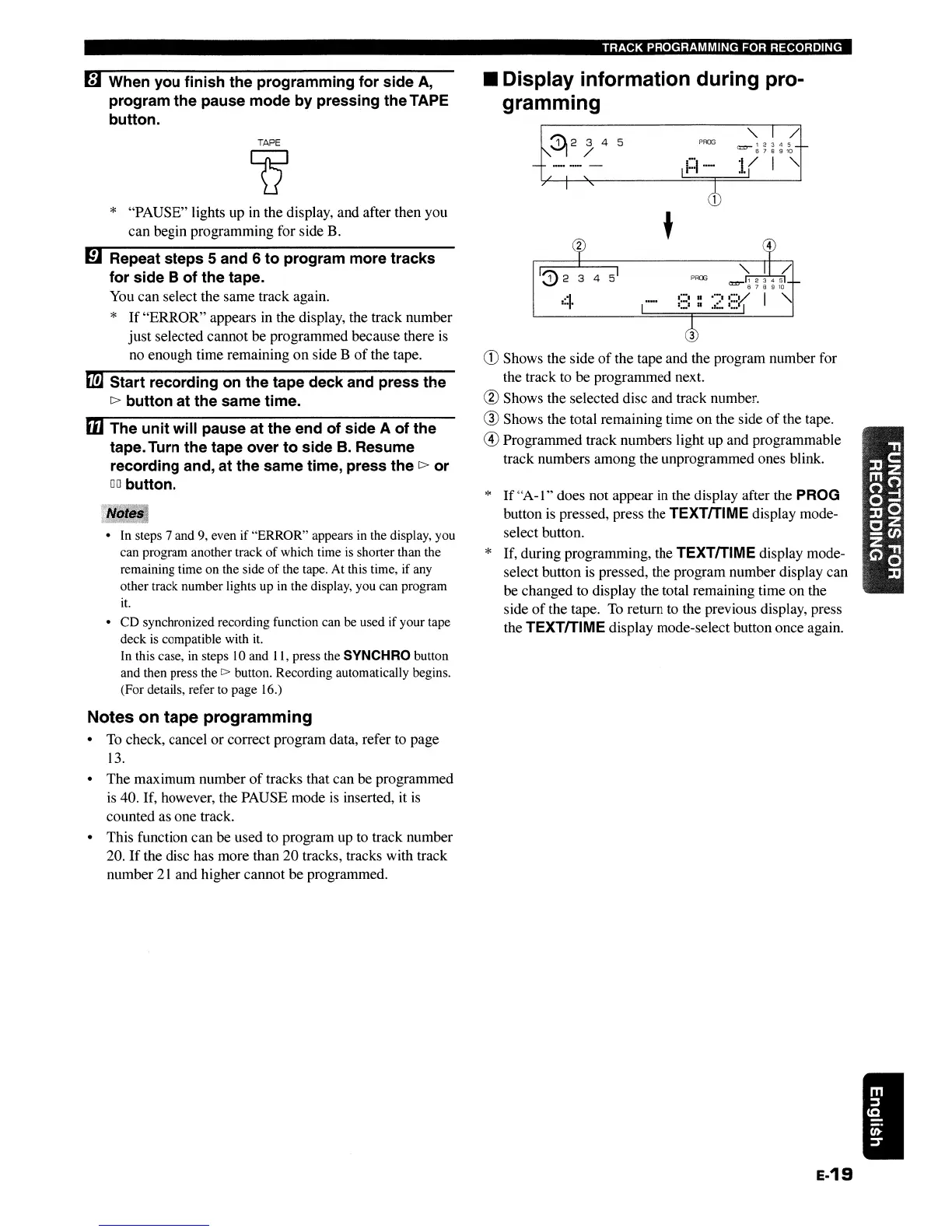
Shows the side
of
the tape and the program number for
the track to
be
programmed next.
@ Shows the selected disc and track number.
® Shows the total remaining time
on
the side
of
the tape.
@)
Programmed track numbers light up and programmable
track numbers among the unprogrammed ones blink.
II
Display information during pro-
gramming
TAPE
Q
* "PAUSE" lights up in the display, and after then you
can
begin programming for side B.
• In steps 7 and 9, even if "ERROR" appears in the display, you
can program another track
of
which time
is
shorter than the
remaining time on the side
of
the tape. At this time, if any
other track number lights up in the display, you can program
it.
• CD synchronized recording function can be used if your tape
deck
is
compatible with it.
In this case, in steps
10
and 11, press the SYNCHRO button
and then press the
[>
button. Recording automatically begins.
(For details, refer to page 16.)
it!]
Start recording
on
the tape deck and press the
[>
button at the same time.
mThe unit will pause at the end of side A of the
tape. Turn the tape over to side
B.
Resume
recording and, at the same time, press the
[>
or
DO
button.
mRepeat steps 5 and 6 to program more tracks
for side
B of the tape.
You can select the same track again.
*
If
"ERROR"
appears in the display, the track number
just
selected cannot
be
programmed because there is
no enough time remaining
on
side B
of
the tape.
[#J
When you finish the programming for side
A,
program the pause mode by pressing the TAPE
button.
Notes on tape programming
•
To
check, cancel
or
correct program data, refer to page
13.
•
The
maximum number
of
tracks that can be programmed
is 40. If, however, the PAUSE mode
is
inserted, it
is
counted as one track.
• This function
can
be used to program up to track number
20.
If
the disc has more than
20
tracks, tracks with track
number
21
and higher cannot
be
programmed.
e-19
TRACK PROGRAMMING FOR RECORDING
+
" /
PR03
*
If
"A-I"
does not appear in the display after the PROG
button is pressed, press the TEXTrrlME display mode-
select button.
* If, during programming, the TEXTrrlME display mode-
select button is pressed, the program number display can
be changed to display the total remaining time
on
the
side
of
the tape.
To
return to the previous display, press
the
TEXTrrlME display mode-select button once again.
3
CD
Shows the side
of
the tape and the program number for
the track to
be
programmed next.
@ Shows the selected disc and track number.
® Shows the total remaining time
on
the side
of
the tape.
@)
Programmed track numbers light up and programmable
track numbers among the unprogrammed ones blink.
II
Display information during pro-
gramming
TAPE
Q
* "PAUSE" lights up in the display, and after then you
can
begin programming for side B.
• In steps 7 and 9, even if "ERROR" appears in the display, you
can program another track
of
which time
is
shorter than the
remaining time on the side
of
the tape. At this time, if any
other track number lights up in the display, you can program
it.
• CD synchronized recording function can be used if your tape
deck
is
compatible with it.
In this case, in steps
10
and 11, press the SYNCHRO button
and then press the
[>
button. Recording automatically begins.
(For details, refer to page 16.)
it!]
Start recording
on
the tape deck and press the
[>
button at the same time.
mThe unit will pause at the end of side A of the
tape. Turn the tape over to side
B.
Resume
recording and, at the same time, press the
[>
or
DO
button.
mRepeat steps 5 and 6 to program more tracks
for side
B of the tape.
You can select the same track again.
*
If
"ERROR"
appears in the display, the track number
just
selected cannot
be
programmed because there is
no enough time remaining
on
side B
of
the tape.
[#J
When you finish the programming for side
A,
program the pause mode by pressing the TAPE
button.
Notes on tape programming
•
To
check, cancel
or
correct program data, refer to page
13.
•
The
maximum number
of
tracks that can be programmed
is 40. If, however, the PAUSE mode
is
inserted, it
is
counted as one track.
• This function
can
be used to program up to track number
20.
If
the disc has more than
20
tracks, tracks with track
number
21
and higher cannot
be
programmed.
e-19


 To Next Page