AUTOMATIC
PEAK
LEVEL
SEARCHING
II
II
__
!!!!!!!!!!!!!!!!!!!!
8 9
10
1112
8 9
10
..
1
1112
1;::1
::
:::1·
:::.
UllWlllllWlllll
1
DISC
REP
1
DISC
REP
1
DISC
PEAK
Q
t
G)2345
1:::-
E::
1:::11<:
G)2345~
1:::
1
E::
1:::11<:
G)2345~
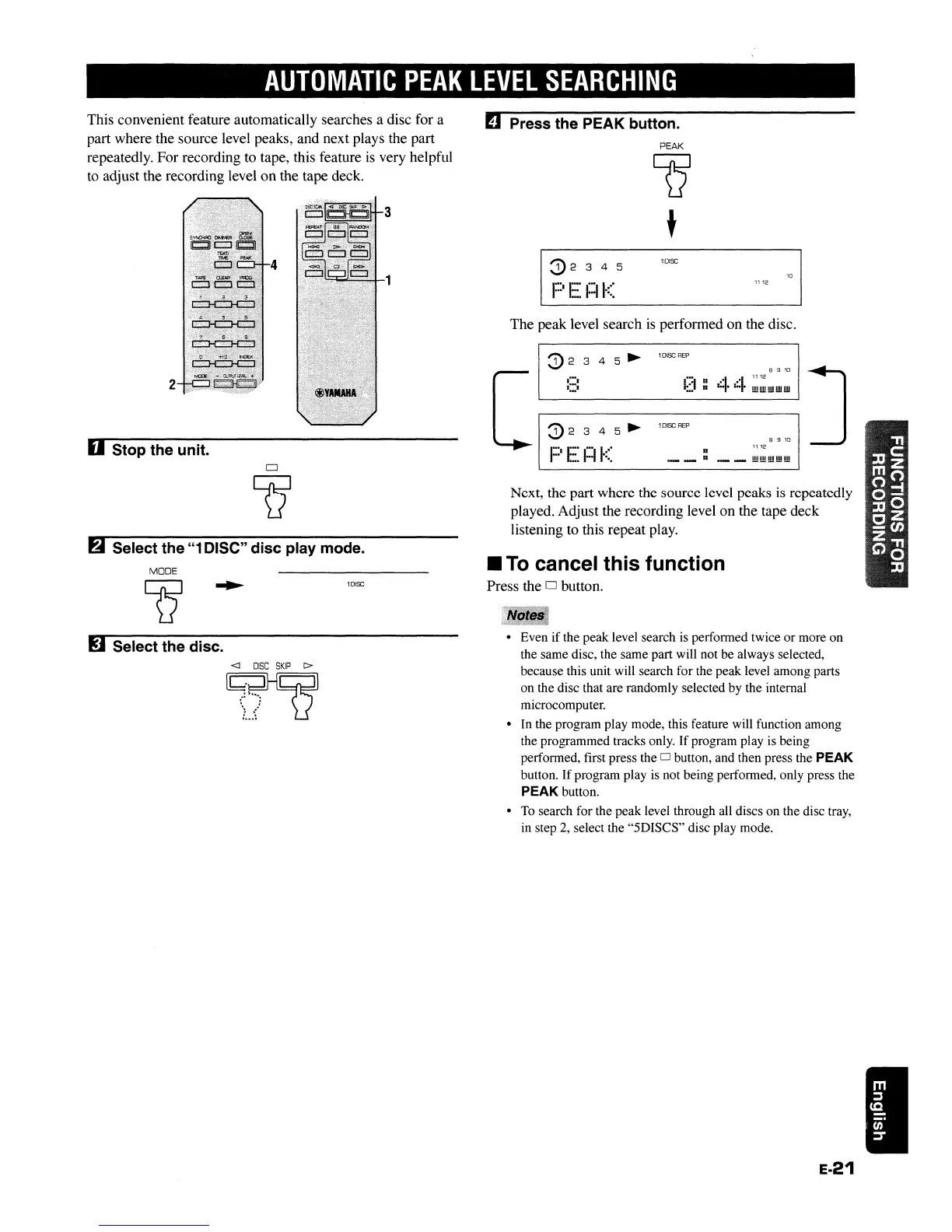
Next, the part where the source level peaks
is
repeatedly
played. Adjust the recording level on the tape deck
listening to this repeat play.
The peak level search
is
performed on the disc.
II
To
cancel this function
Press the 0 button.
D Press the PEAK button.
1
DISC
MODE
Q
2
6 Select the
"1
DISC" disc play mode.
This convenient feature automatically searches a disc for a
part where the source level peaks, and next plays the part
repeatedly. For recording to tape, this feature
is
very helpful
to adjust the recording level
on
the tape deck.
U Stop the unit.
!J
Select the disc.
<J
DISC
SKIP
C>
~
:~
....
\ /
,_
...
• Even if the peak level search is perfonned twice or more on
the same disc, the same part will not be always selected,
because this unit will search for the peak level among parts
on the disc that are randomly selected by the internal
microcomputer.
• In the program play mode, this feature will function among
the programmed tracks only. If program play is being
perfonned, first press the
0 button, and then press the PEAK
button. If program play
is
not being perfonned, only press the
PEAK button.
•
To
search for the peak level through all discs on the disc tray,
in step
2,
select the "5DISCS" disc play mode.
E-21
AUTOMATIC
PEAK
LEVEL
SEARCHING
II
II
__
!!!!!!!!!!!!!!!!!!!!
8 9
10
1112
8 9
10
..
1
1112
1;::1
::
:::1·
:::.
UllWlllllWlllll
1
DISC
REP
1
DISC
REP
1
DISC
PEAK
Q
t
G)2345
1:::-
E::
1:::11<:
G)2345~
1:::
1
E::
1:::11<:
G)2345~
Next, the part where the source level peaks
is
repeatedly
played. Adjust the recording level on the tape deck
listening to this repeat play.
The peak level search
is
performed on the disc.
II
To
cancel this function
Press the 0 button.
D Press the PEAK button.
1
DISC
MODE
Q
2
6 Select the
"1
DISC" disc play mode.
This convenient feature automatically searches a disc for a
part where the source level peaks, and next plays the part
repeatedly. For recording to tape, this feature
is
very helpful
to adjust the recording level
on
the tape deck.
U Stop the unit.
!J
Select the disc.
<J
DISC
SKIP
C>
~
:~
....
\ /
,_
...
• Even if the peak level search is perfonned twice or more on
the same disc, the same part will not be always selected,
because this unit will search for the peak level among parts
on the disc that are randomly selected by the internal
microcomputer.
• In the program play mode, this feature will function among
the programmed tracks only. If program play is being
perfonned, first press the
0 button, and then press the PEAK
button. If program play
is
not being perfonned, only press the
PEAK button.
•
To
search for the peak level through all discs on the disc tray,
in step
2,
select the "5DISCS" disc play mode.
E-21


 To Next Page