BASIC
OPERATION
o
(j)
0
.:"'
...
\
..
{:
On
the front panel
t
Play will automatically start.
or
<J
DISC
SKIP
I>
~
:loh.'
\ /
f
••••
MODE
1DISC
5DIScS
I
Shows the selected disc mode.
"1
DISC" mode:
The
unit will
playa
designated disc
only.
"5DISCS" mode:
The
unit will play all discs
on
the
tray in sequence.
*
If
necessary, select a desired disc by using the DISC
SKIP
buttons,
or
a DISC-select button
on
the front
panel.
OPEN!
CLOSE
~
• You
can
also close the disc tray by pressing the [>/00
button
on
the front panel, a DISC-select button
on
the front panel, a numeric button
or
the RANDOM
button,
or
by pressing the front edge
of
the disc tray
gently.
If
the tray
is
closed in these ways, play will
begin automatically, however, the display will not
show the total number
of
tracks and the total
recorded time
of
the first selected disc.
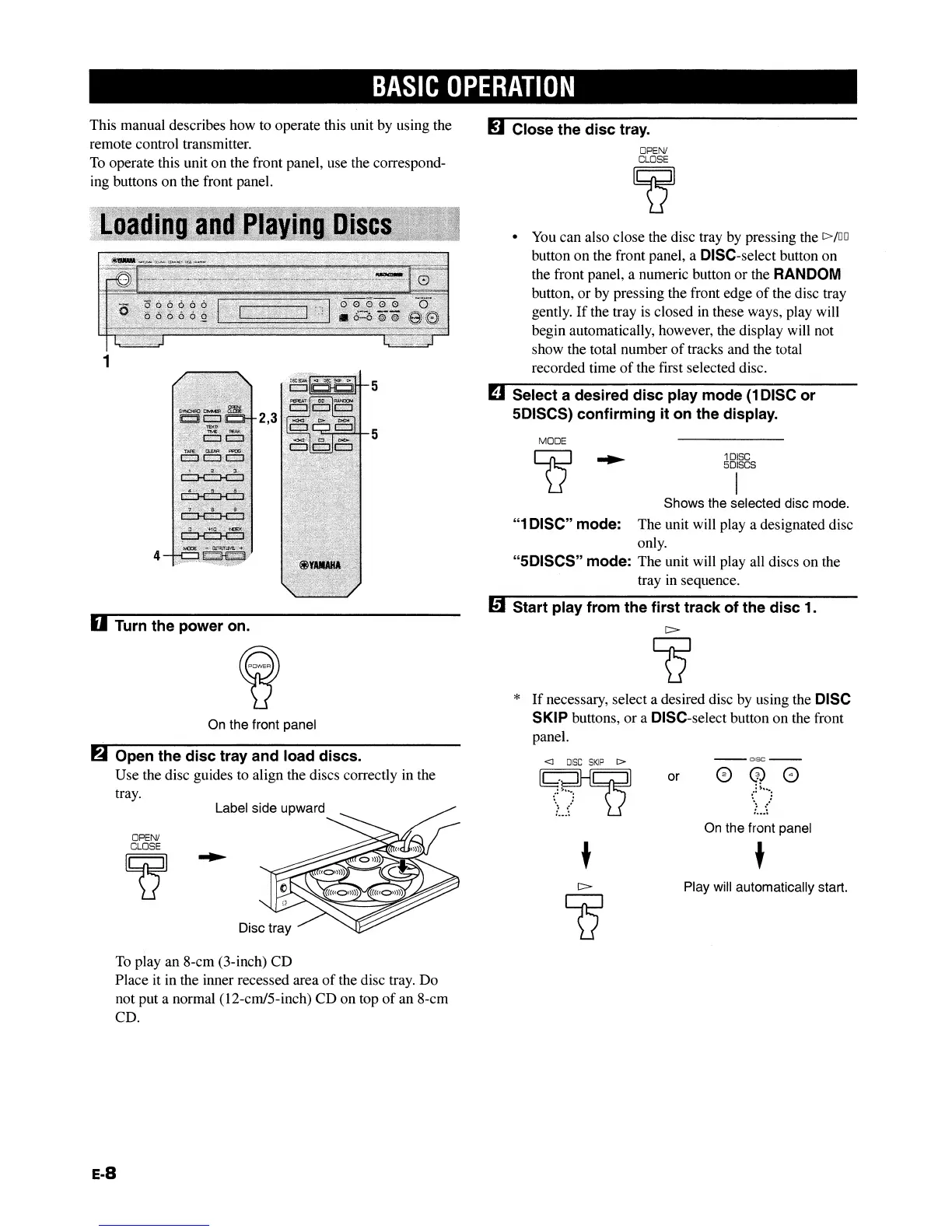
D Select a desired disc play mode
(1
DISC or
5DISCS) confirming it on the display.
mStart play from the first track of the disc 1.
M Close the disc tray.
2,3
Disc tray
OPEN/
CLOSE
~
On
the front panel
Label side upward
4
1
D Turn the power on.
6 Open the disc tray and load discs.
Use
the disc guides to align the discs correctly in the
tray.
This manual describes how to operate this unit by using the
remote control transmitter.
To
operate this unit
on
the front panel, use the correspond-
ing buttons
on
the front panel.
To play
an
8-cm (3-inch)
CD
Place
it in the inner recessed area
of
the disc tray.
Do
not put a normal (12-cm/5-inch)
CD
on
top
of
an
8-cm
CD.
E-8
BASIC
OPERATION
o
(j)
0
.:"'
...
\
..
{:
On
the front panel
t
Play will automatically start.
or
<J
DISC
SKIP
I>
~
:loh.'
\ /
f
••••
MODE
1DISC
5DIScS
I
Shows the selected disc mode.
"1
DISC" mode:
The
unit will
playa
designated disc
only.
"5DISCS" mode:
The
unit will play all discs
on
the
tray in sequence.
*
If
necessary, select a desired disc by using the DISC
SKIP
buttons,
or
a DISC-select button
on
the front
panel.
OPEN!
CLOSE
~
• You
can
also close the disc tray by pressing the [>/00
button
on
the front panel, a DISC-select button
on
the front panel, a numeric button
or
the RANDOM
button,
or
by pressing the front edge
of
the disc tray
gently.
If
the tray
is
closed in these ways, play will
begin automatically, however, the display will not
show the total number
of
tracks and the total
recorded time
of
the first selected disc.
D Select a desired disc play mode
(1
DISC or
5DISCS) confirming it on the display.
mStart play from the first track of the disc 1.
M Close the disc tray.
2,3
Disc tray
OPEN/
CLOSE
~
On
the front panel
Label side upward
4
1
D Turn the power on.
6 Open the disc tray and load discs.
Use
the disc guides to align the discs correctly in the
tray.
This manual describes how to operate this unit by using the
remote control transmitter.
To
operate this unit
on
the front panel, use the correspond-
ing buttons
on
the front panel.
To play
an
8-cm (3-inch)
CD
Place
it in the inner recessed area
of
the disc tray.
Do
not put a normal (12-cm/5-inch)
CD
on
top
of
an
8-cm
CD.
E-8


 To Next Page