VARIOUS
FUNCTIONS
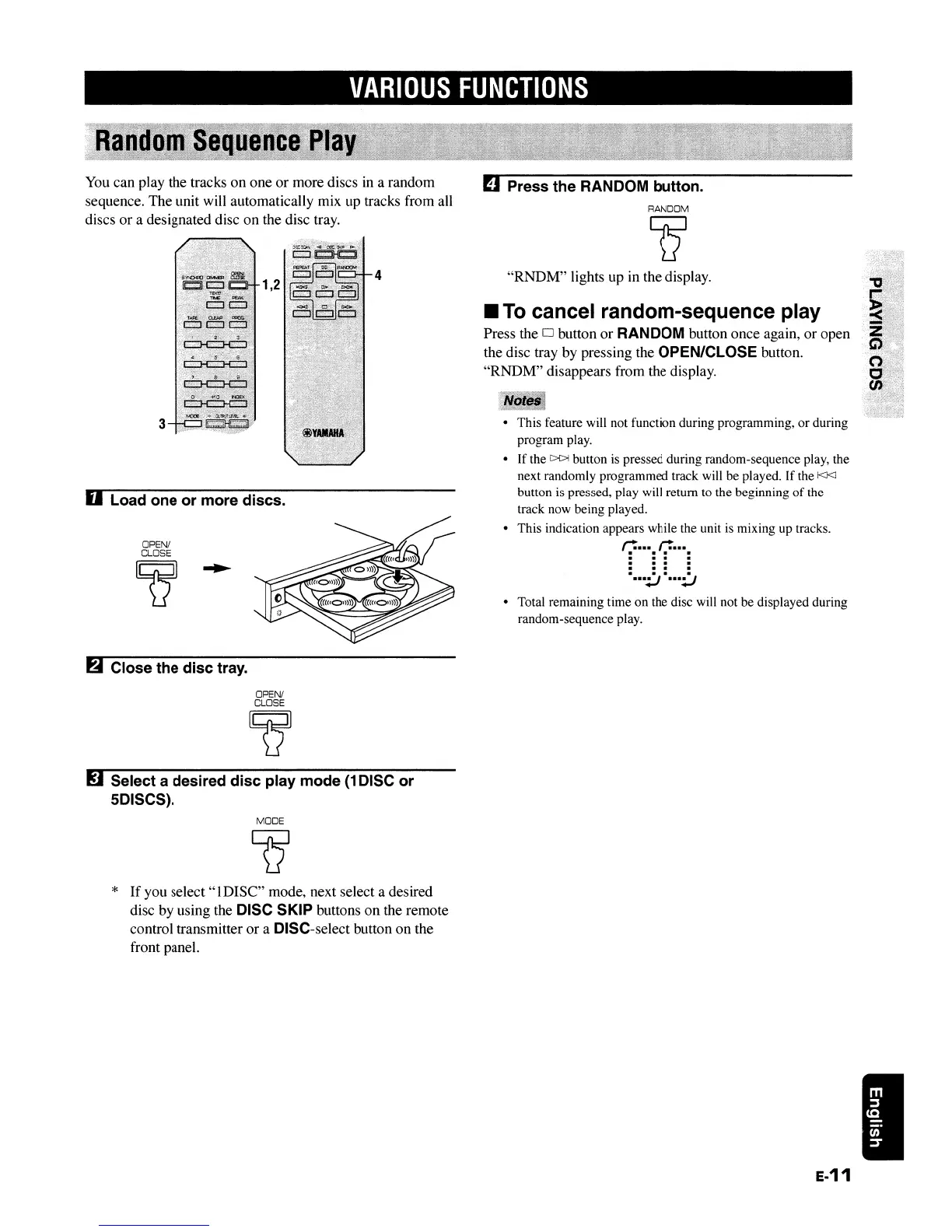
You can play the tracks
on
one
or
more discs in a random
sequence. The unit will automatically mix up tracks from all
discs or a designated disc
on
the disc tray.
RANDOM
err
• Total remaining time
on
the disc will not be displayed during
random-sequence play.
"RNDM"
lights up in the display.
II
To
cancel random-sequence play
Press the D button
or
RANDOM button once again, or open
the disc tray by pressing the
OPEN/CLOSE button.
"RNDM"
disappears from the display.
::::1111111·1
• This feature will not function during programming,
or
during
program play.
• If the
C>C>1
button
is
pressed during random-sequence play, the
next randomly programmed track will be played. If the
kI<J
button is pressed, play will return to the beginning
of
the
track now being played.
• This indication appears while the unit
is
mixing up tracks.
1
..
"(t""l
. .. .
•••
:..J
•••
:..J
mPress the RANDOM button.
4
1,2
3
OPEN/
CLOSE
~
D Load one or more discs.
fA
Close the disc tray.
OPEN!
CLOSE
~
g Select a desired disc play mode
(1
DISC or
5DISCS).
MODE
*
If
you
select"
1DISC" mode, next select a desired
disc by using the
DISC SKIP buttons
on
the remote
control transmitter
or
a DISC-select button on the
front panel.
E-11
VARIOUS
FUNCTIONS
You can play the tracks
on
one
or
more discs in a random
sequence. The unit will automatically mix up tracks from all
discs or a designated disc
on
the disc tray.
RANDOM
err
• Total remaining time
on
the disc will not be displayed during
random-sequence play.
"RNDM"
lights up in the display.
II
To
cancel random-sequence play
Press the D button
or
RANDOM button once again, or open
the disc tray by pressing the
OPEN/CLOSE button.
"RNDM"
disappears from the display.
::::1111111·1
• This feature will not function during programming,
or
during
program play.
• If the
C>C>1
button
is
pressed during random-sequence play, the
next randomly programmed track will be played. If the
kI<J
button is pressed, play will return to the beginning
of
the
track now being played.
• This indication appears while the unit
is
mixing up tracks.
1
..
"(t""l
. .. .
•••
:..J
•••
:..J
mPress the RANDOM button.
4
1,2
3
OPEN/
CLOSE
~
D Load one or more discs.
fA
Close the disc tray.
OPEN!
CLOSE
~
g Select a desired disc play mode
(1
DISC or
5DISCS).
MODE
*
If
you
select"
1DISC" mode, next select a desired
disc by using the
DISC SKIP buttons
on
the remote
control transmitter
or
a DISC-select button on the
front panel.
E-11


 To Next Page