II
Display information during pro-
gramming
t
4
CD
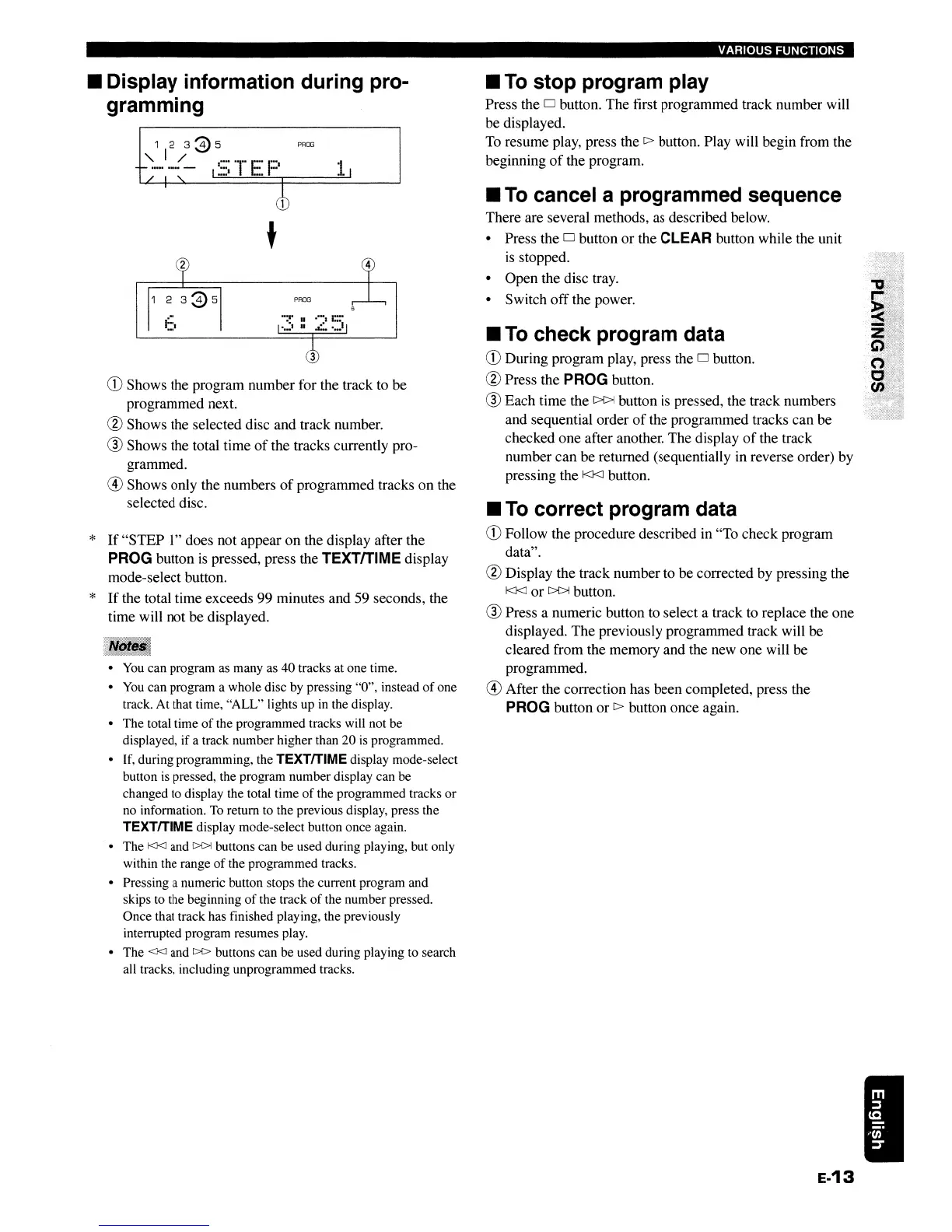
Shows the program number for the track to be
programmed next.
@ Shows the selected disc and track number.
® Shows the total time
of
the tracks currently pro-
grammed.
® Shows only the numbers
of
programmed tracks
on
the
selected disc.
*
If
"STEP 1" does not appear on the display after the
PROG button
is
pressed, press the TEXTfTlME display
mode-select button.
*
If
the total time exceeds 99 minutes and 59 seconds, the
time will not be displayed.
•
You
can program as many as 40 tracks at one time.
•
You
can program a whole disc by pressing "0", instead
of
one
track. At that time, "ALL" lights up in the display.
• The total time
of
the programmed tracks will not be
displayed, if a track number higher than 20
is
programmed.
• If, during programming, the
TEXTITIME display mode-select
button is pressed, the program number display can be
changed to display the total time
of
the programmed tracks or
no information.
To
return to the previous display, press the
TEXTITIME display mode-select button once again.
• The
KJ<]
and
[>{>j
buttons can be used during playing, but only
within the range
of
the programmed tracks.
• Pressing a numeric button stops the current program and
skips to the beginning
of
the track
of
the number pressed.
Once that track has finished playing, the previously
interrupted program resumes play.
• The
<J<J and
[>[>
buttons can be used during playing to search
all tracks, including unprogrammed tracks.
VARIOUS FUNCTIONS
II
To
stop program play
Press the 0 button. The first programmed track number will
be displayed.
To
resume play, press the
[>
button. Play will begin from the
beginning
of
the program.
II
To
cancel a programmed sequence
There are several methods,
as
described below.
• Press the
0 button or the CLEAR button while the unit
is
stopped.
• Open the disc tray.
• Switch offthe power.
II
To
check program data
CD
During program play, press the 0 button.
@ Press the PROG button.
® Each time the
~
button
is
pressed, the track numbers
and sequential order
of
the programmed tracks can be
checked one after another. The display
of
the track
number can be returned (sequentially in reverse order) by
pressing the
I<J<J
button.
II
To
correct program data
CD
Follow the procedure described in "To check program
data".
@ Display the track number to be corrected by pressing the
I<J<J
or
~
button.
® Press a numeric button to select a track to replace the one
displayed. The previously programmed track will be
cleared from the memory and the new one will be
programmed.
® After the correction has been completed, press the
PROG button or
[>
button once again.
E-13
II
Display information during pro-
gramming
t
4
CD
Shows the program number for the track to be
programmed next.
@ Shows the selected disc and track number.
® Shows the total time
of
the tracks currently pro-
grammed.
® Shows only the numbers
of
programmed tracks
on
the
selected disc.
*
If
"STEP 1" does not appear on the display after the
PROG button
is
pressed, press the TEXTfTlME display
mode-select button.
*
If
the total time exceeds 99 minutes and 59 seconds, the
time will not be displayed.
•
You
can program as many as 40 tracks at one time.
•
You
can program a whole disc by pressing "0", instead
of
one
track. At that time, "ALL" lights up in the display.
• The total time
of
the programmed tracks will not be
displayed, if a track number higher than 20
is
programmed.
• If, during programming, the
TEXTITIME display mode-select
button is pressed, the program number display can be
changed to display the total time
of
the programmed tracks or
no information.
To
return to the previous display, press the
TEXTITIME display mode-select button once again.
• The
KJ<]
and
[>{>j
buttons can be used during playing, but only
within the range
of
the programmed tracks.
• Pressing a numeric button stops the current program and
skips to the beginning
of
the track
of
the number pressed.
Once that track has finished playing, the previously
interrupted program resumes play.
• The
<J<J and
[>[>
buttons can be used during playing to search
all tracks, including unprogrammed tracks.
VARIOUS FUNCTIONS
II
To
stop program play
Press the 0 button. The first programmed track number will
be displayed.
To
resume play, press the
[>
button. Play will begin from the
beginning
of
the program.
II
To
cancel a programmed sequence
There are several methods,
as
described below.
• Press the
0 button or the CLEAR button while the unit
is
stopped.
• Open the disc tray.
• Switch offthe power.
II
To
check program data
CD
During program play, press the 0 button.
@ Press the PROG button.
® Each time the
~
button
is
pressed, the track numbers
and sequential order
of
the programmed tracks can be
checked one after another. The display
of
the track
number can be returned (sequentially in reverse order) by
pressing the
I<J<J
button.
II
To
correct program data
CD
Follow the procedure described in "To check program
data".
@ Display the track number to be corrected by pressing the
I<J<J
or
~
button.
® Press a numeric button to select a track to replace the one
displayed. The previously programmed track will be
cleared from the memory and the new one will be
programmed.
® After the correction has been completed, press the
PROG button or
[>
button once again.
E-13


 To Next Page