CL Editor Owner’s Manual
4
❏ Creating a user key
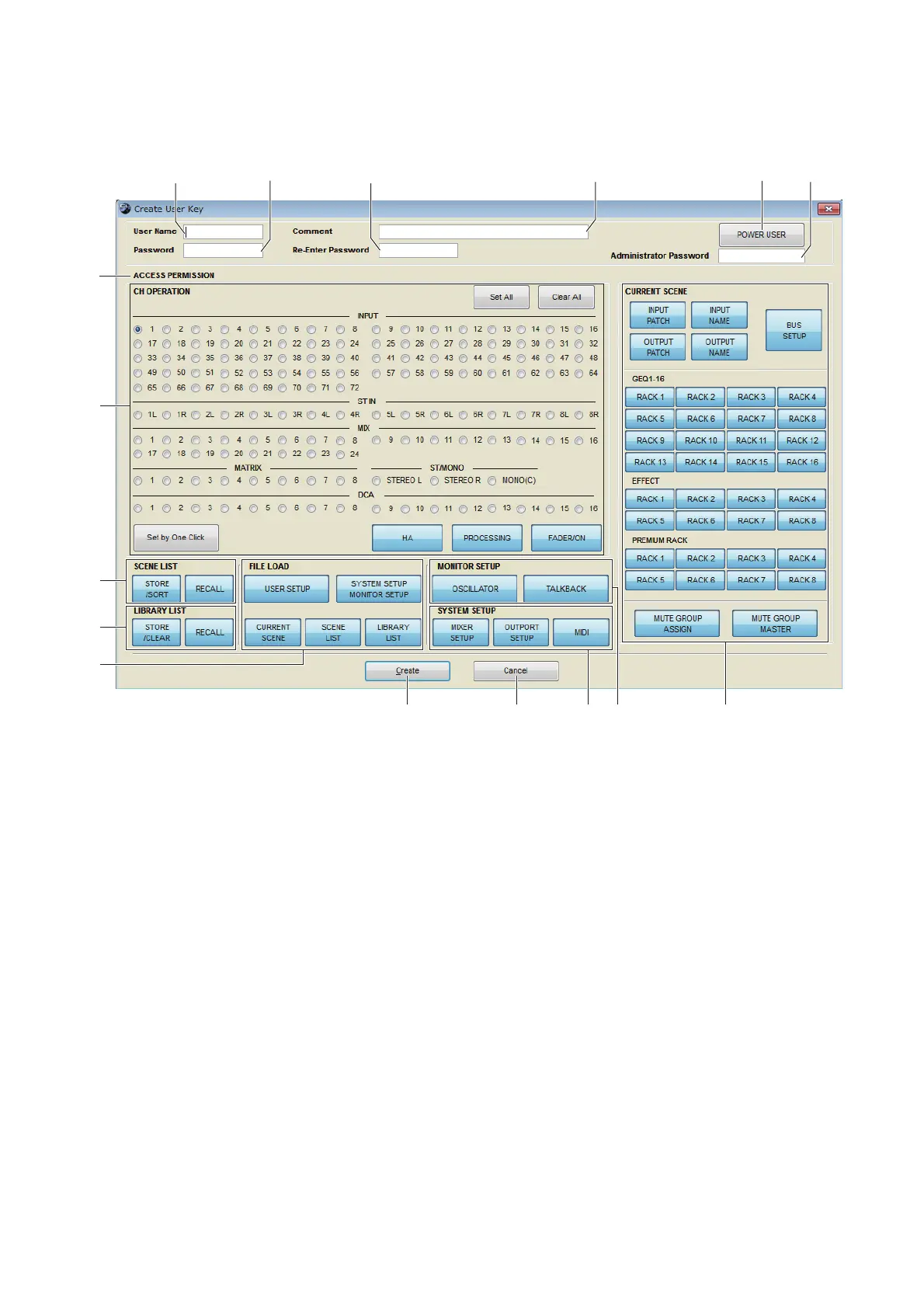
To open the Create User Key dialogbox, choose [Create User Key] from the [File] menu.
This creates a user key (with “.CLU” file name extension) that can be read from a USB flash drive by the CL console to
automatically set user-specific parameters.
1 User Name
Specify the name of the user. You can enter up to eight single-byte alphanumeric characters. Lowercase characters will
automatically become uppercase on the CL console.
2 Comment
Enter a comment for each user. You can enter up to thirty-two single-byte alphanumeric characters.
3 Password
Enter a password that will be used when this user key is read by the CL console. You can enter up to eight single-byte
alphanumeric characters. Uppercase and lowercase are distinguished.
4 Re-Enter Password
Enter the password once again as a safeguard against mistaken entry.
5 POWER USER
Specify whether this user is a power user. Power users can use the CL console to create or edit a user authentication key
with a specified user level.
6 Administrator Password
Enter the Administrator password that was specified on the CL console. This is not required if no Administrator pass-
word has been specified on the CL console, but if this password is incorrect you will be asked to enter it when the user
key is read.
7 ACCESS PERMISSION
In this area, specify the parameters that this user will be allowed to operate.



 To Next Page