Playing CDsGetting Started
English
13
PTY SEEK mode
You can locate a desired station by selecting a program
type. The unit searches all preset stations into the type of
programs currently being broadcast from the RDS
stations.
To locate a station
1 Tune in the FM station. (Refer to page 10, or you can
simply press TUNER on the remote control.)
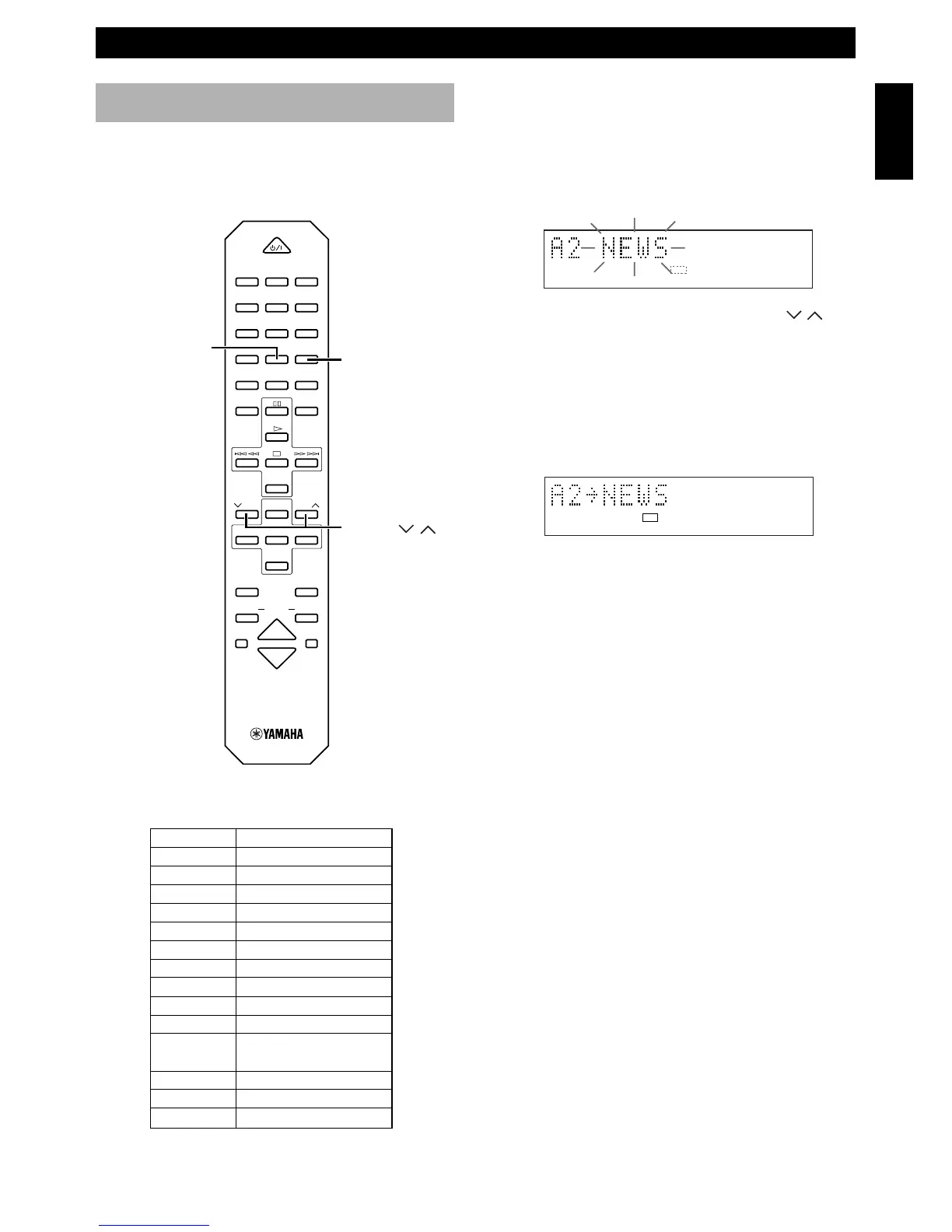
2 Press PTY SEEK MODE once so that “PTY” and a
PTY program flashes on the display.
3 Within about 20 seconds, press PRESET /
repeatedly until the desired program type appears on
the display.
4 Within about 20 seconds, press PTY SEEK START.
• If a station broadcasting the selected program type
is found, the unit stops searching and the Program
Service name appears on the display.
“PTY HOLD” appears on the display.
5 Repeat step 4 until the desired station is located.
If there is no station broadcasting the program type
you select, “NO PTY” appears on the display, then
the Program Service name or frequency appears on
the display.
List of PTY (Program Type)
PTY SEEK MODE
PRESET /
PTY SEEK START
POWER
1 2 3
123
4 5 6
456
7 8 9
78
0 +10 +100
FREQ
/
RDS MODE
–
PTY SEEK
–
START
REP
RANDOM
PROG
ABC
DE
TAPE
DIRECTION
PRESET
TUNER
PRESET
MD TAPE
AUX
MD
REC
/
PAU SE
TAPE
REC
/
PAU SE
MODE
SLEEP
DISPLAY
DUBBING
VOLUME
START
TIME
DVD
PTY
RDS PTY
PTY HOLD
PRESET
NEWS
AFFAIRS
INFO
SPORT
EDUCATE
DRAMA
CULTURE
SCIENCE
VARIED
POP M
ROCK M
M.O.R. M
LIGHT M
CLASSICS
OTHER M
News
Current Affairs
General Information
Sports
Education
Drama
Culture
Science
Light Entertainment
Pops
Rock
Middle of the Road
Music (Easy-listening)
Light Classics
Serious Classics
Other Music
RECEIVING RDS STATIONS



 To Next Page