English
USING THE BUILT-IN TIMER
15
Timer play and recording
By using the built-in timer, you can have the unit turn on
at a specified time and begin playing or recording
automatically. You can also specify the time at which you
want the unit to turn off.
3. Timer REC
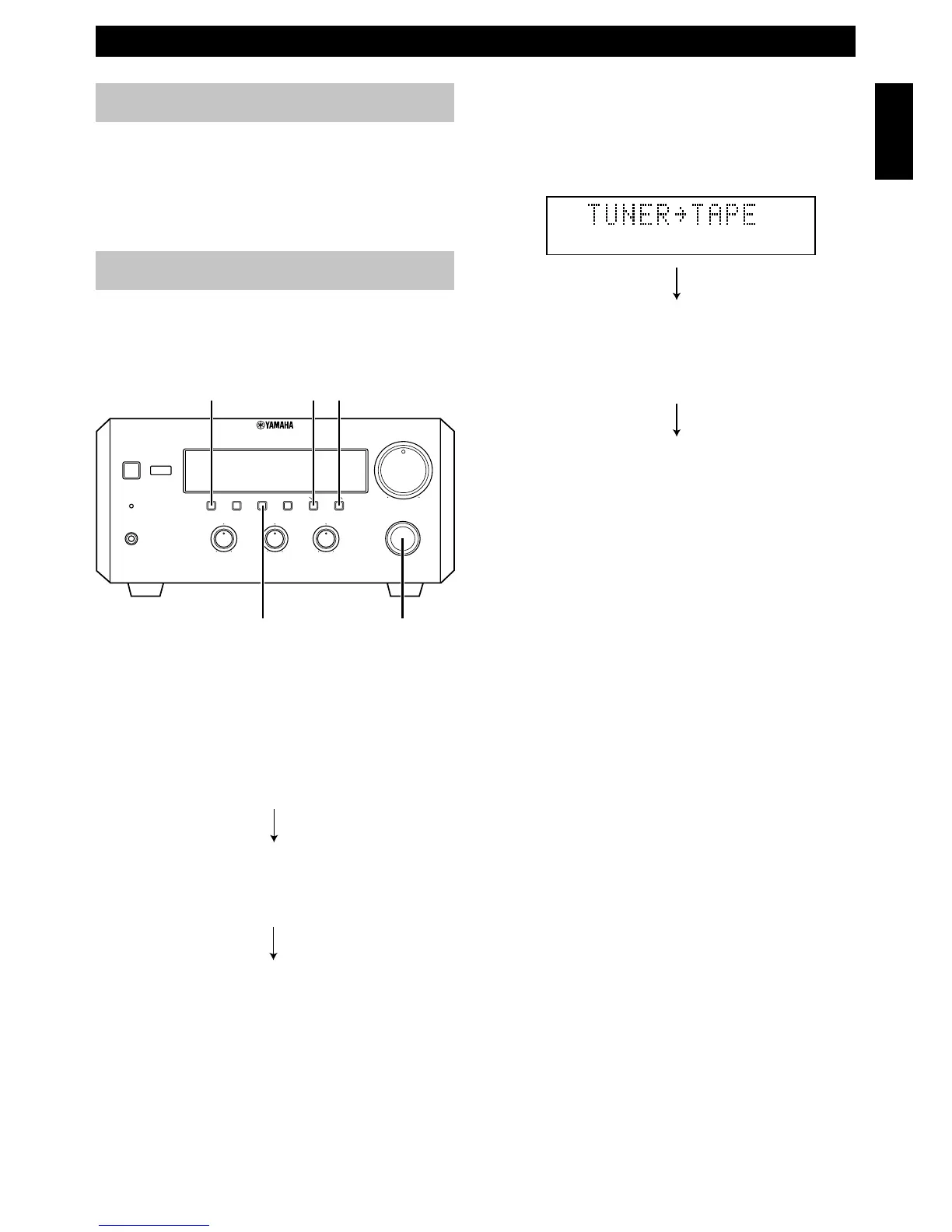
Select the recording component by turning
INPUT. If you wish to enjoy timer playback with
the TUNER or AUX settings, select “REC Mode
OFF”.
4. ON Time
“ON Time” appears on the display for a second,
and changed to the time setting mode.
Press HOUR to set the hour.
Press MIN to set the minute.
5. OFF Time
Set the time the same way as above.
If you set the ON time but not OFF time, timer
play or recording will finish automatically after an
hour.
Notes
• The display mode changes after approximately 8 seconds.
If you change the mode before completing setting, press
DISPLAY once or more to return to the desired mode.
• If you select the input other than TUNER and AUX on
“2. Timer Input”, “3. Timer REC” is skipped.
2 Press TIMER to complete the timer setting.
The system changes to the standby mode.
• TIMER indicator lights up.
If you continue using the system, press STANDBY/
ON to turn on this unit.
To cancel the timer play setting
Press DISPLAY to show the current time, then press
TIMER so that “TIMER” disappears from the display.
You can also cancel the timer play setting by pressing
TIMER when the unit is in standby mode.
Note
• In the event of a power failure or when the AC power cord is
disconnected for more than five minutes, you must reset the
clock.
1 Press DISPLAY.
Whenever DISPLAY is pressed, the display mode
changes as follows:
1. Clock Time (TIMER on/off mode)
If you have not set the clock yet “Set Clock”
appears. You need to set the current time as
described on page 6.
2. Timer Input
Select the source to be played by turning INPUT.
• Timer recording is possible only when you
select TUNER or AUX.
MIN
INPUT
DISPLAY HOUR
TIMER
Before using the timer
If you want to use the cassette deck, KX-E300 or the MD
Recorder, MDX-E300 for timer play or recording, you
must first make the connections as shown in “Connecting
the system” on page 5. For details, refer to the instructions
supplied with the MDX-E300 or KX-E300.
(Example)
BALANCE
INPUT
VOLUME
L
R
TREBLEBASS
PHONES
STANDBY/ON
TIMER
DISPLAY MEMORY
NATURAL SOUND
STEREO RECEIVER
RX–E600
AUTO/MAN'L
PRESET/BAND
TIMER HOUR MIN
MIN MAX
PRESET/TUNING
TIMER ADJ
+–+–
USING THE BUILT-IN TIMER



 To Next Page