EasyManua.ls Logo

Yamaha RX21 - Beat Exchange

Yamaha RX21
59 pages
Print Icon
To Next Page IconTo Next Page
To Previous Page IconTo Previous Page
Loading...
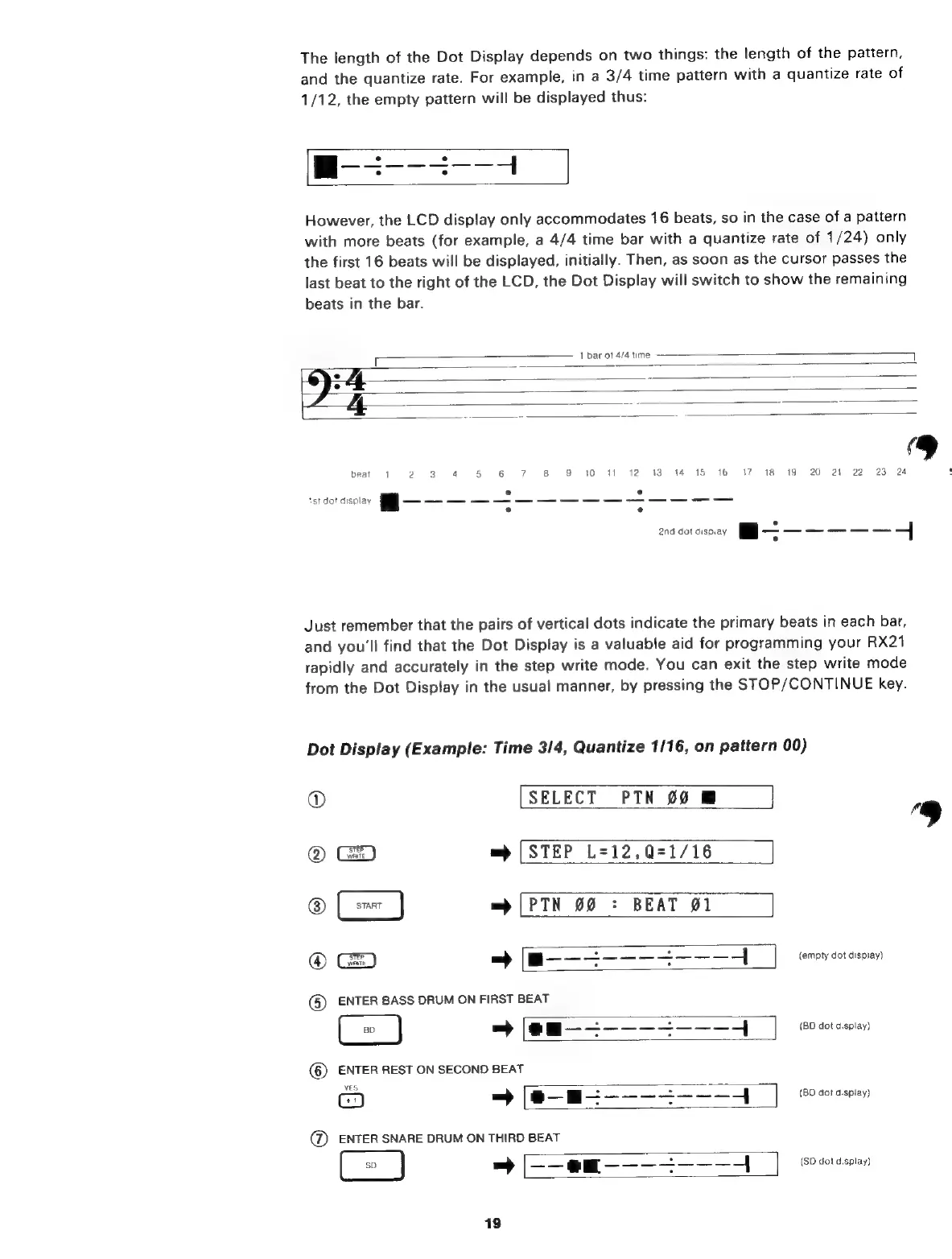
The
length
of
the
Dot
Display
depends
on
two
things:
the
length
of
the
pattern,
and
the
quantize
rate.
For
example,
in
a
3/4
time
pattern
with
a
quantize
rate
of
1/12,
the
empty
pattern
will
be
displayed
thus:
However,
the
LCD
display
only
accommodates
16
beats,
so
in
the
case
of
a
pattern
with
more
beats
(for
example,
a
4/4
time
bar
with
a
quantize
rate
of
1/24)
only
the
first
16
beats
will
be
displayed,
initially.
Then,
as
soon
as
the
cursor
passes
the
last
beat
to
the
right
of
the
LCD,
the
Dot
Display
will
switch
to
show
the
remaining
beats
in
the
bar.
r
1
bar
ot
4/4
time
9
baat
1
2
3
4
5
6
7
8 9
10
11
12
13
14
15 16
17
18
19
20
21
22
23
24
.
.
st
do!
display
8———————————————
°
°
Just
remember
that
the
pairs
of
vertical
dots
indicate
the
primary
beats
in
each
bar,
and
you'll
find
that
the
Dot
Display
is
a
valuable
aid
for
programming
your
RX21
rapidly
and
accurately
in
the
step
write
mode.
You
can
exit
the
step
write
mode
from
the
Dot
Display
in
the
usual
manner,
by
pressing
the
STOP/CONTINUE
key.
Dot
Display
(Example:
Time
3/4,
Quantize
1/16,
on
pattern
00)
©
[SELECT
PTN
00
M
]
@
=>
(STEP
L=12,Q=1/16
®
=>
[РТН
99
:
BEAT
01
®
-—[m———2——-23--—-4
|
"eem
(5)
ENTER
BASS
DRUM
ОМ
FIRST
BEAT
-
(em
——2————-———4
1
(BD
dot
display)
(8)
ENTER
REST
ON
SECOND
BEAT
YES
=
————-———4
(BD
dol
display)
=
[—-еш-——-_———-
(SD
dot
display)

Related product manuals