EasyManua.ls Logo

Yamaha RX21 - System Information Available

Yamaha RX21
59 pages
Print Icon
To Next Page IconTo Next Page
To Previous Page IconTo Previous Page
Loading...
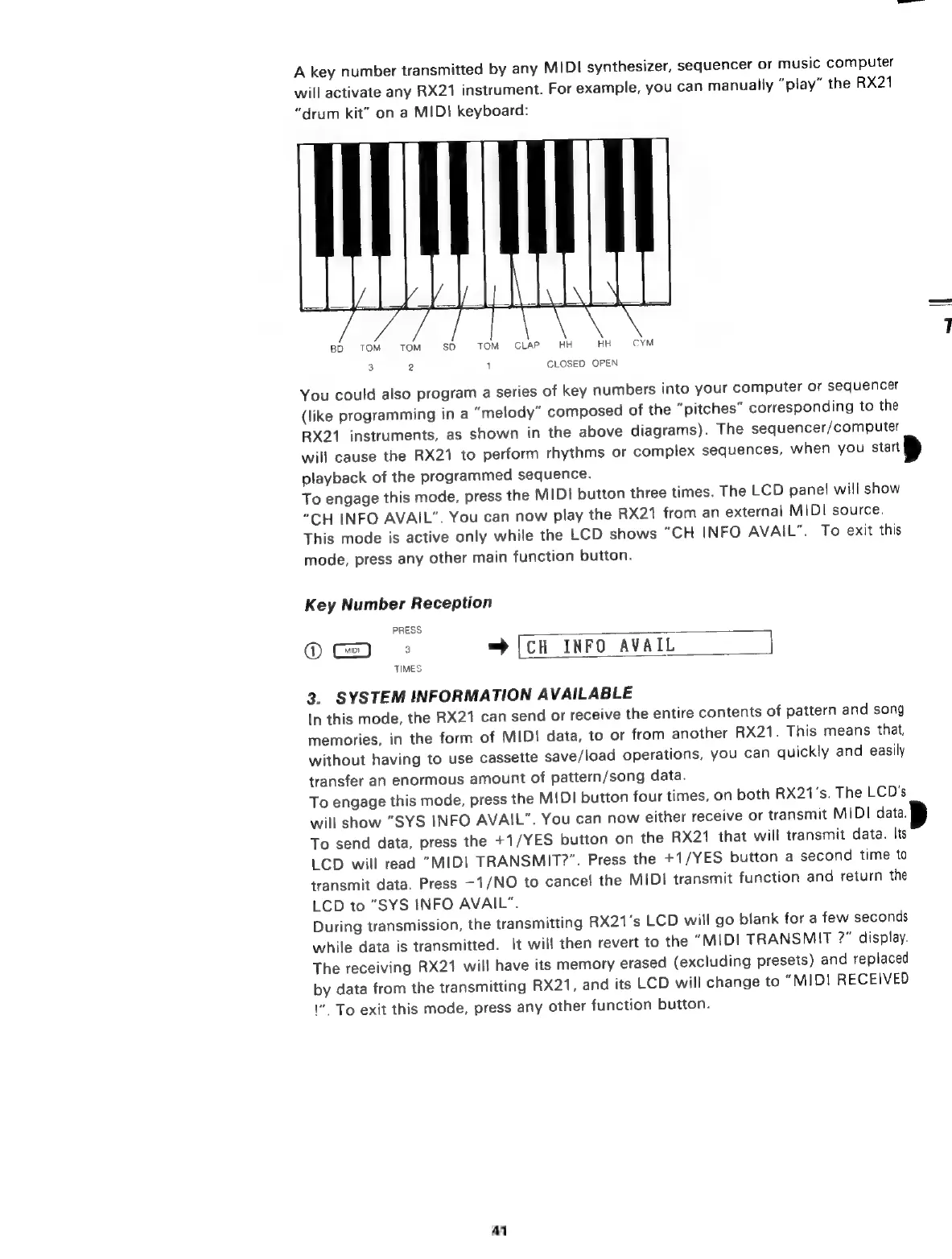
A
key
number
transmitted
by
any
MIDI
synthesizer,
sequencer
or
music
computer
will
activate
any
RX21
instrument.
For
example,
you
can
manually
“play”
the
RX21
"drum
kit"
on
a
MIDI
keyboard:
50
TOM
CLAP.
HH
HH
3
2
1
CLOSED
OPEN
You
could
also
program
a
series
of
key
numbers
into
your
computer
or
sequencer
(like
programming
ina
“melody”
composed
of
the
"pitches"
corresponding
to
the
RX21
instruments,
as
shown
in
the
above
diagrams).
The
sequencer/computer
will
cause
the
RX21
to
perform
rhythms
or
complex
sequences,
when
you
stat
p
playback
of
the
programmed
sequence.
To
engage
this
mode,
press
the
MIDI
button
three
times.
The
LCD
pane!
will
show
“CH
INFO
AVAIL”.
You
can
now
play
the
RX21
from
an
external
MIDI
source.
This
mode
is
active
only
while
the
LCD
shows
“CH
INFO
AVAIL”.
To
exit
this
mode,
press
any
other
main
function
button.
Key
Number
Reception
PRESS
Ф
з
=
[CH
INFO
AVAIL
]
TIMES
3.
SYSTEM
INFORMATION
AVAILABLE
In
this
mode,
the
RX21
can
send
or
receive
the
entire
contents
of
pattern
and
song
memories,
in
the
form
of
MIDI
data,
to
or
from
another
RX21.
This
means
that,
without
having
to
use
cassette
save/load
operations,
you
can
quickly
and
easily
transfer
an
enormous
amount
of
pattern/song
data.
To
engage
this
mode,
press
the
MIDI
button
four
times,
on
both
RX21's.
The
LCD's
will
show
“SYS
INFO
AVAIL”.
You
can
now
either
receive
or
transmit
MIDI
data.
To
send
data,
press
the
+1/YES
button
on
the
RX21
that
will
transmit
data.
Its
LCD
will
read
"MIDI
TRANSMIT?".
Press
the
+1/YES
button
a
second
time
to
transmit
data.
Press
-1/NO
to
cancel
the
MIDI
transmit
function
and
return
the
LCD
to
"SYS
INFO
AVAIL".
During
transmission,
the
transmitting
RX21's
LCD
will
go
blank
for
a
few
seconds
while
data
is
transmitted.
It
will
then
revert
to
the
"MIDI
TRANSMIT
?"
display.
The
receiving
RX21
will
have
its
memory
erased
(excluding
presets)
and
replaced
by
data
from
the
transmitting
RX21,
and
its
LCD
will
change
to
"MIDI
RECEIVED
1“.
To
exit
this
mode,
press
any
other
function
button.
41

Related product manuals