EasyManua.ls Logo

Yamaha RX21 - Page 43

Yamaha RX21
59 pages
Print Icon
To Next Page IconTo Next Page
To Previous Page IconTo Previous Page
Loading...
Tape
Sync
with
the
RX21.
Transmitting
MIDI
Data
PRESS
Ф
4
=
[575
INFO
AVAIL
TIMES
@
=
[MIDI
TRANSMIT?
@
-[
_]
1^
2
Seconas}
=
[MIDI
TRANSMIT?
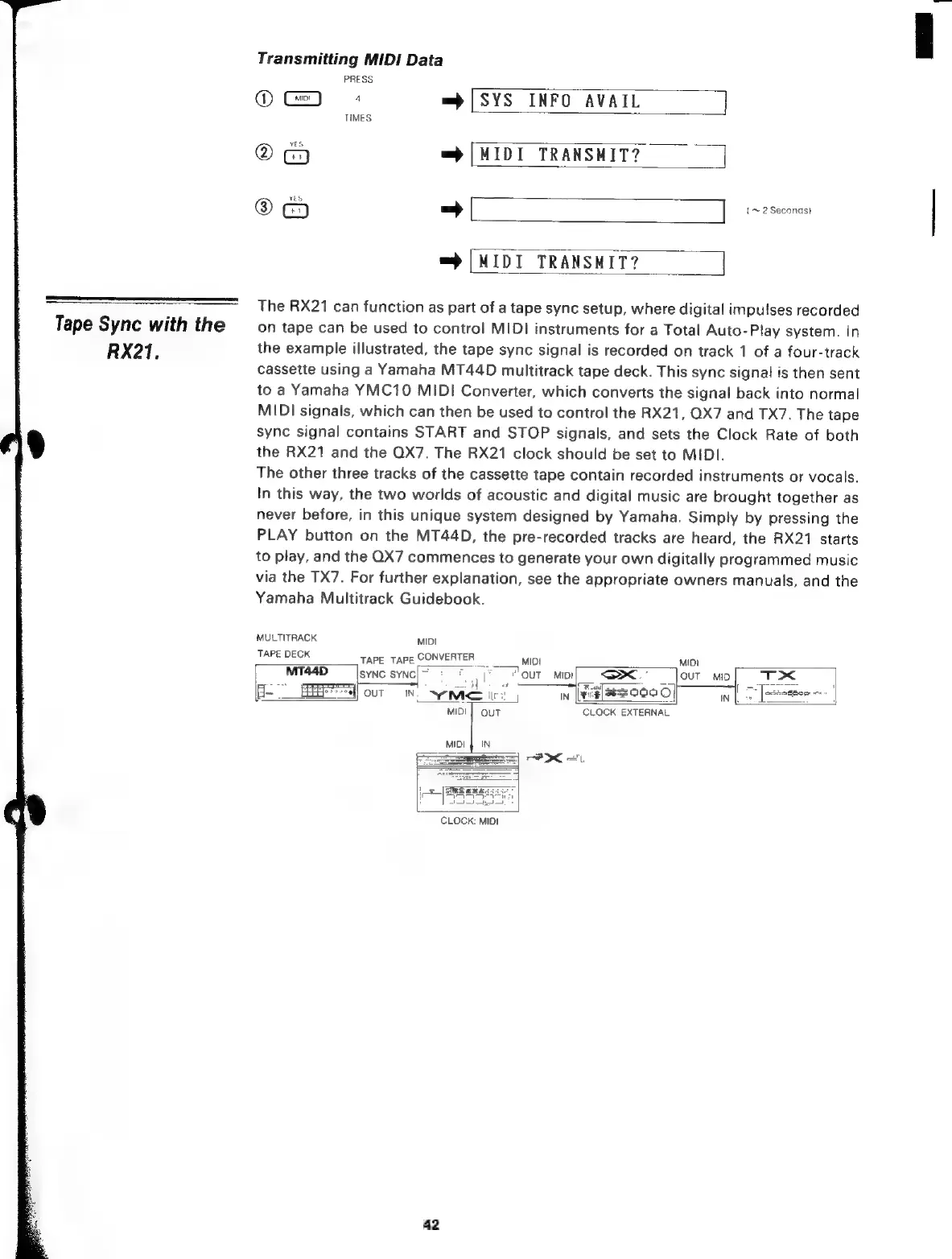
The
RX21
can
function
as
part
of
a
tape
sync
setup,
where
digital
impulses
recorded
on
tape
can
be
used
to
control
MIDI
instruments
for
a
Total
Auto-Play
system.
In
the
example
illustrated,
the
tape
sync
signal
is
recorded
on
track
1
of
a
four-track
cassette
using
a
Yamaha
MT44D
multitrack
tape
deck.
This
sync
signal
is
then
sent
to
a
Yamaha
YMC10
MIDI
Converter,
which
converts
the
signal
back
into
normal
MIDI
signals,
which
can
then
be
used
to
control
the
RX21,
QX7
and
TX7.
The
tape
sync
signal
contains
START
and
STOP
signals,
and
sets
the
Clock
Rate
of
both
the
RX21
and
the
QX7.
The
RX21
clock
should
be
set
to
MIDI.
The
other
three
tracks
of
the
cassette
tape
contain
recorded
instruments
or
vocals.
In
this
way,
the
two
worlds
of
acoustic
and
digital
music
are
brought
together
as
never
before,
in
this
unique
system
designed
by
Yamaha.
Simply
by
pressing
the
PLAY
button
on
the
MT44D,
the
pre-recorded
tracks
are
heard,
the
RX21
starts
to
play,
and
the
QX7
commences
to
generate
your
own
digitally
programmed
music
via
the
TX7.
For
further
explanation,
see
the
appropriate
owners
manuals,
and
the
Yamaha
Multitrack
Guidebook.
MULTITRACK
MIDI
TAPE
DECK
ТАРЕ
ТАРЕ
CONVERTER
мо
MT44D
SYNC
SYNC]
c
T
"our
мој
<
=
|
a
4
—s
|
H-
EEE]
OUT
м
AEM
it:
j
IN
зе
COO
o]
|
CLOCK:
EXTERNAL
CLOCK:
MIDI
42

Related product manuals