6
4Ω MIN. /SPEAKER
SPEAKERS SETTING
HRIZ OTHER OUT
FM 75 Ω UNBAL.
GND AM
SUBWOOFER
CD DIGITAL OUT
OPTICAL
ANTENNA
FOR USA : CLASS 2 WIRING
OUT IN
LINE
A
B
NX-TS20
NX-TS10
NX-TS20
NX-TS10
Connections
Never plug the AC power cord into the wall outlet until all connections are
completed.
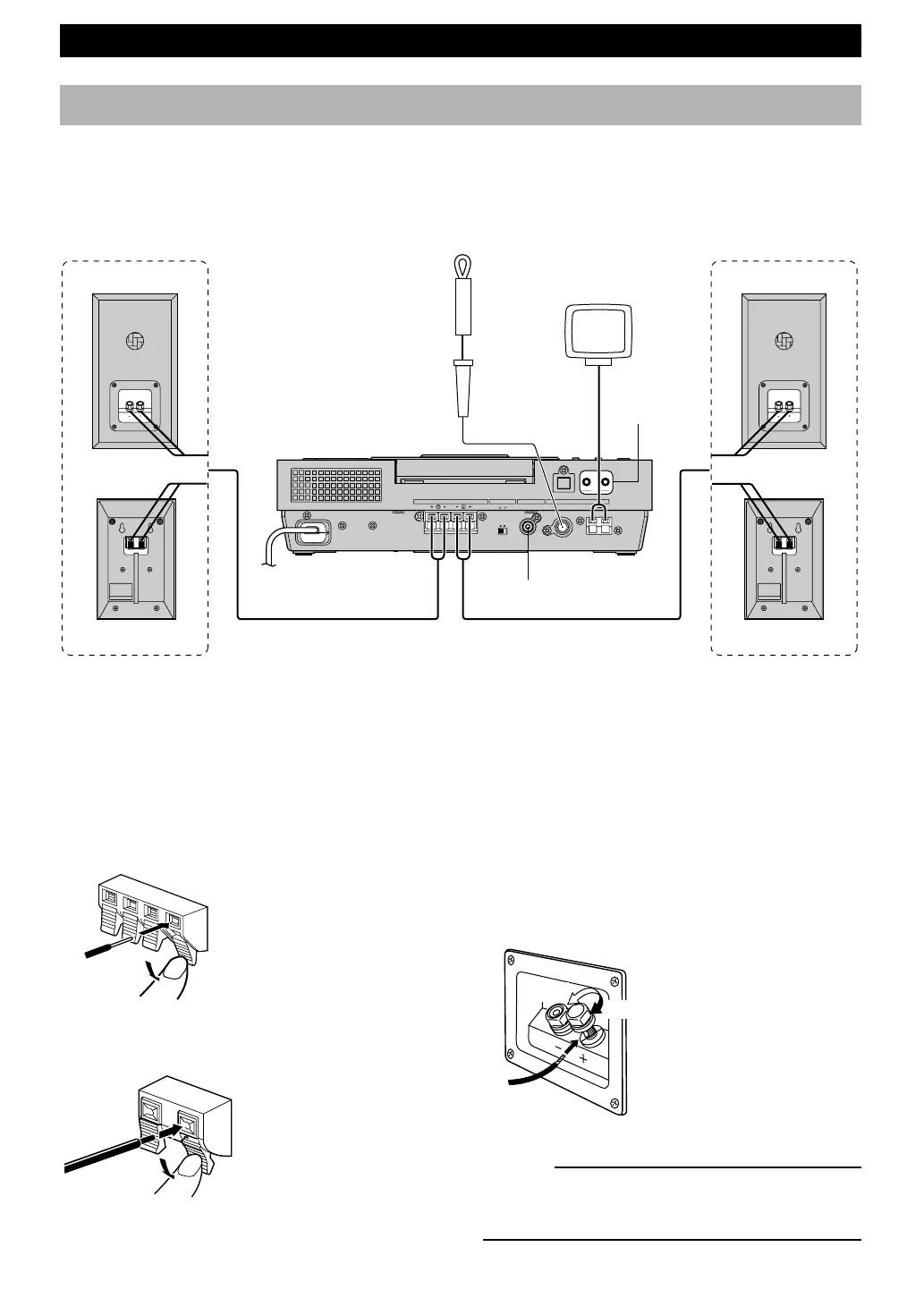
Follow the steps as shown below to connect the system using the supplied cables and accessories.
Indoor
FM antenna
AM loop antenna
Right speaker Left speaker
GETTING STARTED
To wall outlet
On the speakers (NX-TS20)
Red: positive (+)
Black: negative (–)
Caution
Do not let the bare speaker wires touch each
other as this could damage the main unit and/or
speakers.
1 Connecting speakers
Connect the speakers to the SPEAKERS terminals of the main unit by using the speaker cables. Make sure that the
polarity of the speaker cables is correct, i.e. the + and – markings are observed. If these cables are reversed, the sound will
be unnatural and lack bass.
On the main unit
On the speakers
(NX-TS10)
Red: positive (+)
Black: negative (–)
1 Press the tab.
2 Remove approx. 10 mm
(3/8”) of insulation from
each of the speaker
cables and insert the bare
wire into the terminal.
3 Release the tab and
secure the cable.
1 Unscrew the knob.
2 Remove approx. 10 mm
(3/8”) of insulation from
each of the speaker
cables and insert the bare
wire into the terminal.
3 Tighten the knob to
secure the cable.
Loosen
Tighten
1
3
2
04/TSX-10E(6.12)e 01.6.12, 4:17 PM6


 To Next Page
 Loading...