7
English
GETTING STARTED
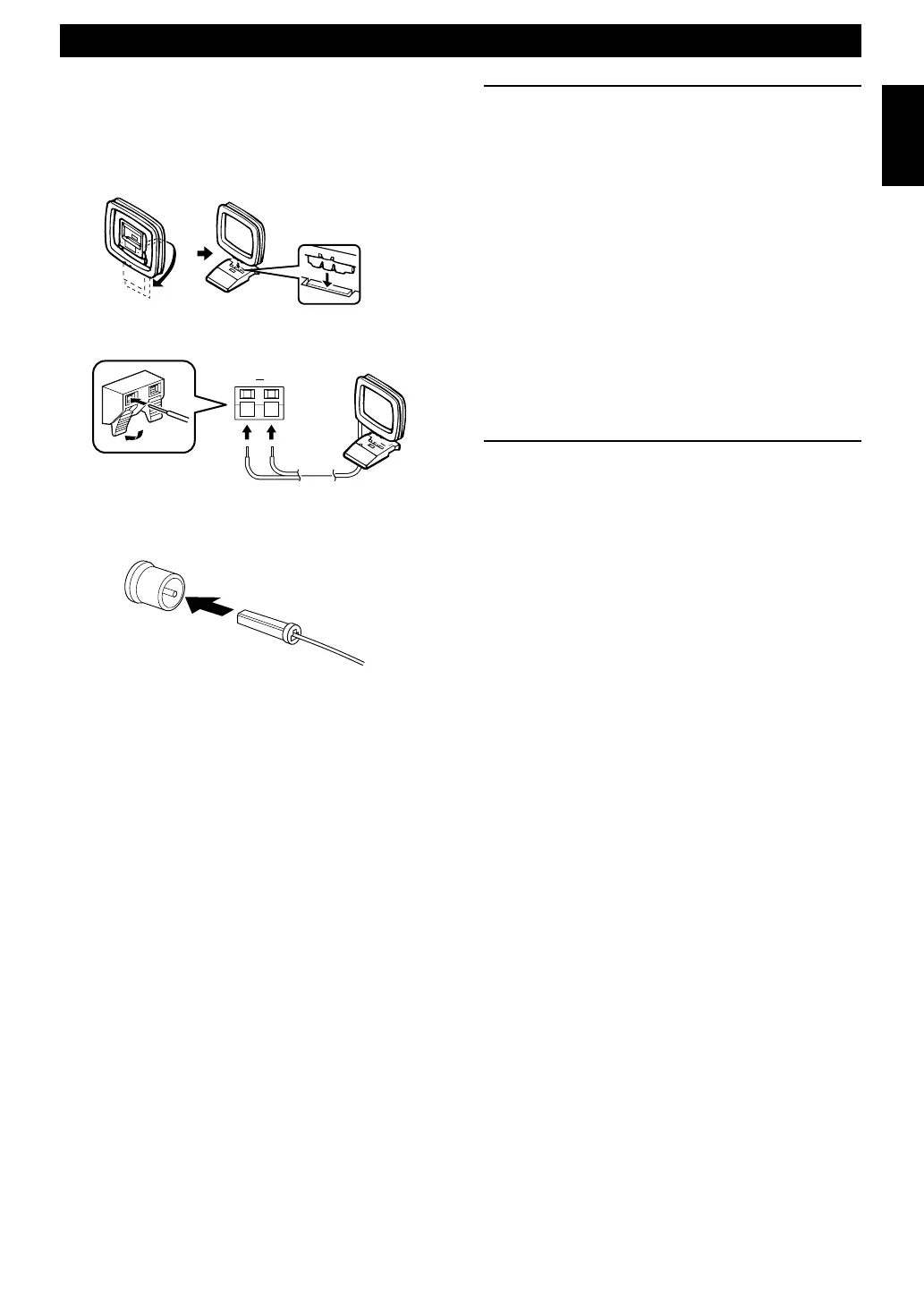
2 Connecting antennas
AM loop antenna
Set up the AM loop antenna, then connect it.
Indoor FM antenna
Notes
• Use external FM/AM antennas if you need better reception.
Consult your dealer.
• The AM loop antenna should be placed apart from the main
unit. The antenna may be hung on a wall.
To enhance your system
A
. To connect a Subwoofer (optional)
You can reinforce the bass frequencies by adding a
subwoofer (optional).
Connect the SUBWOOFER OUT terminal of the main
unit to the INPUT terminal of the subwoofer.
B. To connect an external component
• An external audio/video component can be connected to
the LINE OUT (output) and/or IN (input) mini-jack
terminals of the main unit.
• Digital-to-digital recording is possible from a CD
played on this system to an MD (or tape) on an external
MD (or DAT) recorder by connecting the CD
DIGITAL OUT (OPTICAL) terminal on the rear of the
main unit to the MD (or DAT) recorder.
3 Connecting to the wall outlet
After all connections are finished, connect the AC power
cord to a wall outlet.
GND AM
04/TSX-10E(6.12)e 01.6.12, 4:17 PM7


 To Next Page
 Loading...