EasyManua.ls Logo

Yamaha TX 816 - Front Panel Features

Yamaha TX 816
79 pages
Print Icon
To Next Page IconTo Next Page
To Previous Page IconTo Previous Page
Loading...
FRONT
PANEL FEATURES
Q
Q
® O
(DO®
YAMAHA
MIDI RACK
t
o
&
w
iiS
^5
mn
(TX816)
t.
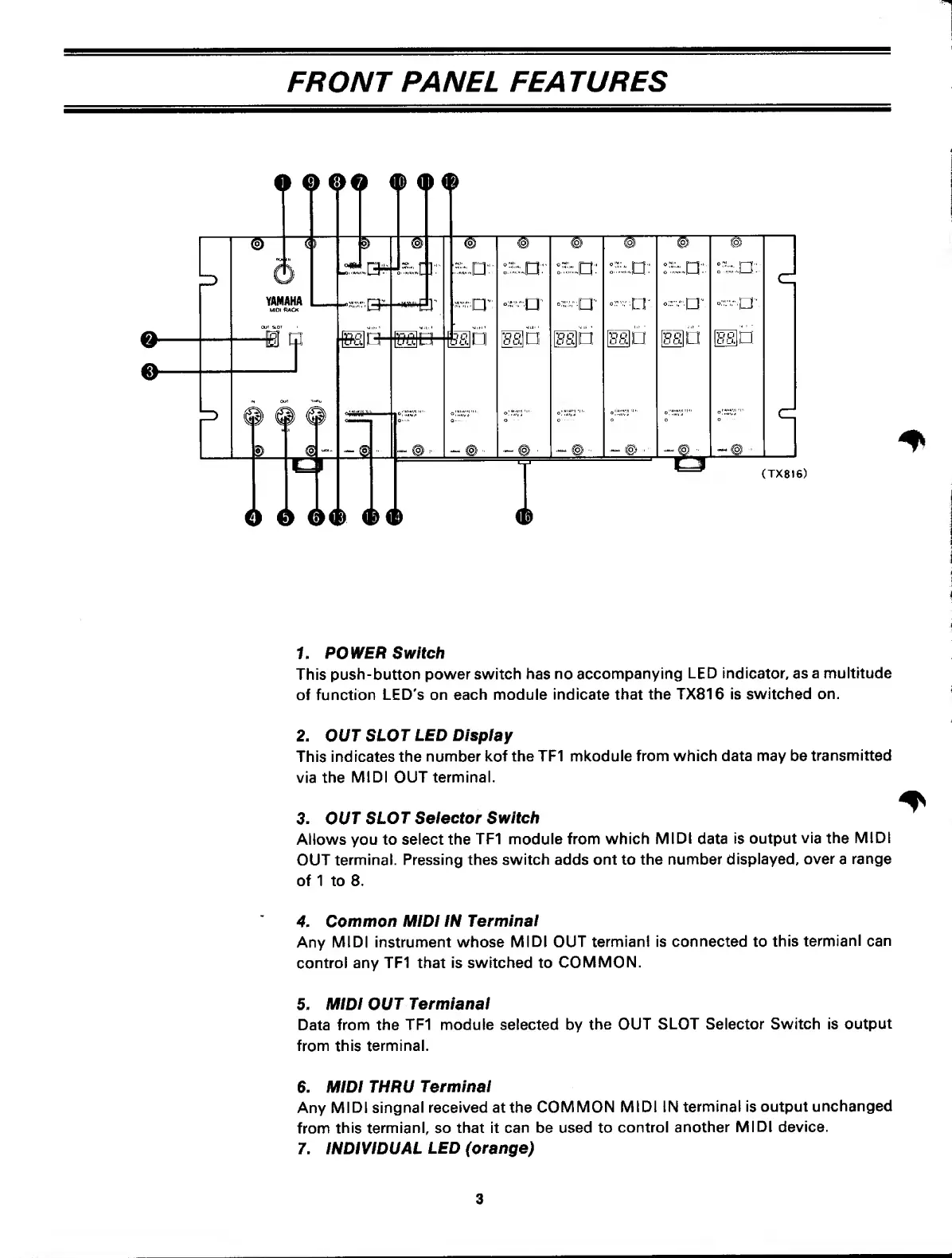
POWER Switch
This
push-button
power switch has
no
accompanying
LED
indicator,
as
a multitude
of
function LED's on each module
indicate that
the TX816 is
switched on.
2. OUT
SLOT
LED Display
This indicates the
number
kof the TF1
mkodule from which data may be
transmitted
via the
MIDI
OUT
terminal.
3. OUT
SLOT
Seiector
Switch
Allows
you
to select the
TF1
module
from which
MIDI
data
is
output
via
the
MIDI
OUT
terminal. Pressing thes
switch
adds
ont to the number
displayed,
over
a
range
of 1 to 8.
4.
Common
MiDI IN
Terminal
Any
MIDI
instrument whose
MIDI
OUT
termianl is connected to
this
termiani can
control any
TF1
that
is switched to
COMMON.
5.
MIDI OUT
Termianal
Data from
the
TF1 module selected by
the OUT
SLOT
Selector Switch is
output
from this
terminal.
6. MIDI THRU
Terminal
Any
MIDI singnal
received at the
COMMON
MIDI IN
terminal
is
output
unchanged
from
this
termianl,
so
that it can be used to
control
another
MIDI device.
7. INDIVIDUAL
LED (orange)
3

Related product manuals