EasyManua.ls Logo

Yamaha TX 816 - The Play Mode

Yamaha TX 816
79 pages
Print Icon
To Next Page IconTo Next Page
To Previous Page IconTo Previous Page
Loading...
program
1
prograrn
2
program
3 program
32
VOICE
1
VOICE 2
VOICES
VOICE
32
FUNCTION
1 FUNCTION
2 FUNCTIONS
FUNCTION
32
MEMORY
PLAY
or EDIT
tj"
STORE
VOICE
FUNCTION
EDIT
BUFFER
LOAD
rm TONE
GENERATOR
•-INSIDE
THE TF1
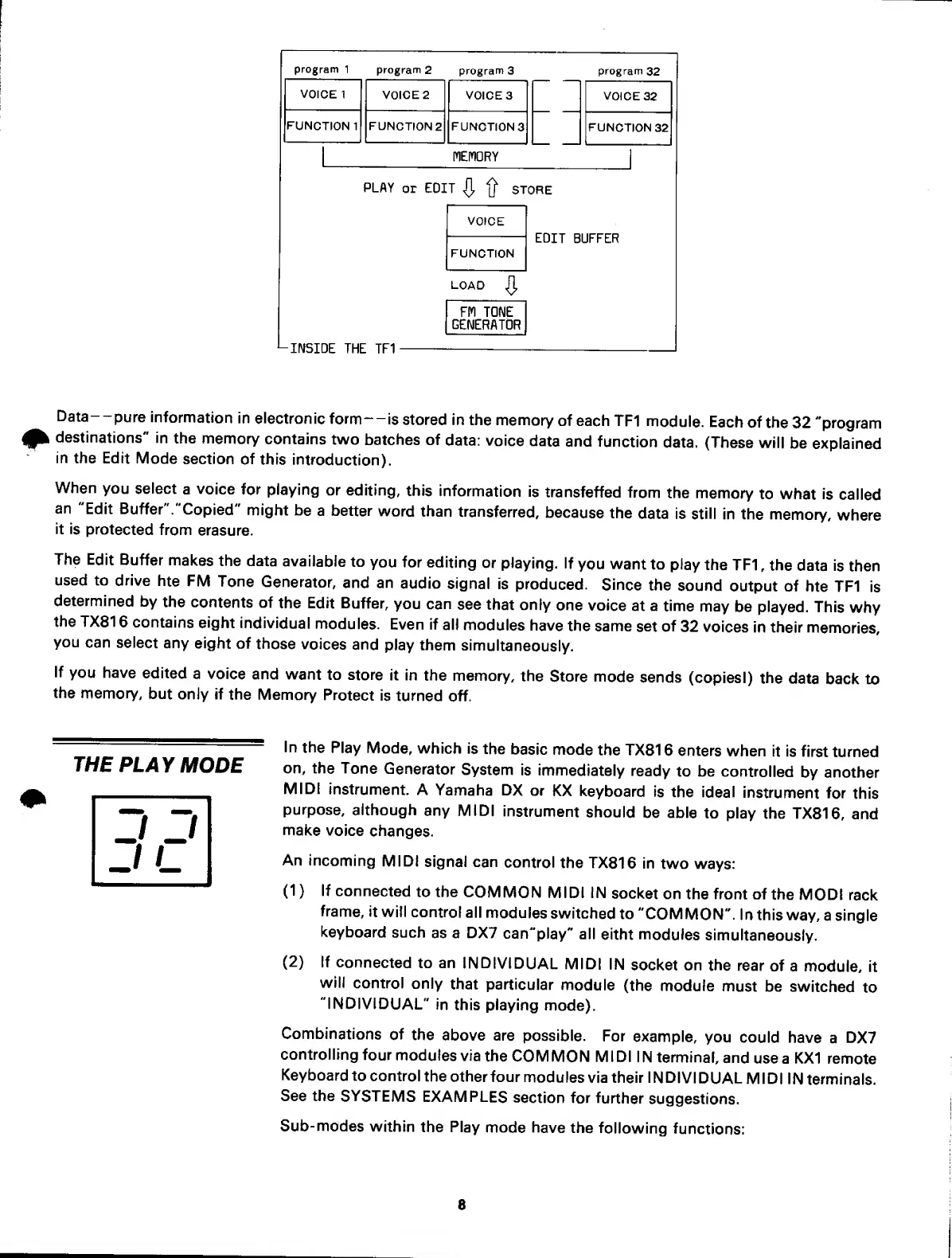
Data-
-pure
information
in
electronic
form
—
is stored in
the
memory
of each
TF1
module.
Each
of
the
32 "program
destinations"
in
the
memory
contains
two
batches of
data:
voice
data
and
function
data. (These
will
be
explained
in the
Edit
Mode
section
of
this
introduction).
When
you select
a
voice
for
playing
or editing,
this
information
is
transfeffed
from
the
memory
to
what Is
called
an
"Edit
Buffer
"."Copied"
might
be
a better
word than
transferred,
because
the
data is
still
in the
memory,
where
it is
protected
from
erasure.
The
Edit
Buffer
makes
the data
available
to
you for
editing
or
playing.
If
you
want
to
play
the
TF1
,
the
data
is
then
used to
drive
hte
FM
Tone
Generator,
and an
audio
signal
is
produced.
Since
the
sound
output
of
hte TF1
is
determined
by
the
contents
of
the Edit Buffer,
you
can
see
that
only
one
voice
at a
time
may
be played.
This
why
the TX81
6
contains
eight
individual
modules.
Even if
all
modules
have
the same
set of
32
voices
in their
memories,
you
can
select
any
eight
of
those
voices
and
play them
simultaneously.
If
you have
edited
a
voice
and
want
to
store
it in
the memory,
the
Store
mode
sends
(copiesi)
the
data
back
to
the
memory,
but
only if
the
Memory
Protect
is turned
off.
THE
PLAY
MODE
In
the
Play
Mode, which
is
the
basic
mode
the TX81
6 enters
when
it
is first
turned
on, the
Tone
Generator
System
is
immediately
ready
to be
controlled
by another
MIDI
instrument.
A
Yamaha DX
or
KX
keyboard
is
the
ideal
instrument
for
this
purpose,
although
any MIDI
instrument
should
be able
to play
the TX816,
and
make
voice
changes.
An
incoming
MIDI
signal can
control
the TX816
in
two
ways:
(1)
(2)
If
connected
to the
COMMON
MIDI IN
socket
on the front
of
the
MODI
rack
frame,
it
will control
all
modules
switched
to
"COMMON".
In this
way,
a
single
keyboard
such
as a DX7
can"play"
all
eitht
modules
simultaneously.
If
connected
to an
INDIVIDUAL
MIDI
IN
socket
on the
rear
of a
module,
it
wilt
control
only
that
particular
module
(the module
must
be
switched
to
"INDIVIDUAL"
in
this
playing
mode).
Combinations
of
the
above are
possible.
For
example,
you
could have
a
DX7
controlling
four
modules
via
the
COMMON
MIDI
IN
terminal,
and
use
a
KX1
remote
Keyboard
to control
the
other
four
modules
via their
I
N
Dl
VI
DUAL
M I
D 1 1 N
terminals.
See the
SYSTEMS
EXAMPLES
section
for
further
suggestions.
Sub- modes
within
the Play
mode have
the
following
functions:
8

Related product manuals