22
Deva 5.8 and Deva 16 Owner’s Manual
Chapter 2
Setting Sampling Rate For Recorded Tracks
Sampling Rate Options: 44.1 kHz, 47.952 kHz, 48 kHz, 48.048 kHz, 88.2 kHz, 96 kHz, 96.096 kHz,
192 kHz
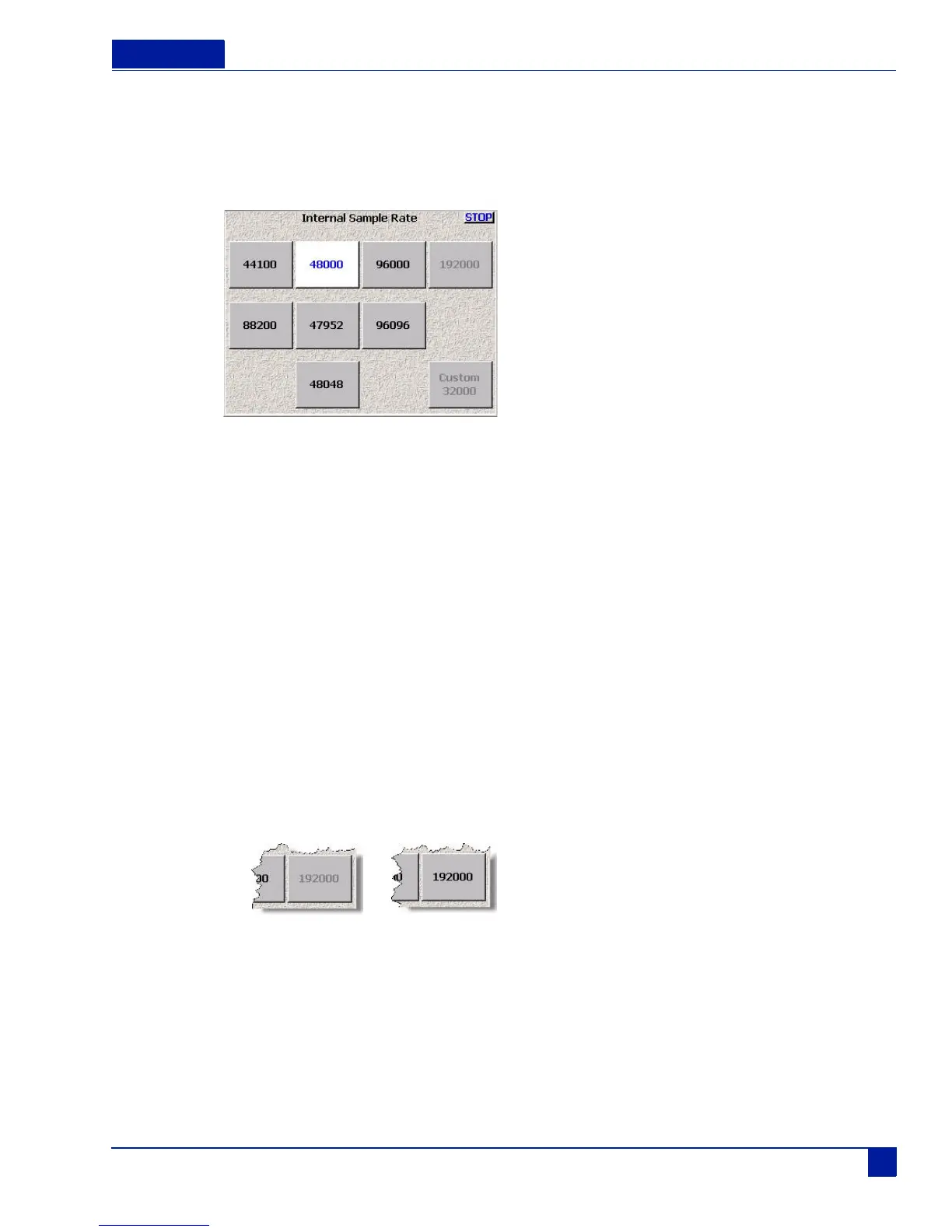
Main Menu > Deva Setup > Internal Sample Rate
Figure 19 Internal Sample Rate Menu
Setting the sampling rate on the Deva consists of simply pressing the button for the sampling rate required.
Note: After changing sampling rates timecode may need to be re-jammed.
Setting Up 192 kHz Recording
Recording at 192 kHz requires large amounts of the Deva’s processing cycles. Because of this, you must
enable it when powering on the Deva. Zaxcom recommends that you reduce your recording channels to
two, turn off any EQ, and unneeded routing when recording at 192 kHz.
To enable 192 kHz, perform the following:
1. Power down the Deva
2. Press and hold the 9 on the Deva’s number keypad
3. Power on the Deva.
The startup screen will indicate that 192 kHz recording is now enabled.
4. Go to the Internal Sample Rate menu and you can now enable 192 kHz.
Once enabled, you can change the number of tracks recorded, up to eight tracks.
Figure 20 192 kHz recording button
Not Enabled
Enabled



 To Next Page