15
Zaxis Inc. LLC
801.264.1000
2442 South 2570 West
West Valley City, UT 84119
LEGEND
Positive/Negative
±
USB not plugged in
Tester unlocked
Δ
P
Test type: Pressure
Decay
Next Program
Previous Program
4.2
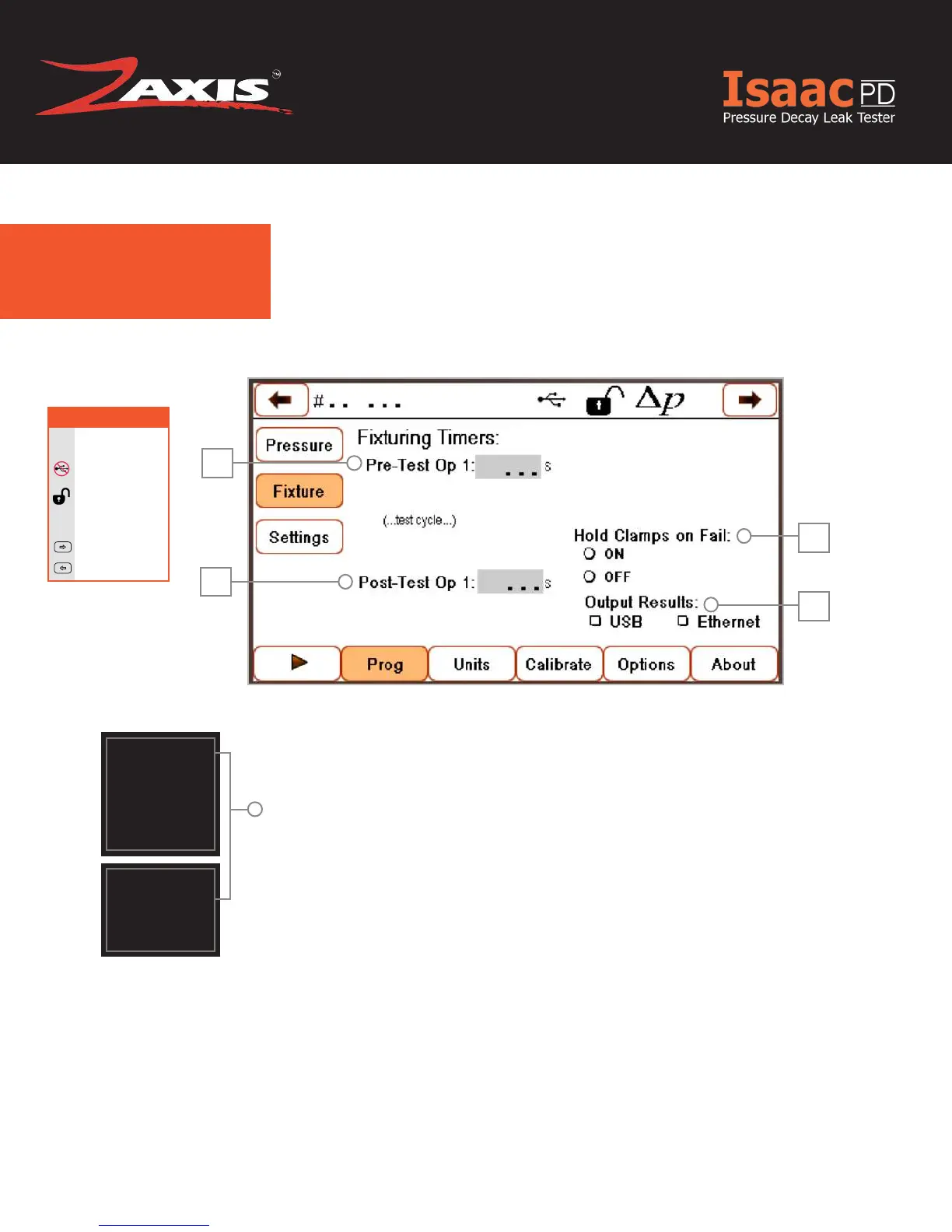
Fixture.
1
2
3
4
1. Pre-Test Op 1 — The amount of time the output will be set
prior to test start.
2. Post-Test Op 1 — The amount of time until the valves
de-energize at the end of the test.
3. Hold Clamps on Fail — Keeps the clamps in their test po-
sition and the fail indicator LED will ash to alert the user of
failure.
4. Output Results — Output the results via USB or Ethernet.
The xture menu controls the xturing valves. These valves can
be used to activate pneumatic xturing tools or seals to capture
the part for testing.
All outputs are supplied as four-way valves with one normally
open and one normally closed port. The outputs can be used
as a three-way valve by plugging the normally open port. The
normally open port will be plugged from the factory.
!
Clamps, Coupling
outputs, and Fixtur-
ing Timers are all
similar terms used to
describe pneumatic
outputs that can
be used for various
functions.
These outputs are
used to actuate
tooling, manipulate
a part, or activate
a pneumatic seal
around a part.
!
Fig. 7. Fixture Settings Screen.



 To Next Page