EN
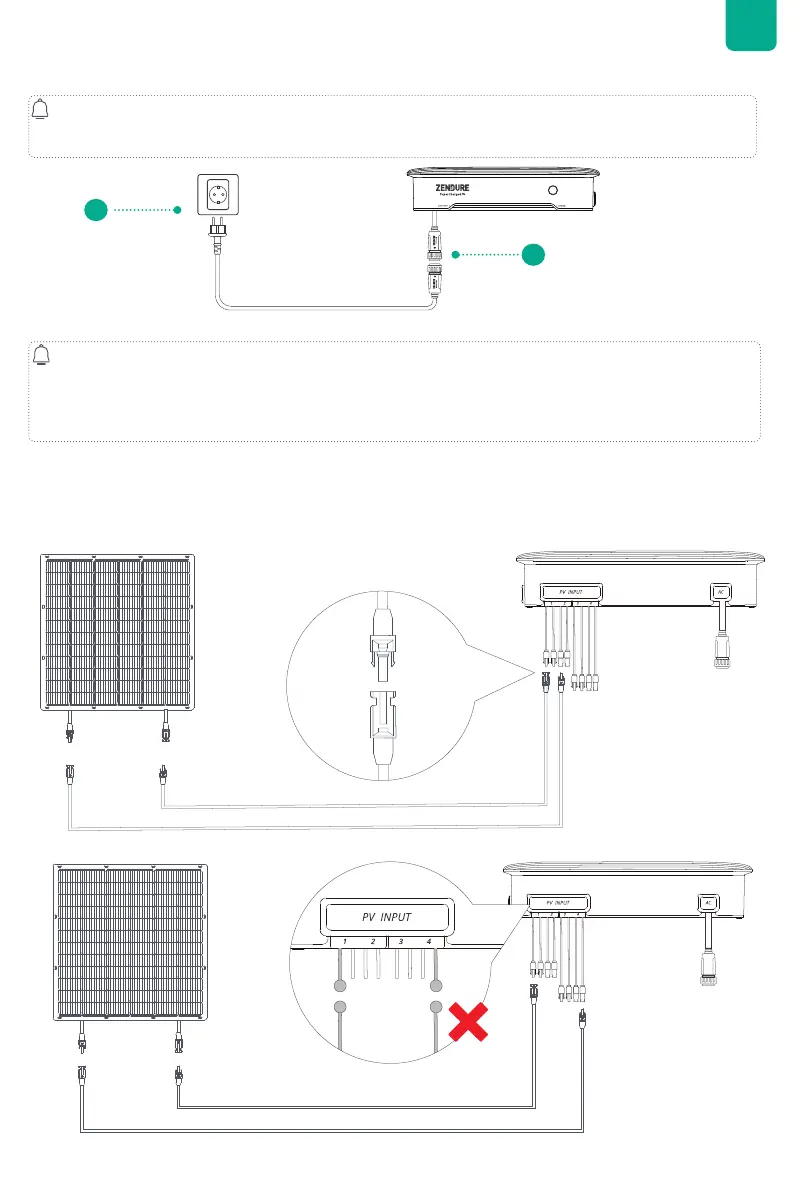
3. Connect to the Power Grid
4.Connect to a Solar Panel
1. Install solar panels in their desired location before connecting them to your Hyper 2000.
2. There are two MPPTs in Hyper 2000. PV inputs 1 and 2 share MPPT1, and inputs 3 and 4 share MPPT2.
3. Please note that the Voc (open circuit voltage) on each PV input must be lower than 55V.
4. The total combined input current for PV1 and PV2 should not exceed 20A, and the same for PV3 and PV
5.Recommended maximum power range for connecting the solar panels to each PV input is between 350W~550W.
Connect Each Solar Panel Directly
(2) The positive and negative terminals of the same solar panel must be connected to the same MPPT, for example, only to PV1
and PV2, or to PV3 and PV4.
1
2
400W
400W
lower load power or no other loads.



 To Next Page