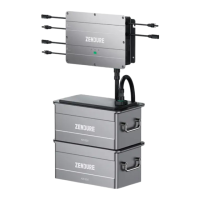
EN
Disclaimer
Contents
Read all safety guidelines, warnings and other product information in this manual carefully, and read any labels
or stickers attached to the product before using. Users take full responsibility for the safe usage and operation
of this product. Familiarize yourself with relevant regulations in your area. You are solely responsible for being
aware of all relevant regulations and using Zendure products in a way that is compliant.
Keep this manual for future reference.
1. Safety Instructions
1.1 Usage
1. Read all up-to-date documents carefully before installing, using or servicing the product. Documentation is
2. Please check whether the Hyper 2000 hybrid inverter is damaged, cracked, leaking liquids, becoming hot,
or exhibiting other abnormalities, and check any cables for damage before operating. If there are any
problems, please stop using the product immediately and contact our customer service.
3.
4. Make sure all cords and plugs are intact and dry before connecting to avoid electric shock.
5. Do not install or operate the system under extreme climatic conditions such as lightning, snow, heavy rain,
strong winds, etc.
6.
1. Safety Instructions ....................................................................................................................................... 1
1.1 Usage ........................................................................................................................................................ 1
1.2 EC DECLARATION OF CONFORMITY ...................................................................................................3
2. Symbols Used in This Guide ......................................................................................................................3
3. Important Tips .............................................................................................................................................. 4
4. What’s in the Box ........................................................................................................................................4
5. Overview .......................................................................................................................................................5
5.1 System Overview ...................................................................................................................................5
5.2 Product Overview .................................................................................................................................6
5.3 Button Controls .....................................................................................................................................6
5.4 LED Display ............................................................................................................................................7
6. Installing Your Hyper 2000 Hybrid Inverter ............................................................................................ 8
6.1 Pre-assembly ..........................................................................................................................................8
6.2 Assembly Process ............................................................................................................................... 10
6.3 Installing Multiple Hyper 2000 Sets ................................................................................................ 12
6.4 Product Placement and Cable Management ................................................................................ 13
7. Zendure App Setup ................................................................................................................................... 14
8. Maintenance .............................................................................................................................................. 14
8.1 Disconnection of the cables .............................................................................................................. 14
8.2 Troubleshooting ................................................................................................................................... 15
........................................................................................................................... 16


 To Next Page
 Loading...