EN
1. The Zendure app is continually being improved and may change over time. If there are any differences between the
instructions in this guide and in the app, follow the in-app instructions.
2. Privacy Policy: By using Zendure Products, Applications and Services, you consent to the Zendure Terms of Use and
Privacy Policy, which you can access via the "About" section of the "User" page in the Zendure app.
The Zendure app allows users to monitor and manage power systems, offering real-time
power monitoring, historical records, charge/discharge scheduling, and more.
1. To download the Zendure app, scan the QR code or search “Zendure” in the Apple App
Store® or Google Play Store.
2. Open the Zendure app. Log In or sign up.
3. Follow the in-app instructions to add your Hyper 2000 hybrid inverter.
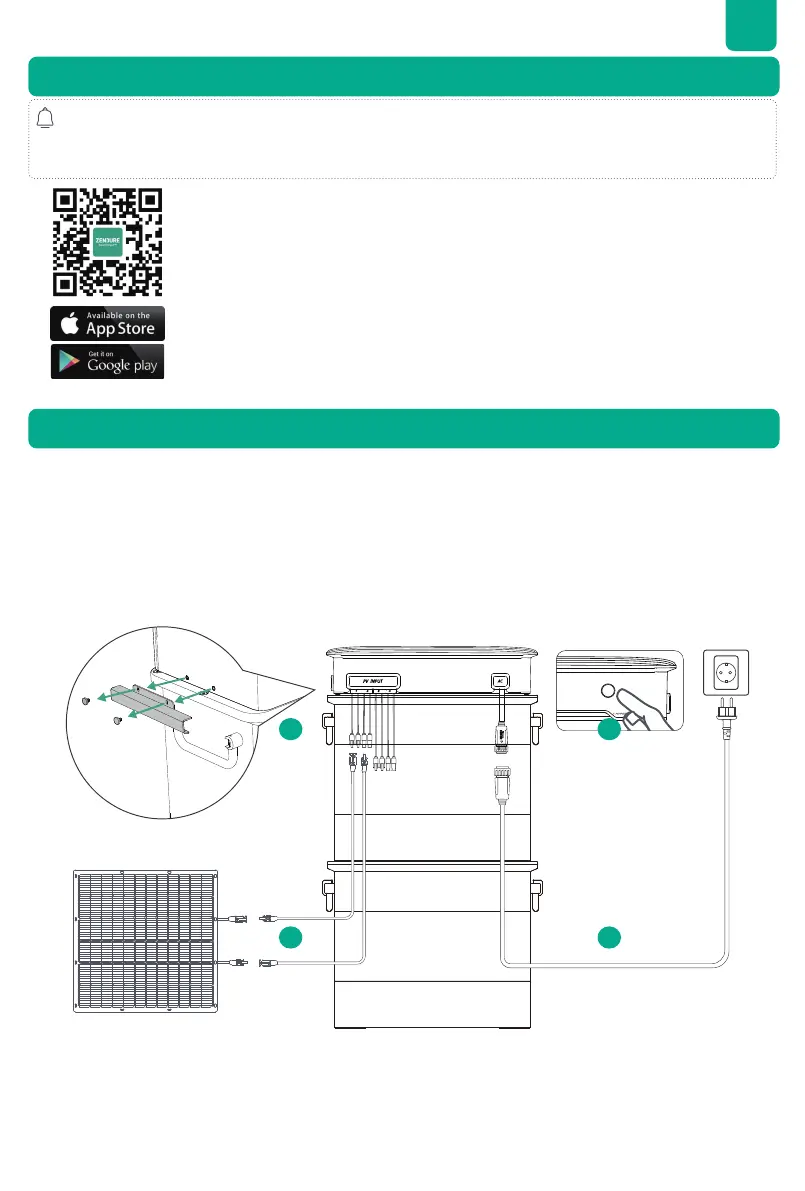
8.1 Disconnection of the cables
1. Press the button on the Hyper 2000 for 6 seconds to power it off.
the Hyper 2000 hybrid inverter to pull it out.
3. Press the connectors on the PV inputs of the Hyper 2000 to pull out the solar panel cables.
5. Remove the Hyper 2000 from the batteries.
7. Zendure App Setup
8. Maintenance
14
3 2


 To Next Page