EN
8.2 Troubleshooting
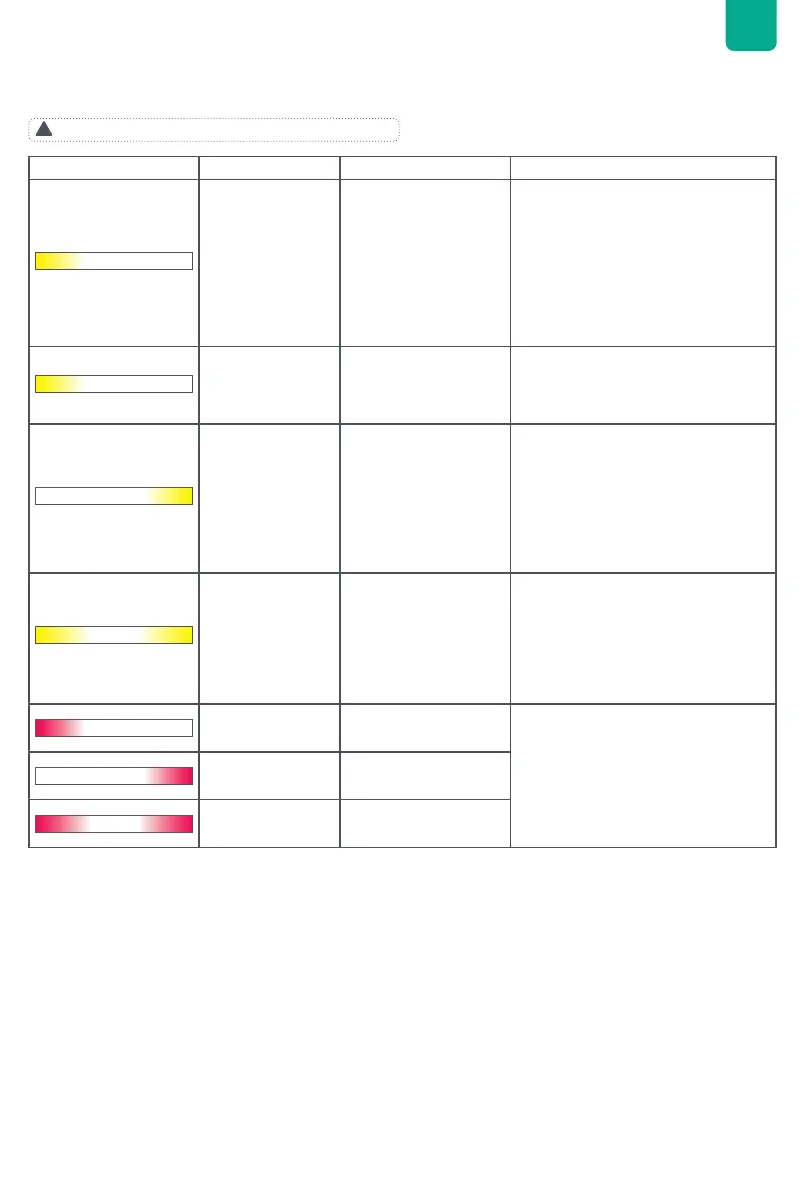
If the LED light strip turns yellow or red, there is a warning or error. Please follow the instructions in the app or the table below to
address the problem. lf it is not resolved, please contact our customer service.
!
Do not attempt to repair the Hyper 2000 hybrid inverter.
LED Indicator LED Description Detailed Explaination Suggestion
Solid yellow on the
left side
Battery level is below
XX% and not charging
1. Make sure the both sides of the
solar panel cable and AC power
cable are correctly wired. Unplug
all the cables and reconnect after
30s
2. Make sure the home grid and solar
panels are working normally.
3. If the issue persists, contact
customer service.
Blinking yellow on
the left side
Battery not connected
1. Lift the Hyper 2000 placed on the
battery, and then put it back down
2. If the issue persists, contact
customer service.
Blinking yellow on
the right side
Home grid not
connected
1. Try pulling out the AC cable and
inserting re-inserting it. Make sure
that the plug is inserted well.
2. If the issue persists, the power
grid is probably faulty; wait for the
power grid to recover.
3. If the issue persists for more than 1
hour, contact customer service.
Blinking yellow on
both sides
Both battery and home
grid not connected
1. Lift the Hyper 2000 placed on the
battery, and then put it back down
2. Try pulling out the AC cable and re-
inserting it. Make sure that the plug
is inserted well.
3. If the issue persists, contact
customer service.
Blinking red on the
left side
Abnormal status of
Battery
1. Check the cause and resolution
suggestions for abnormal faults in
the Zendure App.
2. If the issue persists, contact
customer service.
Blinking red on the
right side
Abnormal status of
Hyper 2000
Blinking red on
both sides
Abnormal status of
Hyper 2000 and Battery


 To Next Page
 Loading...