Connections
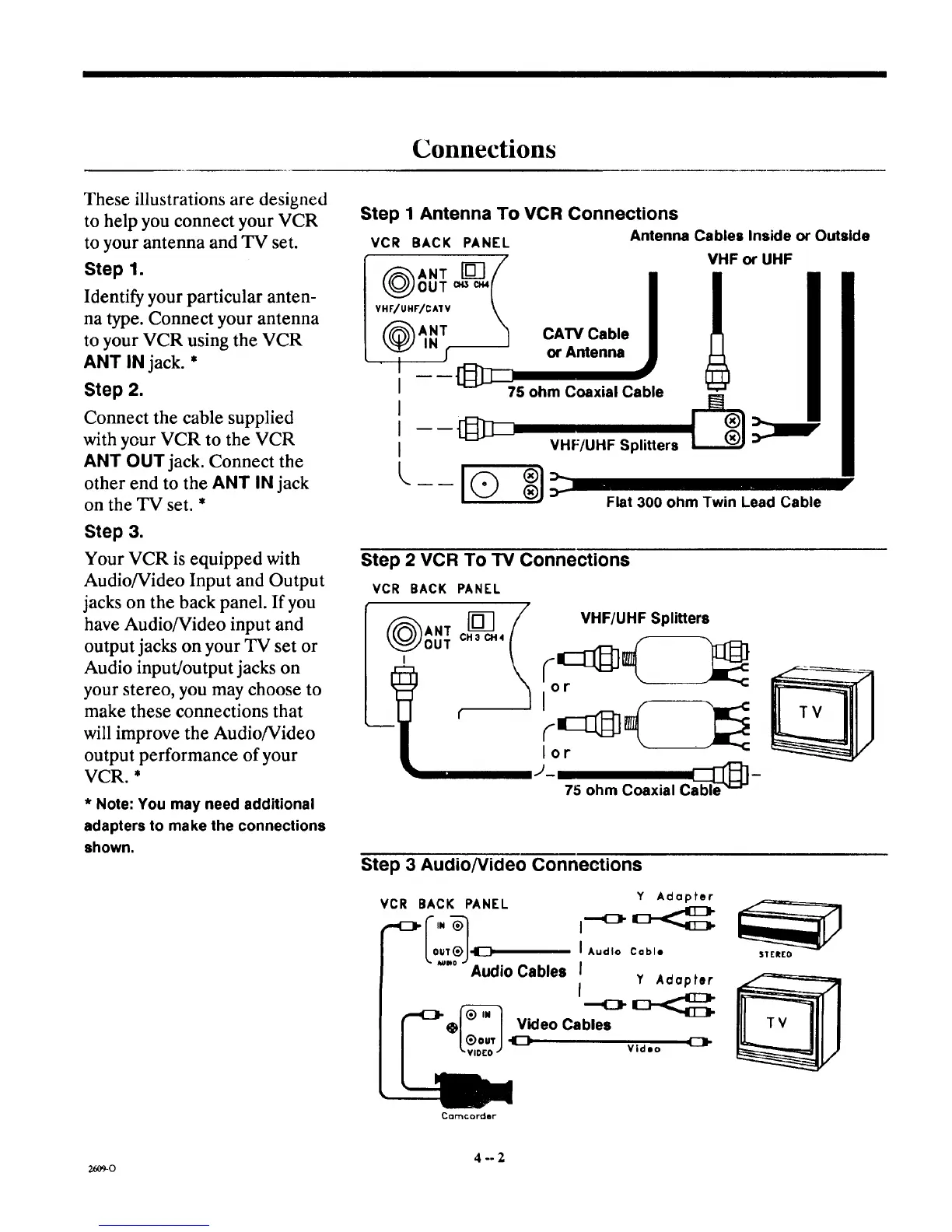
These illustrations are designed
to help you connect your VCR
to your antenna and TV set.
Step 1.
Identify your particular anten-
na type. Connect your antenna
to your VCR using the VCR
ANT IN jack. *
Step 2.
Connect the cable supplied
with your VCR to the VCR
ANT OUT jack. Connect the
other end to the ANT iN jack
on the TV set. *
Step 3.
Your VCR is equipped with
Audio/Video Input and Output
jacks on the back panel. If you
have Audio/Video input and
output jacks on your TV set or
Audio input/output jacks on
your stereo, you may choose to
make these connections that
will improve the Audio/Video
output performance of your
VCR. *
* Note: You may need additional
adapters to make the connections
shown.
Step 1 Antenna To VCR Connections
VCR BACK PANEL Antenna Cables Inside or Outside
( )ANT[] /
OUT c.s c_{
VHF/UHr/CA1V \
f_ANT "_
I
I
I
I ----[:I_:I_
I
[,..._ _
VHF or UHF
CAW Cable
or Antenna
75 ohm Coaxial Cable
VHF/UHF Splitters
Flat 300 ohm Twin Lead Cable
Step 2 VCR To TV Connections
VCR BACK PANEL
lm
OUT CHacH4
t VHF/UHF Splitters
lot
J- able_]-
75 ohm Coaxial C
Step 3 AudioNideo Connections
VCR BACK PANEL
Lo '.?J
Audio Cables
Y Adapter
I Audio Cable
I
Y Adapter
f
Video Cables
Video
SIEREO
Cclrl'lc oFder"
4--2
26O9-O



 To Next Page