Page 14
TO GET ASSISTANCE, CALL: 919-774-7667
ZENITH PUMPS
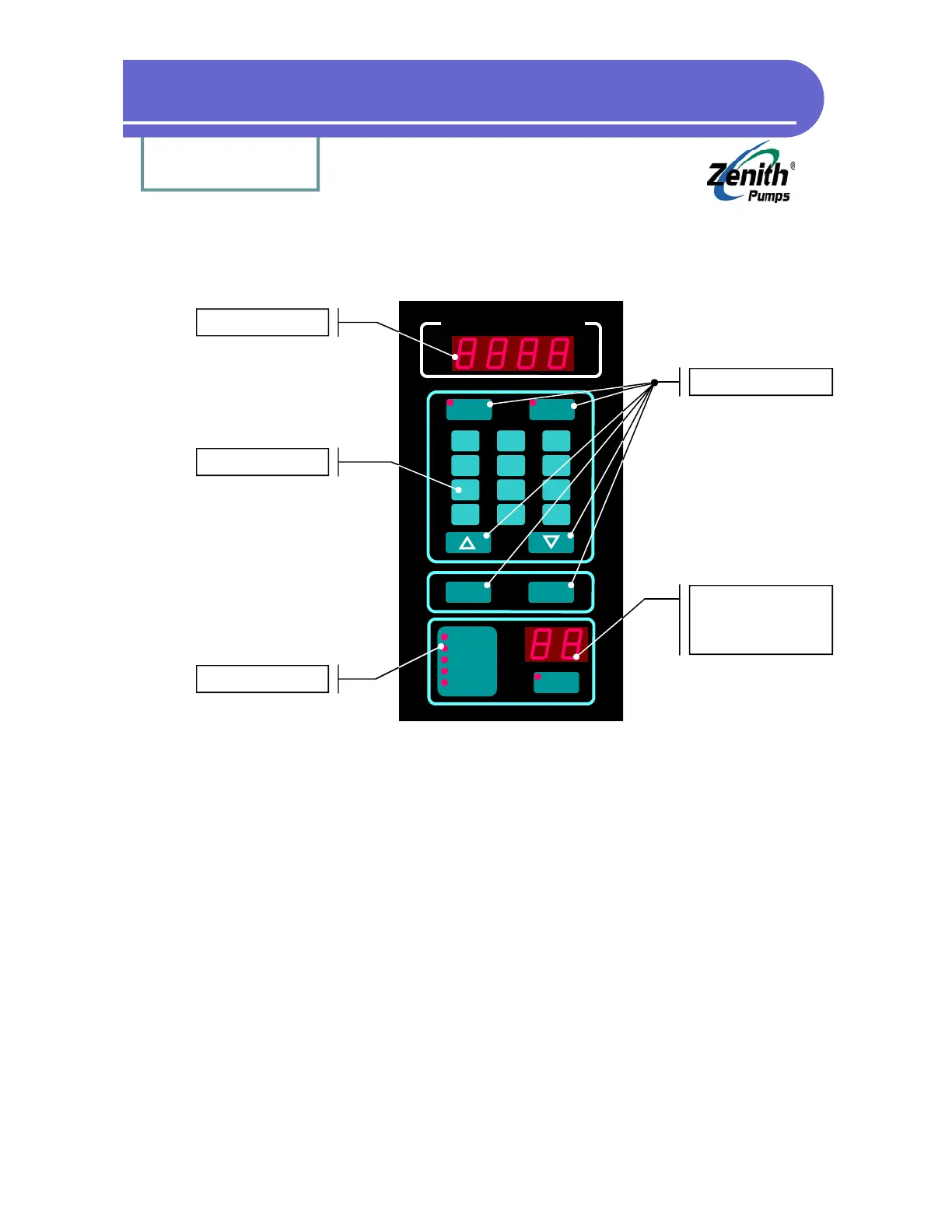
• LED Display:
To display values for parameters
• Numeric Keys:
To input values for parameters, or to input code number when “CODE SELECT” button
being pressed
• Status LEDs:
To display operation status and alarms
• Control Buttons:
SET SPEED: To enter new set speed values in engineering unit
TACH: To show the actual feedback signal in engineering unit
Scroll Buttons: To increase/decrease the value showing in LED display
CLEAR: To erase value in LED display, or code number under code select mode
ENTER: To enter new value of a code, or to show the value of a code
Code Select Key & Display:
CODE SELECT: To view or change values for any code
Code Display: To display code number
Keypad & Display
LED Display
Numeric Keys
Status LEDs
Code Select Key
&
Display
Zenith
®
Pumps
SET
SPEED
TACH
7
4
1
--
8
5
2
0
9
6
3
.
CLEAR ENTER
Run
Jog
Preset
Limit Alarm
Dev Alarm
CODE
SELECT
Control Keys


 To Next Page