Page 36
TO GET ASSISTANCE, CALL: 919-774-7667
ZENITH PUMPS
Calibrate Analog Output
NOTE:
In most instances, ZeDrive™ 2000 will come to you prepackaged in a control cabinet. The con-
troller will be mounted and all internal cabinet wiring will be complete.
The unit will also be programmed according to your specifications. The analog inputs and output
will have been calibrated for 4-20mA, unless otherwise specified. If re-calibration is desired for
some reason, such as using 0-10V signals, instead of 4-20mA, follow the appropriate procedure
below.
1. Preliminary Action:
• External device which can measure 0-10 (VDC) or 4-20
(mA) analog signal, i.e., a multi-meter
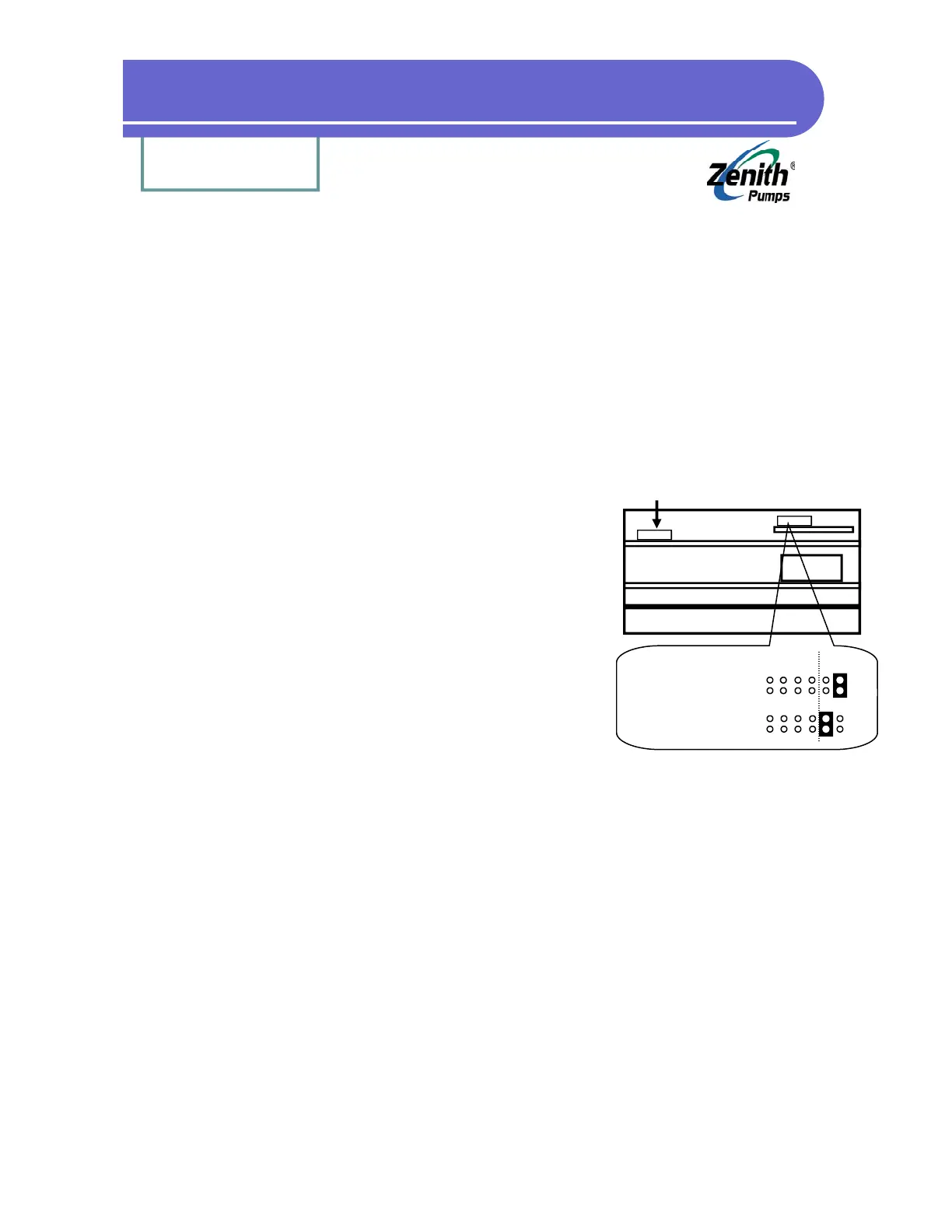
• Locate Analog Select Jumpers on “Control Board”:
1. Loosen up 6 screws on the back panel, and 2
screws located on the heat sink of ZeDrive
2. Remove the back panel, place ZeDrive as shown
at left. The top board is the “Control Board”, and
the bottom one is “Drive Board”
3. Locate Analog Select Jumper as shown at left
4. Depend on the signal, change the jumper set-
ting as shown at the left
2. Procedures:
2.1 Connect the analog calibration measuring device to J4-18(+) and J4-17 (-)
2.2 Select code C-82
2.3 Change the value in code C-82 until the measuring device reads “zero” (4mA or 0V)
2.4 Select code C-83
2.5 Change the value in code C-83 until the measuring device reads “span” (20mA or 10V)
Analog Select Jumper
Analog Select Jumper Location
Heat Sink
Transformer
Feedback
(Not this jumper)
4-20 mA: (disregard)
Left
0-10 VDC:
(Default) Left


 To Next Page