16
Control cards
www.zepro.com
2.1.8 Display and LED’s
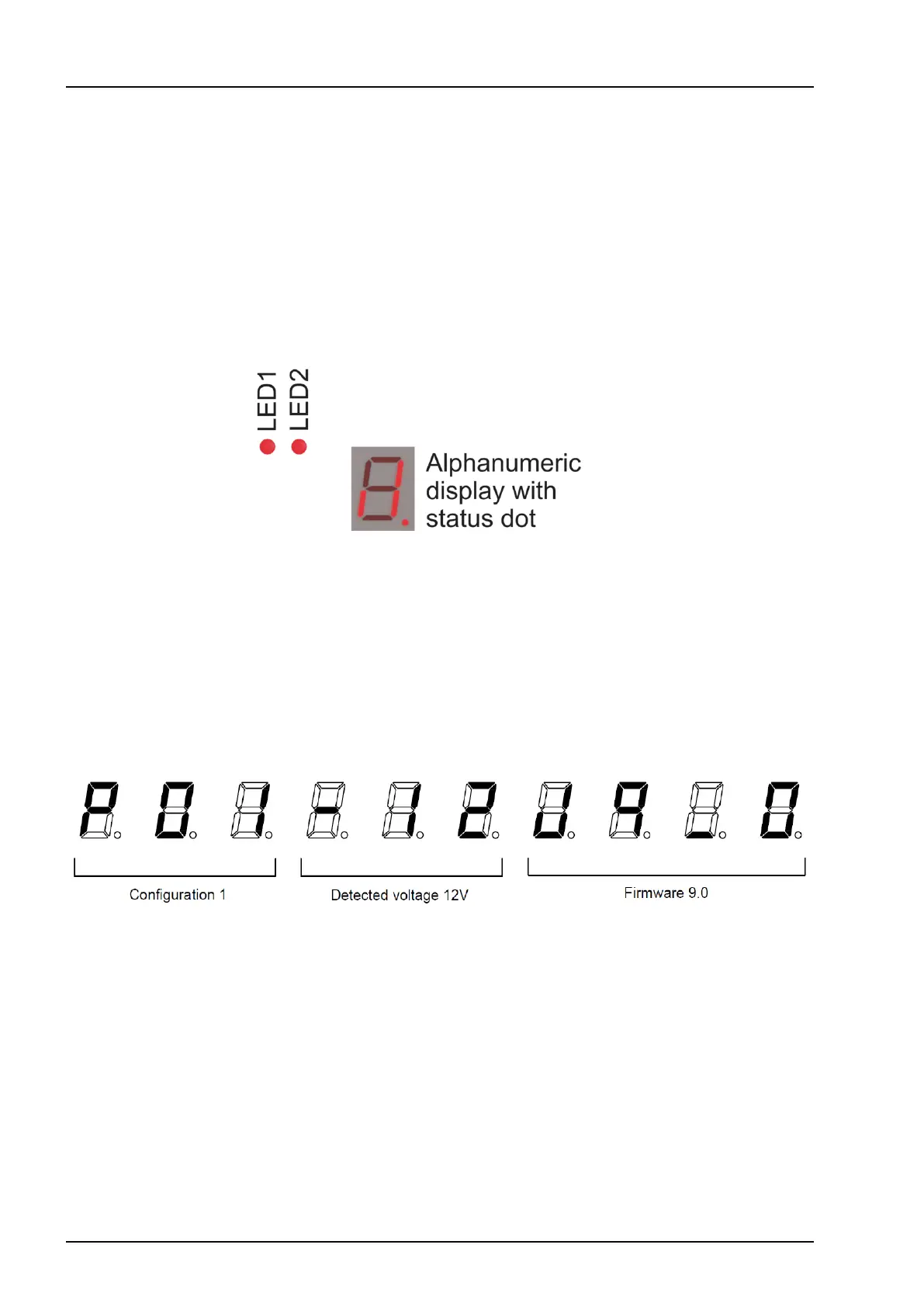
The control card is equipped with two LED’s and an alphanumeric display with a status point on the lower right
corner which provide useful information about the system.
• The status dot has three states:
• Off: no supply voltage to control card.
• On: supply voltage is available but the cabin switch is switched off.
• Flashing: supply voltage is available and the cabin switch is switched on. The card is awaiting input signal.
When a button press is being registered by the card, LED1 is lit and when the signal from the control device and
sensors is registered and approved by the card, LED2 is lit to indicate an active output.
Startup sequence
Every time the card is switched on, either by turning the cabin switch off and then back on or by cutting the
powertotheliftandturningitbackon,astartupsequenceisdisplayedonthedisplay.Thesoftwarecongura-
tionisdisplayedrst,followedbythedetectedvoltageandthermwareversionnumber.Itiscrucialthatthe
softwarecongurationisthecorrectoneforthetailliftitisinstalledon,seethesoftwarecongurationschapter
for more information.


 To Next Page