Installation and Operating Instructions V04 30
6 Communication
6.1 System monitoring via RS485
This inverter is equipped with RJ45 interfaces for multipoint communication.
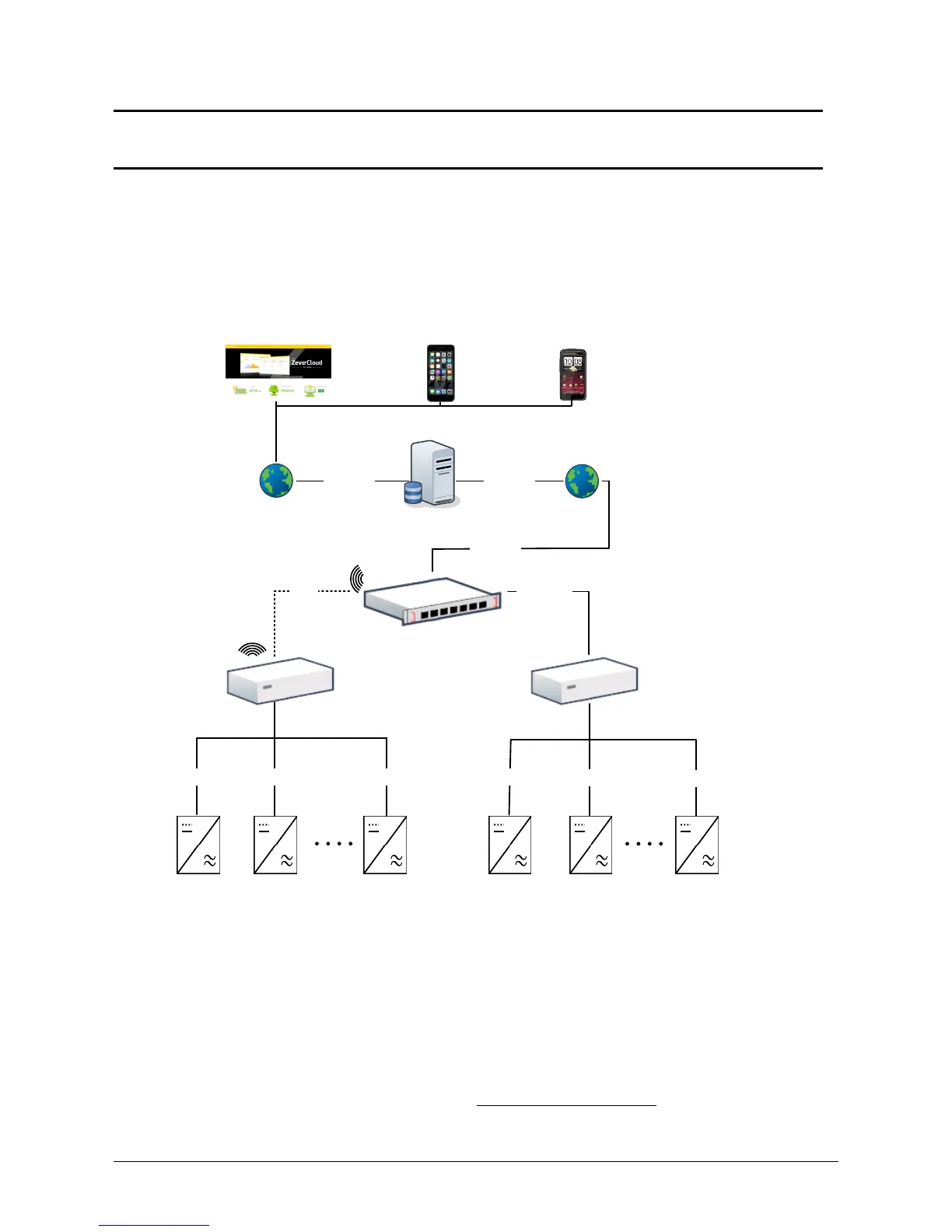
One ZeverCom/ZeverManager connects inverters via an RS485 bus. The overall
length of the network cable should not exceed 1,000 m. The monitoring system
layout for inverters is as follows.
Inverter_1 Inverter_2
Inverter_n
iPhone Android
Web browser
Wireless Router
RS485
RS485
Inverter_1 Inverter_2 Inverter_n
Internet Internet
Internet
ZeverCloud
RS485
RS485 RS485 RS485
WiFi
Ethernet
ZeverCom WiFi ZeverCom/ZeverManager
The ZeverCom/ZeverManager connects to the inverter via the RJ45 interface, and it
connects to the router via Ethernet.
We offer a remote monitoring platform called ‛ZeverCloud“. You can install the
‛ZeverCloud“ application on a smart phone using Android or an iOS operating
systems.
The website address of the ‛ZeverCloud“ is www.zevercloud.com



 To Next Page