Installation and Operating Instructions V04 40
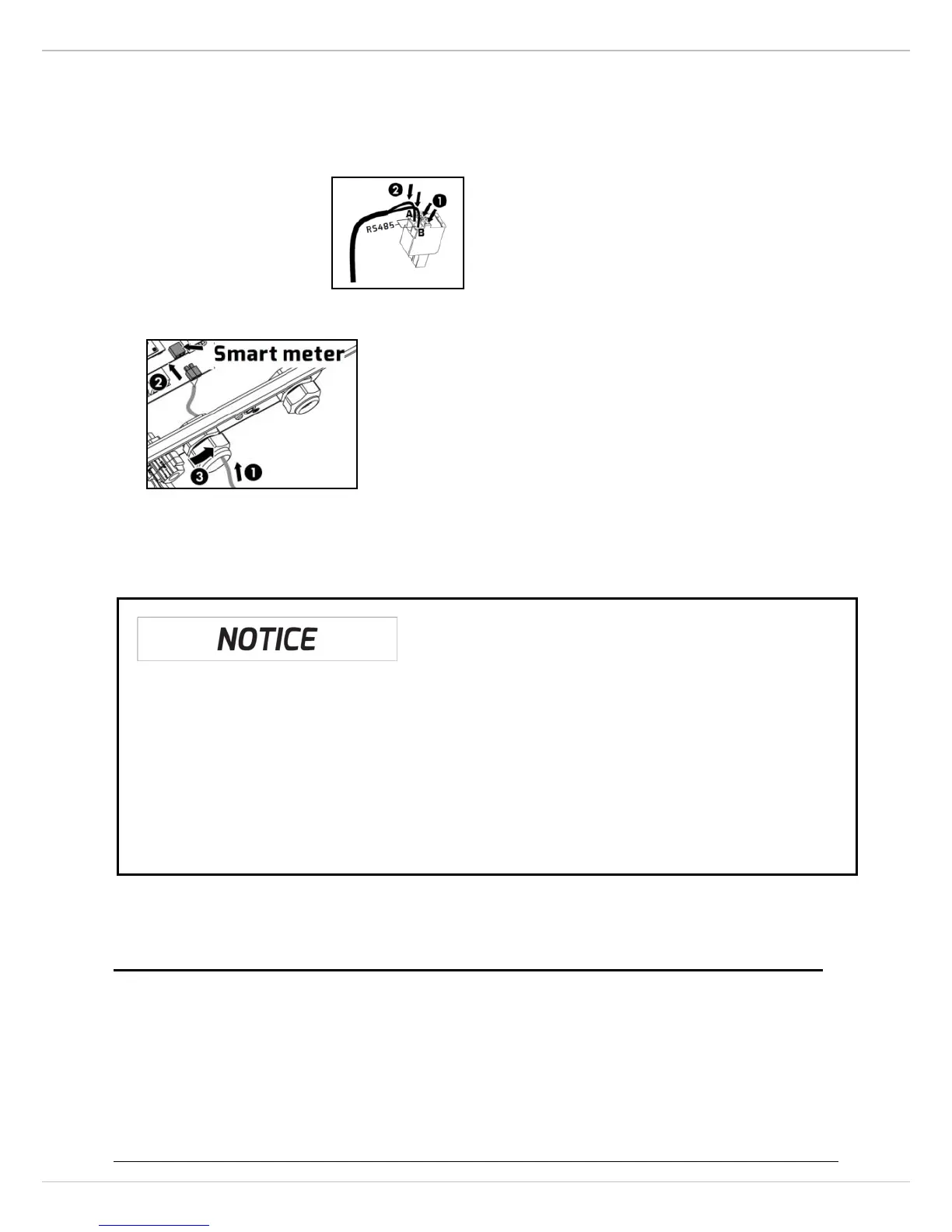
3. Connect the conductors to the supplied smart meter connector in accordance
with the symbol‛A“ and ‛B“. Whendoing so, ensure the conductors are plugged
completely into the terminal up to the insulation.
4. Plug the assembled smart meter connector into the pin connector.
5. Push the seal insert back into the cable gland. Tighten the swivel nut slightly.
6. Place the cover on the housing, then tighten all 4 screws with a Torx screwdriver
(screw driver type: T25, torque: 2.5Nm).
6.6 Communication with third-party devices
Zeverlutioninverters can communicate with Solarlog or Meteocontrol, in other
words, you can use Solarlog or Meteocontrol to monitor Zeverlution inverters. For
more information, please refer to their user manual.
Possible reason of communication failure due to the wrong meter
• The smart meterbrand:EASTRON
• Supported model: SDM120-Modbus,SDM220-Modbus,SDM230-Modbus
• Must set the meter baud rate for modbus to 9600bps
More meter details are available at http://www.eastron.com.cnor



 To Next Page