4.5 Starting the Cleaner
The default cleaning surface setting for the Vortex
cleaners is Floor Only . To change the current
programmed cycle, see Section 5. Programming the
Cleaner.
Select Cleaning Surface (all models):
Use to change cleaning surface setting.
Toggle between: Floor Only
Floor and Walls
Waterline (VX55 4WD only)
Select Cleaning Intensity Level
(VX55 4WD only):
Use to choose cleaning intensity level.
Toggle between: INTENSIVE
HIGH INTENSITY
Select Pool Shape (VX55 4WD only):
Use to choose pool shape.
Toggle between: RECTANGULAR
FREEFORM
Begin Cleaning:
After selecting the cleaning surface and other options as
applicable, press to begin operation.
The screen displays the time remaining for the selected
cycle. For example, 0:44 on the display indicates that
cleaning will be completed in 44 minutes.
NOTE: Thecontrolboxautomaticallyswitchestostandby
powermodeafter10minutesofinactivityandthe
displayscreenturnsoff.Pressanykeytoexitstandby
mode.Cleanerwillcontinuetofunctioninstandby
modeifinthemiddleofacleaningcycle.
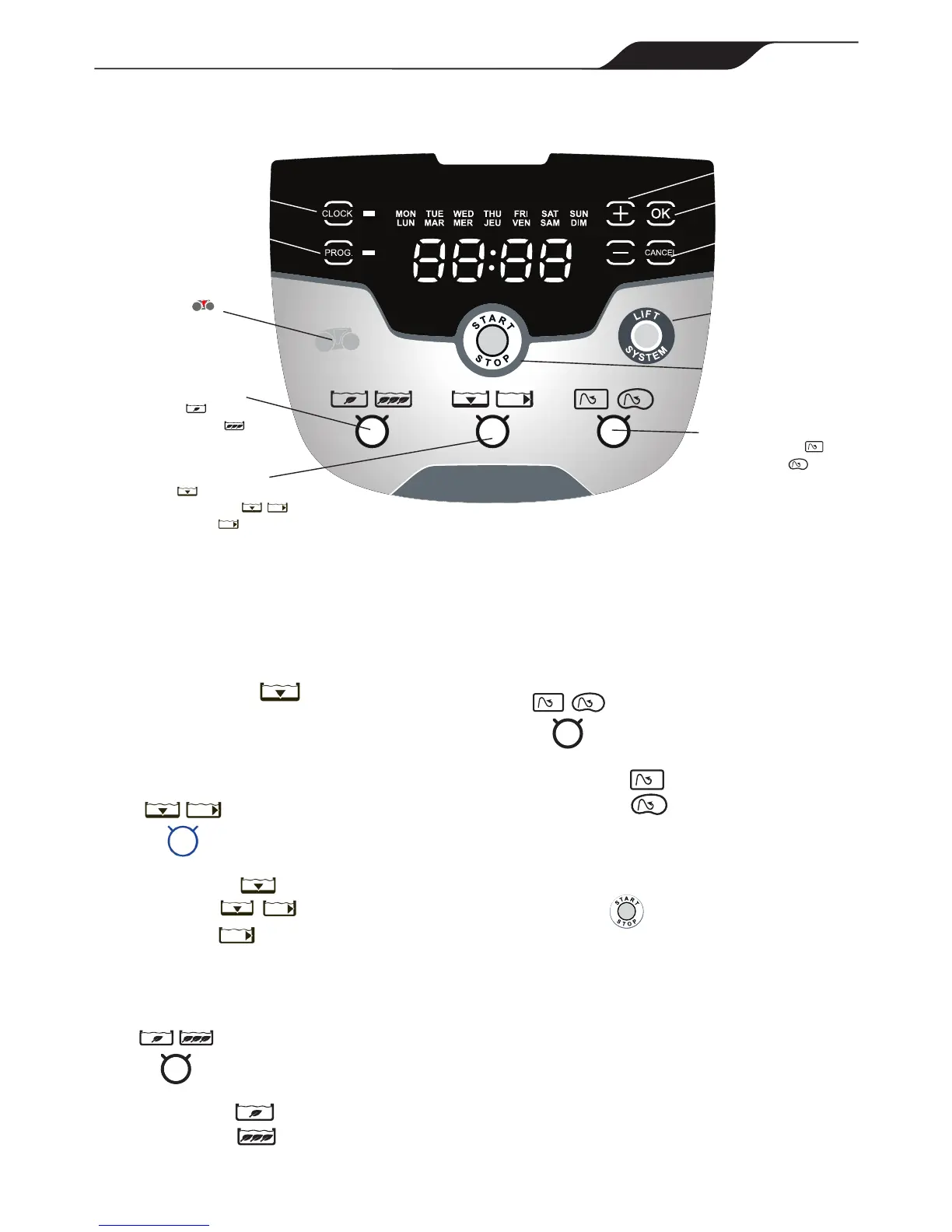
Display Current
Time/ Set Time
Program Cleaning
Cycles / Set Time
Navigate Day/Hour
Remove Cleaner
from Pool
Start/Stop Cleaner
Operation
Cancel Programming
Validate Time Setting
Selection
Select Cleaning Surface
• Floor
• Floor and Walls
• Waterline only
Select Cleaning Level
• Intensive
• High Intensity
Select Pool Shape
• Rectangular
• Freeform
Dirty Filter
Indicator
4.4 The VX55 4WD Cleaner Control box
Figure 20. VX55 4WD Control Box



 To Next Page