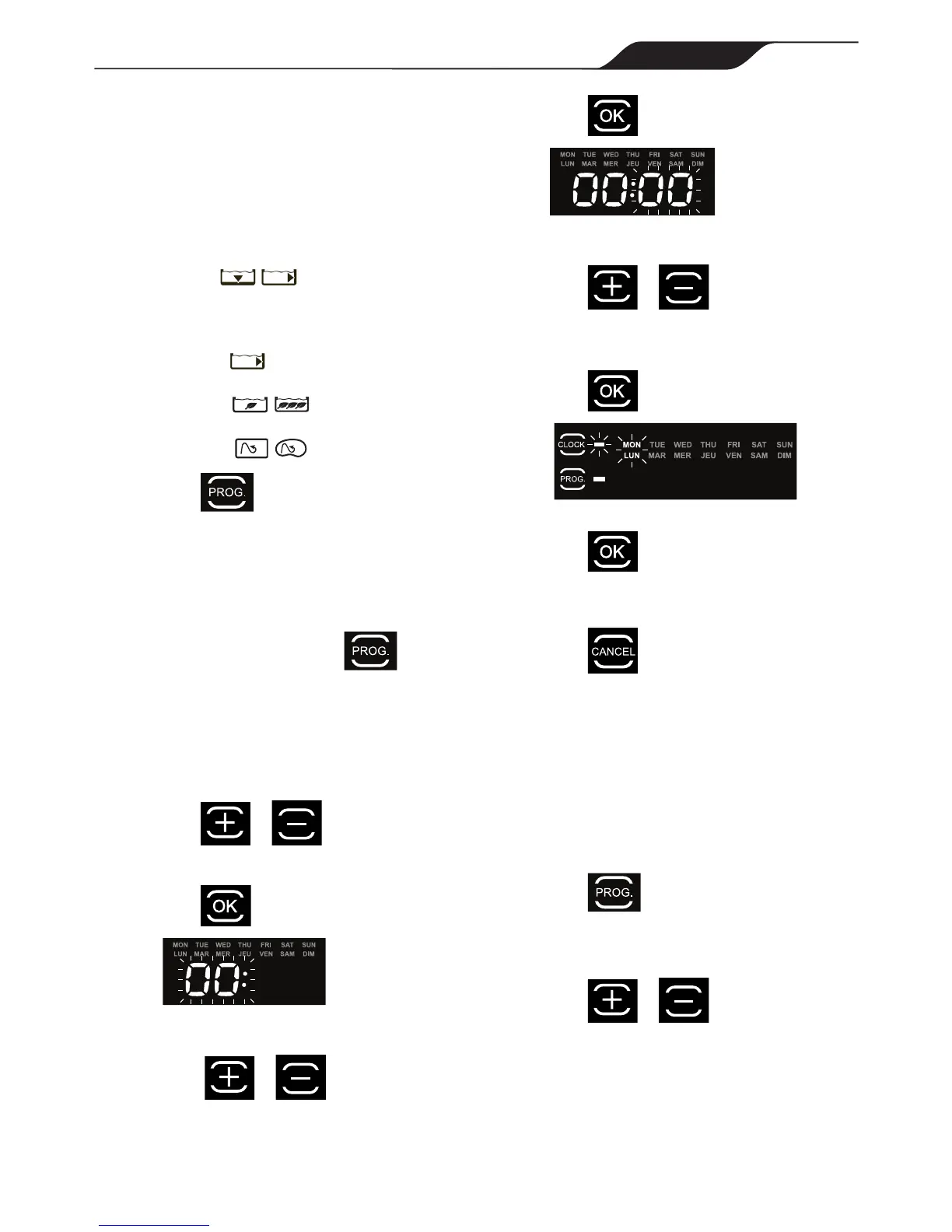
5.4 Programming Cleaning Cycles
You can program up to seven cleaning cycles.
Program cleaning for either seven consecutive cycles or
the same cycle repeated over several weeks
(e.g., every Wednesday and Saturday for three weeks).
1. Choose pool cleaning settings to program.
All models:
Choose toselecteitherthepooloor
ortheoorandwallsofthepool.
VX55 4WD:
• Choose to select waterline only in
addition to Floor Only or Floor and Walls.
• Choose to select intensive or
high intensity level cleaning.
• Choose to select pool shape.
2. Press to view currrent programmed
cleaning cycles.
Cycle day and time is displayed for three
seconds.
3. When the cleaning cycle you want to change
is displayed, press and hold for 3 to 5
seconds.
Thedaysoftheweekashtwice.
NOTE: Ifthedisplayflashesallzeros,thetimehas
notbeenset(newcleaner).Dayandtimemustbeset
beforeyoucanprogramcleaningtimes,seesection
5.2 Changing the Clock Day and Time.
4. Press or buttons to cycle through
7 days of the week.
5. Press to select.
Hour setting ashes twice.
6. Press or buttons to cycle
through 24 hours.
7. Press to select.
Minutes setting ashes zero.
8. Press or buttons to cycle
through four 15- minute increments (00, 15, 30,
or 45).
10. Press to select.
The next day to program ashes.
11. Press to program an additional cleaning
cycle for a different day OR
Press to exit the programming menu
Days of the week are lit indicating programs
stored in the control box memory for that day.
5.5 Canceling Cleaning Cycles
To Cancel an Individual Program:
1. Press and hold for 3 to 5 seconds.
Thedaysoftheweekashtwice.
2. Press or buttons to cycle
through seven (7) days.
NOTE: Ifthedayoftheweekflasheswithnotime
displayed,thereisnoprogramsetforthatday.




 To Next Page