Playback
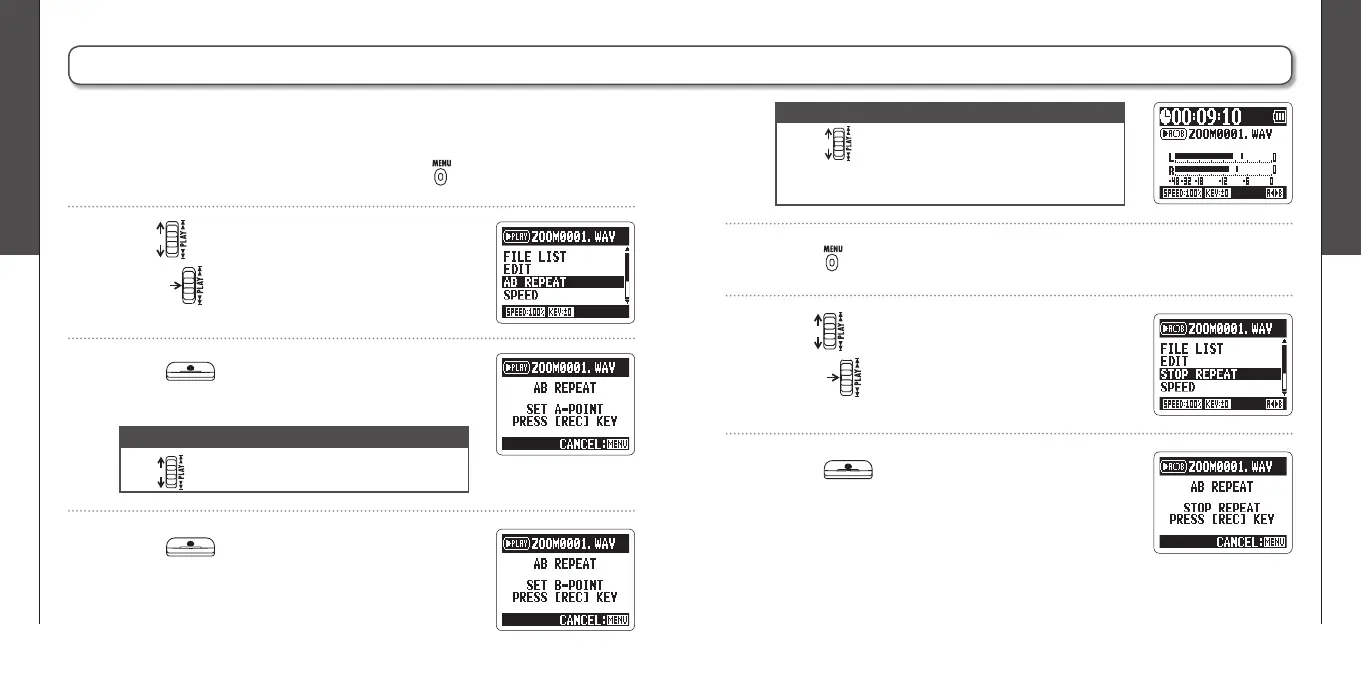
Loop playback of a set interval (AB REPEAT)
34
Playback
Loop playback of a set interval (AB REPEAT)
35
H2n
Handy Recorder
Loop playback of a set interval (AB REPEAT)
1.
When the playback screen is open, press .
2.
Use to select AB REPEAT, and then
press .
5.
Press to stop loop playback.
6.
Use to select STOP REPEAT, and then
press .
You can loop playback between two set points. Select the fi le that you want to
play back fi rst.
NOTE
∙ Use to search for the stopping point quickly.
∙ If you set the stopping point before the starting
point, they will be automatically swapped.
3.
Press at the point you want to start
playback.
NOTE
Use to search for the starting point quickly.
4.
Press at the point you want to stop
playback.
Loop playback between the points will start.
7.
Press .



 To Next Page