Playback
Mixing a 4ch surround fi le
40
Playback
Mixing a 4ch surround fi le
41
H2n
Handy Recorder
Mixing a 4ch surround fi le
2.
Press .
1.
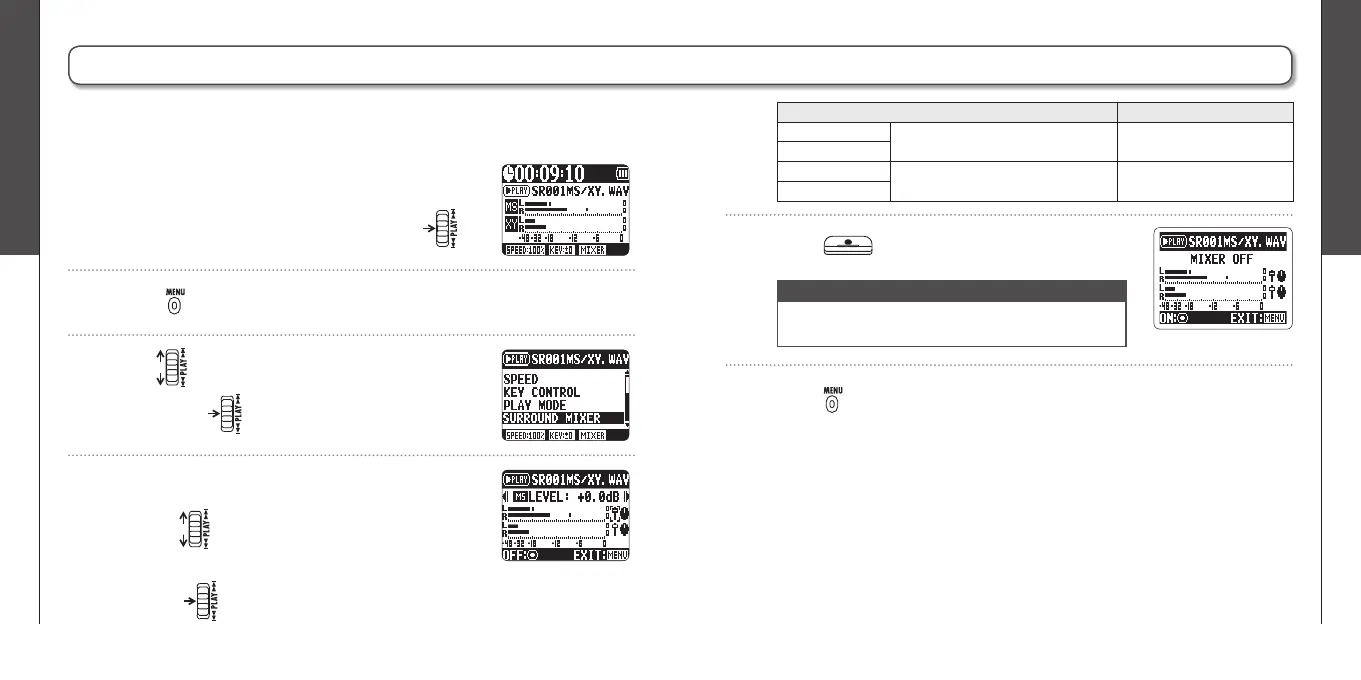
Set the recorder to 4ch surround mode, select
the fi le you want to mix, and then press .
3.
Use to select SURROUND MIXER, and
then press .
4.
Change the values of the parameters.
Use to move the cursor and change
values
Push to select a parameter to change
You can adjust the levels and panning of the MS and XY recordings made for 4ch
surround fi les.
5.
Press to turn the mixer ON or OFF.
NOTE
The mixer setting is only applied to playback. It does
not change the recordings.
6.
Press twice to return to the playback
screen.
Parameter setting ranges Explanation
MS LEVEL MUTE, –48 ~ +12 dB
(0.5 dB increments)
Adjusts volume
XY LEVEL
MS PAN L100 ~ CENTER ~ R100
(even values only)
Adjusts left-right balance
XY PAN



 To Next Page