Network Camera User’s Guide
55/96
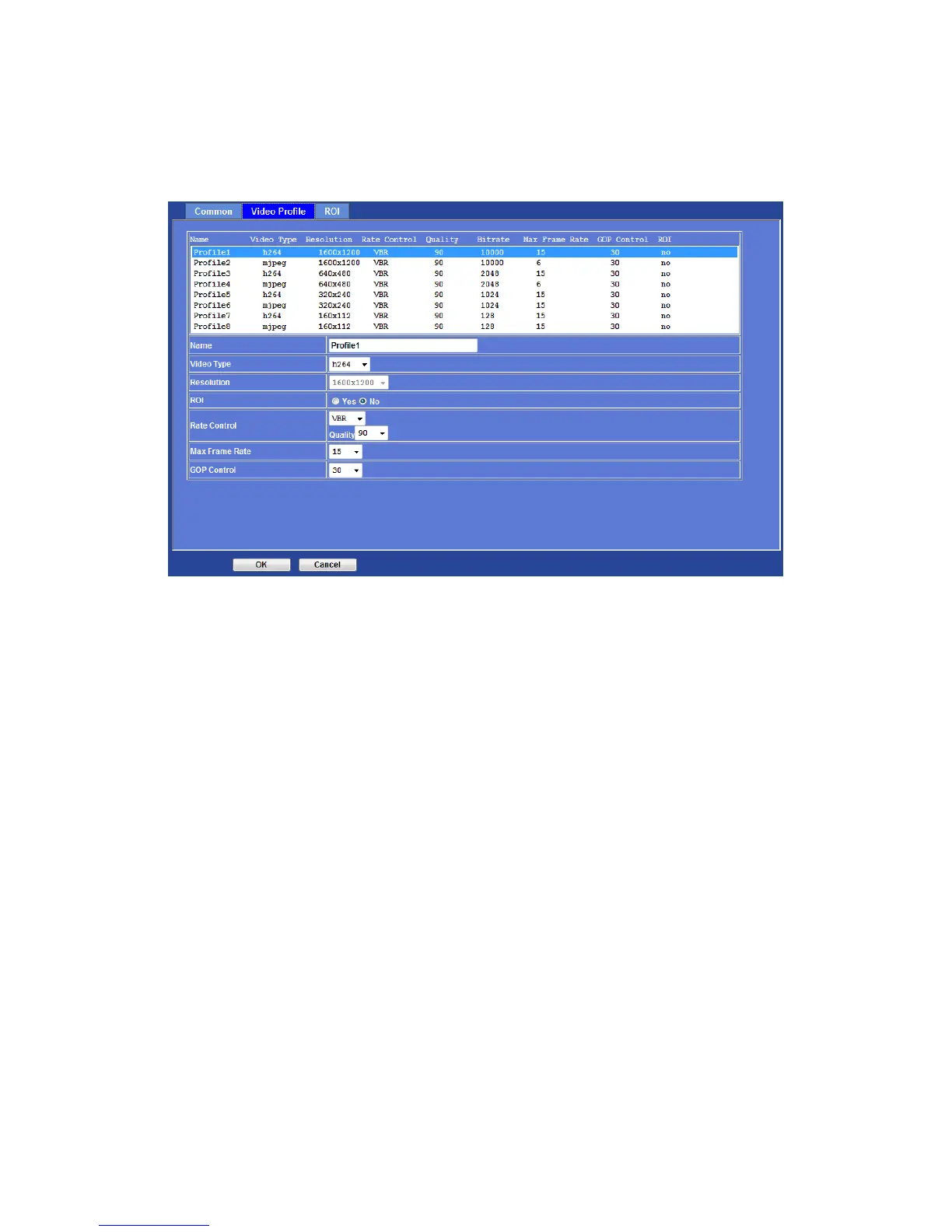
Video Profile
Name:
To assign a name to the selected profile.
Video Type:
Video codec of the selected profile.
Resolution:
Show the resolution of the selected profile.
ROI:
Assign the selected profile as a ROI stream or not. (Only available for the profiles with
max resolution)
Rate Control:
Defines the rate control method of this profile. There are four options: Constant Bit Rate
(CBR), Variable Bit Rate (VBR), Enhanced Constant Bit Rate (ECBR), and Enhanced
Variable Bit Rate (EVBR).
For CBR, the video bit rate is between low to high bandwidth based on different
resolutions. User can set the desired bit rate to match the limitation of bandwidth.
For VBR, user should choose the quality level to set the video quality rather than bit rate.
The quality level is between 1 and 100. The higher value can reach the better quality but
of course will consume higher bandwidth.
For ECBR, the video bitrate is based on normal CBR mode. However, the target bitrate
can be increased to max target bitrate while lots of motion in video. The max target
bitrate will keep a pre-defined time period and then back to normal CBR bitrate.
For EVBR, the video bitrate is based on normal VBR mode. However, the bitrate can be



 To Next Page