0.1 g.
weight is.
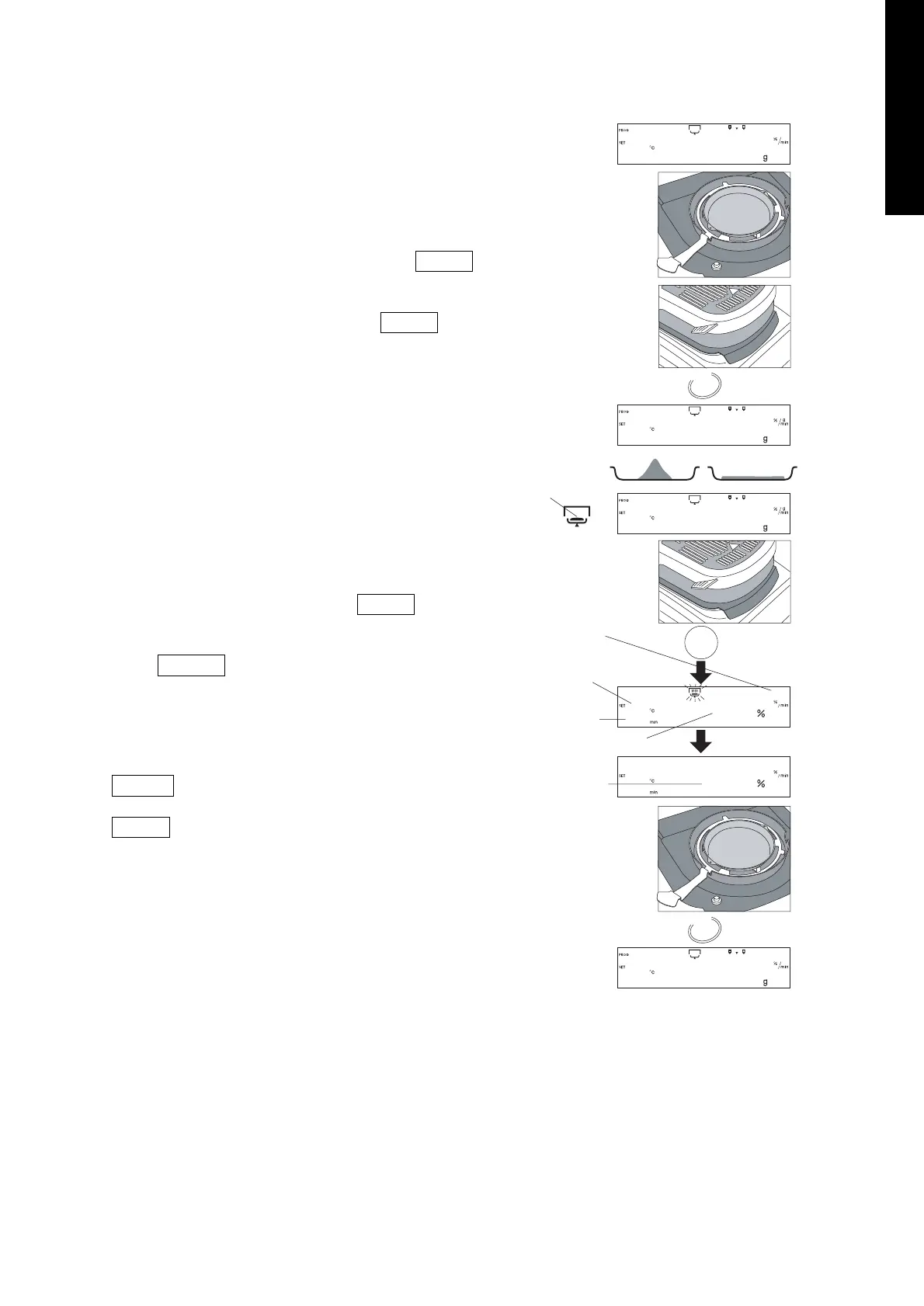
Place the Sample
13. Set the breeze break ring, pan support, sample pan
handle and sample pan in order. (Do not put in a
sample.)
14. Close the heater cover.
15. When displaying a stable value, Press the RESET
key. Avoid mechanical vibration, breeze and
environmental noise during measurement. If the
display deviates from zero, press the RESET key.
16. Open the heater cover. Remove the sample pan,
using the sample pan handle and replace when
sample has been added.
Caution
The sample needs to be more than 0.1 g.
Spread the sample evenly on the Sample Pan
Start the Measurement
17. Close the heater cover. Press the START key after
the weight value becomes stable.
18. If the SELECT key is pressed during measurement,
other units can be displayed.
Completing the Measurement
19. When the Drying Rate reaches the preset value, the
measurement is completed and the buzzer beeps.
ENTER key . . . . .The result will be transferred to
printer or PC.
RESET key . . . . . .The result will be deleted and the
display returns to the weighing mode.
20. Open the heater cover and remove the sample.
To repeat measurement using the same setting,
proceed to step 13.
To change the conditions, return to step 2.


 To Next Page