The safety function will be provided by the actuator itself. Therefore the FB only initiates the request, moni-
tors it, and sets the output when the actuator acknowledges the Safe state. This will be indicated with the
"S_SafetyActive" output.
This FB does not define any generic actuator-specific parameters. They should have been specified in the
generic actuator itself. It switches the generic actuator from the operation mode to a safe state.
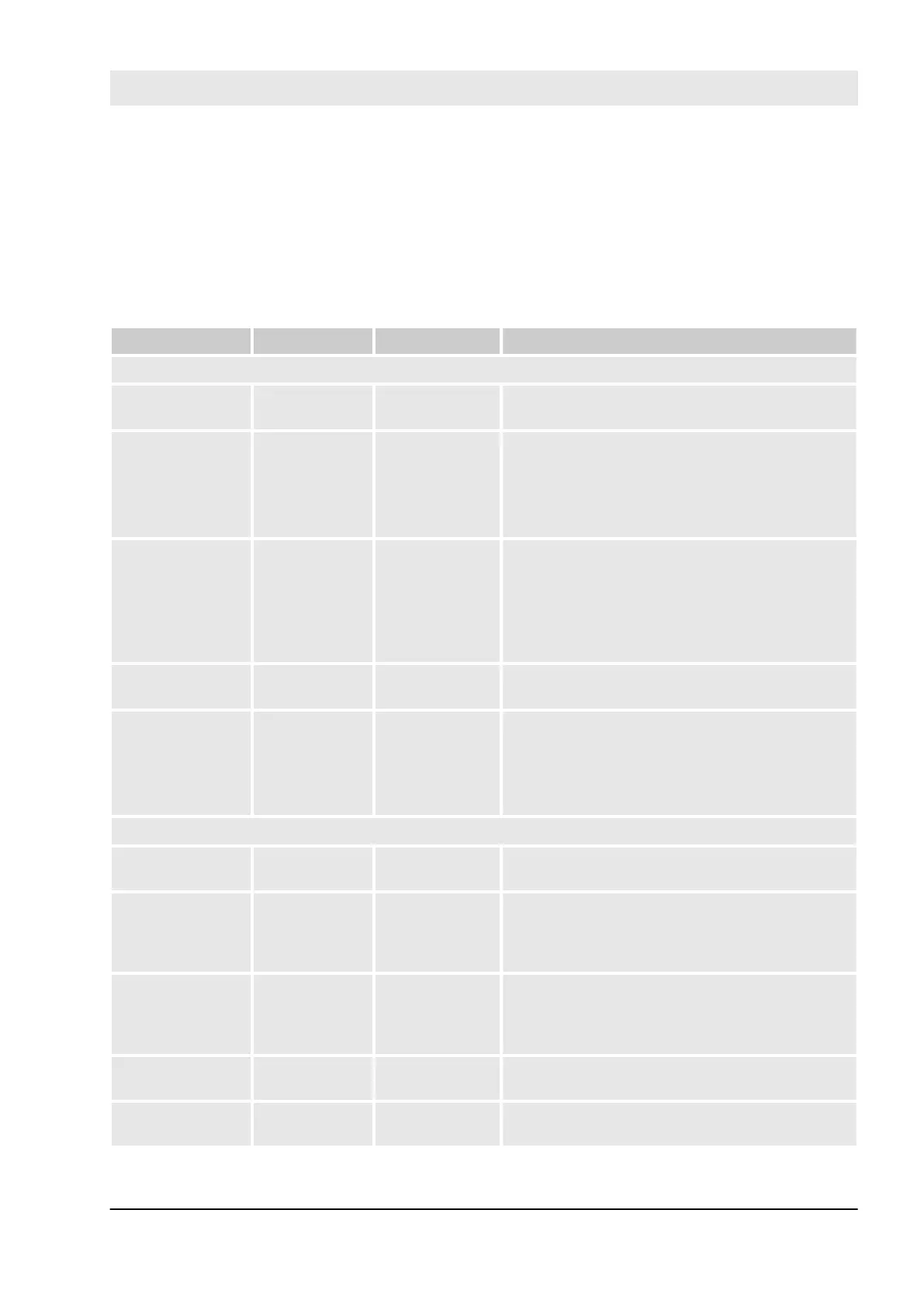
Table 78: FB Name: SF_SafetyRequest
Name Data Type Initial Value Description, Parameter Values
VAR_INPUT
Activate BOOL FALSE
Ä
Table 31 “General Input Parameters”
on page 266
S_OpMode BOOL FALSE Variable.
Requested mode of a generic safe actuator.
FALSE: Safe mode is requested.
TRUE: Operation mode is requested.
S_Acknowledge BOOL FALSE Variable.
Confirmation of the generic actuator, if actuator is
in the Safe state.
FALSE: Operation mode (non-safe).
TRUE: Safe mode.
Reset BOOL FALSE
Ä
Table 31 “General Input Parameters”
on page 266
MonitoringTime TIME T#0s Constant.
Monitoring of the response time between the
safety function request (S_OpMode set to FALSE)
and the actuator acknowledgment (S_Acknowl-
edge switches to TRUE).
VAR_OUTPUT
Ready BOOL FALSE
Ä
Table 32 “General Output Parameters”
on page 267
S_SafetyActive BOOL FALSE Confirmation of the Safe state.
FALSE: Non-safe state.
TRUE: Safe state.
S_SafetyRequest BOOL FALSE Request to place the actuator in a safe state.
FALSE: Safe state is requested.
TRUE: Non-safe state.
Error BOOL FALSE
Ä
Table 32 “General Output Parameters”
on page 267
DiagCode WORD 16#0000
Ä
Table 32 “General Output Parameters”
on page 267
Configuration and programming
AC500-S Libraries > SafetyBlocks_PLCopen_AC500_v22.lib
30.03.2017 AC500-S 375


 To Next Page