Serial communications 143
ACH550-01 User's Manual
(3AFE68320658 [English]) and BACnet® Protocol
(3AUA0000004591 [English]).
The communication between the drive and the fieldbus is then
activated by selecting the appropriate protocol with parameter
9802
COMM PROT SEL. After the communication is initialized, the
configuration parameters become available in parameter Group
53: EFB PROTOCOL in the drive.
Setting up EFB with the Serial Communication assistant is
shown below. The related parameters are described starting
from page 144.
For BACnet/IP, follow the instructions in RBIP-01 BACnet/IP
Router Module Installation Manual (3AUA0000040168 [English])
and RBIP-01 BACnet/IP Router Module User’s Manual
(3AUA0000040159 [English]).
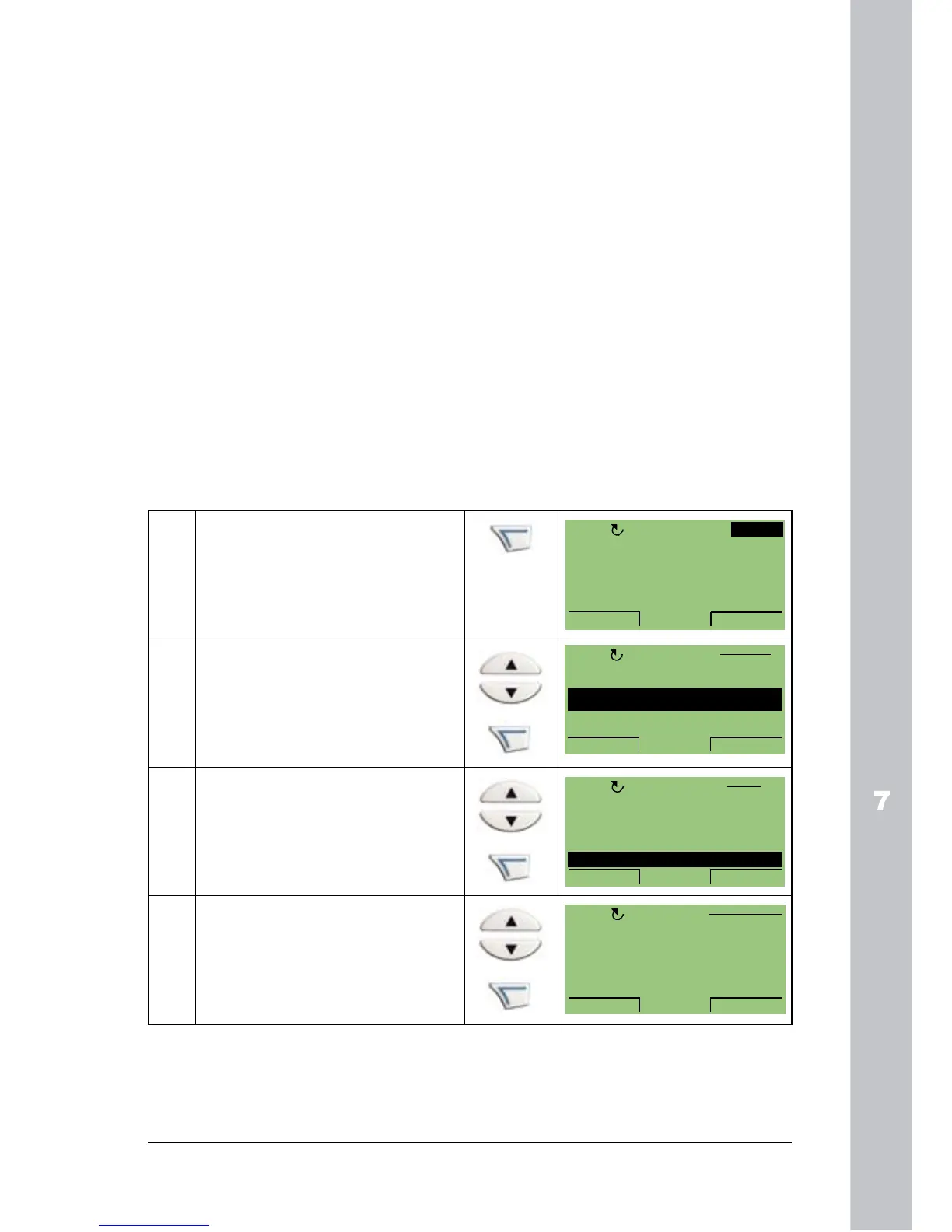
Setting up EFB with the Serial Communication assistant
To set up EFB, follow these steps:
1 Press MENU to go to the
main menu.
2 Select ASSISTANTS with
the UP/DOWN keys and
press ENTER.
3 Scroll to Serial
Communication and press
SEL.
4 Select the protocol with the
UP/DOWN keys and press
SAVE.


 To Next Page