EasyManua.ls Logo

ABB ACH550-01 - Parameters Mode

ABB ACH550-01
478 pages
Print Icon
To Next Page IconTo Next Page
To Previous Page IconTo Previous Page
Loading...
74 Start-up and control panel
ACH550-01 User's Manual
Parameters mode
To change the parameters, follow these steps:
To complete the control connections by manually entering the
parameters, see chapter Parameter listing and descriptions.
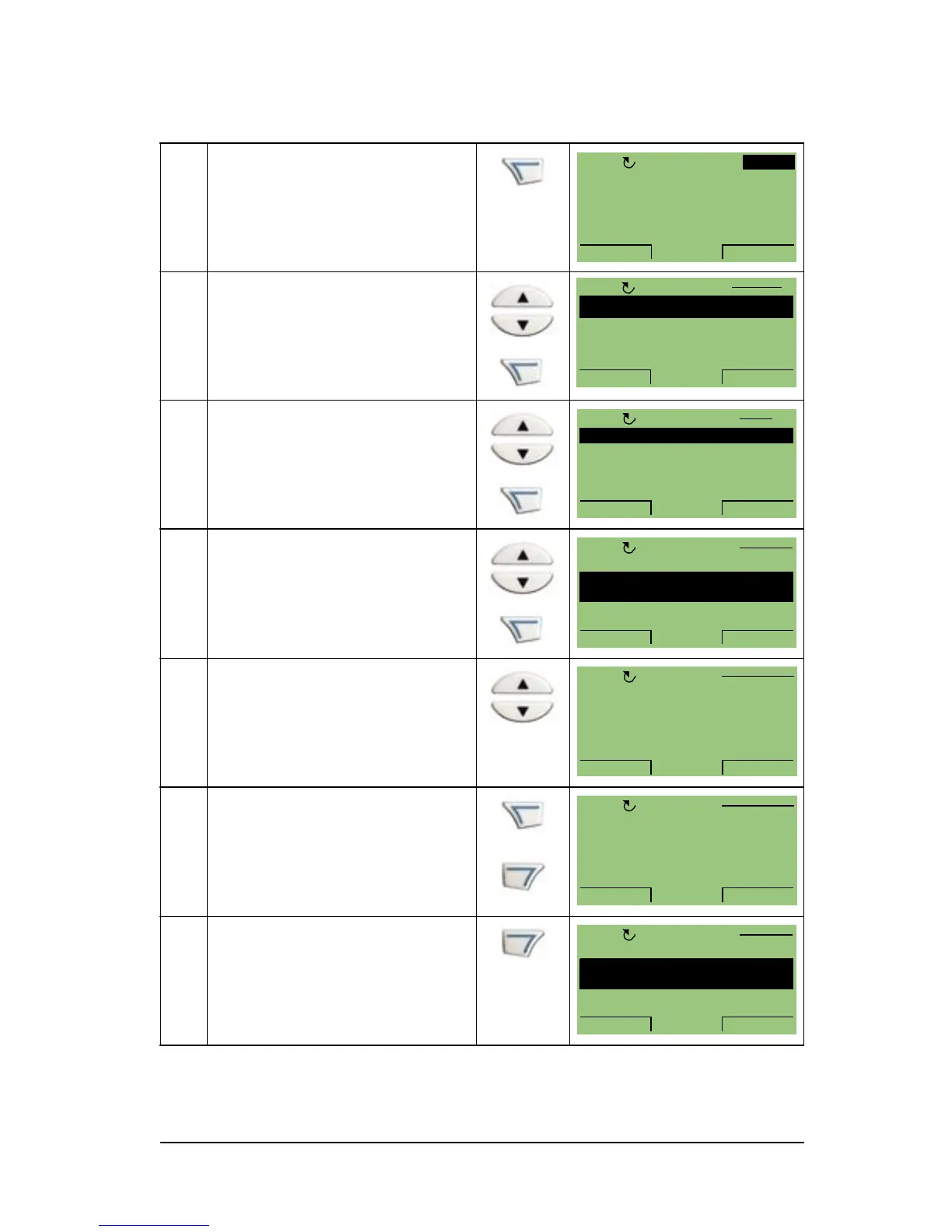
1 Press MENU to go to the
main menu.
2 Select PARAMETERS with
the UP/DOWN keys and
press ENTER
to go to the
Parameters mode.
3 Select the appropriate
parameter group with the
UP/DOWN keys and press
SEL.
4 Select the appropriate
parameter in a group with
the UP/DOWN keys. Press
EDIT to change the
parameter.
5 Press the UP/DOWN keys
to change the parameter
value.
6 Press SAVE to store the
modified value or press
CANCEL to leave the set
mode. Any modifications
not saved are cancelled.
7 Press EXIT to return to the
listing of parameter groups,
and again to return to the
main menu.

0 A
0 Hz
0 %0.
0.
0.
0.0HzOFF
MENU00:00
PARAMETERS
ASSISTANTS
CHANGED PAR
EXIT ENTER00:00
1
OFF
MAIN MENU
99 START-UP DATA
01 OPERATING DATA
03 FB ACTUAL SIGNALS
04 FAULT HISTORY
10 START/STOP/DIR
PAR GROUPS 99
EXIT
SEL00:00
OFF
9901 LANGUAGE
9902 APPLIC MACRO
HVAC DEFAULT
9904 MOTOR CTRL MODE
9905 MOTOR NOM VOLT
PARAMETERS
EXIT
EDIT00:00
OFF
9902 APPLIC MACRO
PAR EDIT
HVAC DEFAULT
[1]
OFF
CANCEL SAVE00:00
9902 APPLIC MACRO
PAR EDIT
SUPPLY FAN
[2]
OFF
CANCEL SAVE00:00
9901 LANGUAGE
9902 APPLIC MACRO
SUPPLY FAN
9904 MOTOR CTRL MODE
9905 MOTOR NOM VOLT
PARAMETERS
EXIT
EDIT00:00
OFF
Artisan Technology Group - Quality Instrumentation ... Guaranteed | (888) 88-SOURCE | www.artisantg.com

Table of Contents

Related product manuals