4
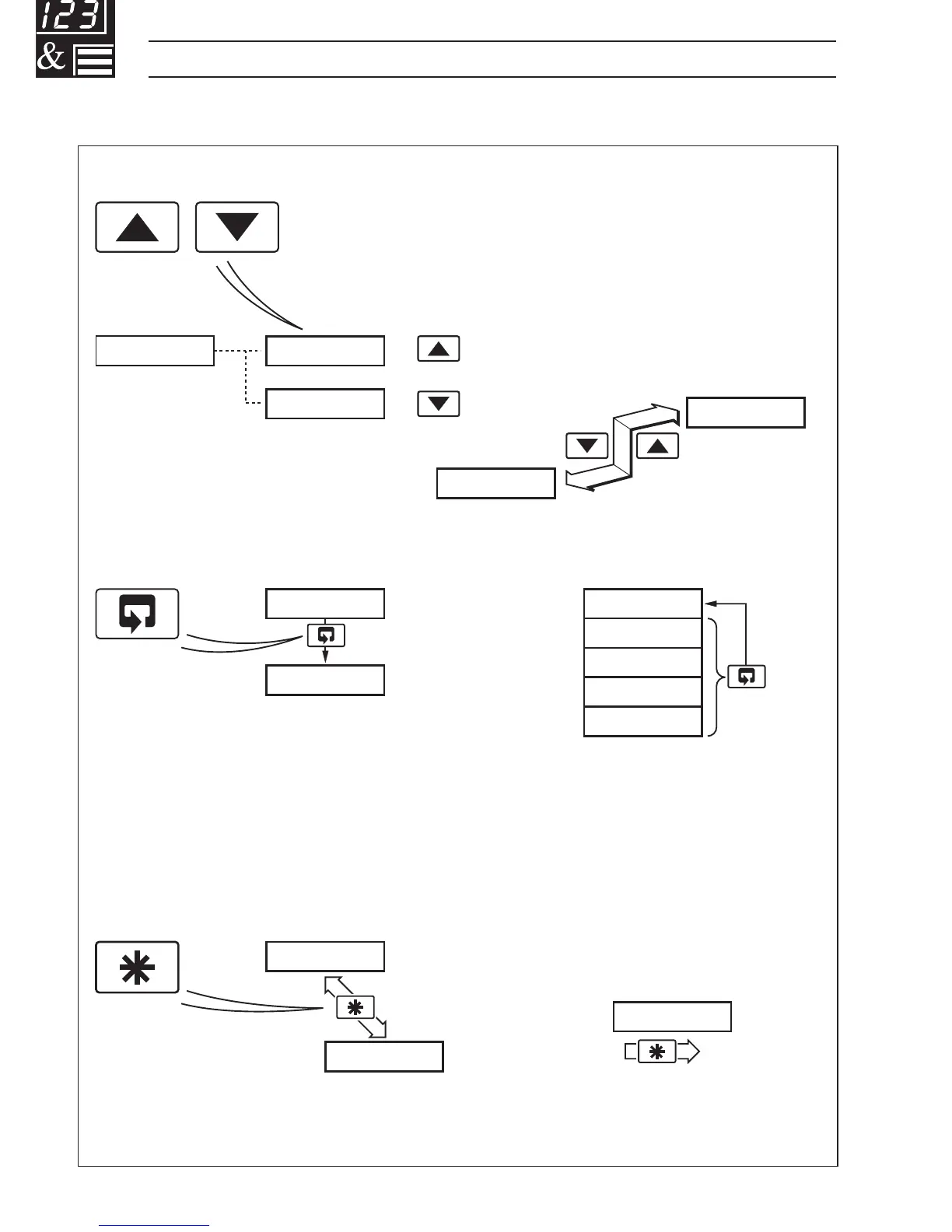
A – Raise and Lower Keys
B – Parameter Advance Key
Frame 1
(top of level)
Frame 2
+
–
C – Multi-function Key
Use to change/set a parameter value…
Use to advance to the next
frame within a level…
or…
100.0 100.1
99.9
LEVEL1
100.1
CodE
0
Use to view a parameter setting or selection…
123456
…select individual characters in a frame
or…
…move between levels
LEVEL1
LEVEL2
LEVELx
100.1
200.2
300.3
400.4
Press and
hold
or…
…select the top (LEVEL) frame
from within a level
Note. This key also stores any changes made in the previous frame
…1 DISPLAYS AND FUNCTION KEYS
1.2 Use of Function Keys – Fig. 1.2
Fig. 1.2 Use of Function Keys



 To Next Page