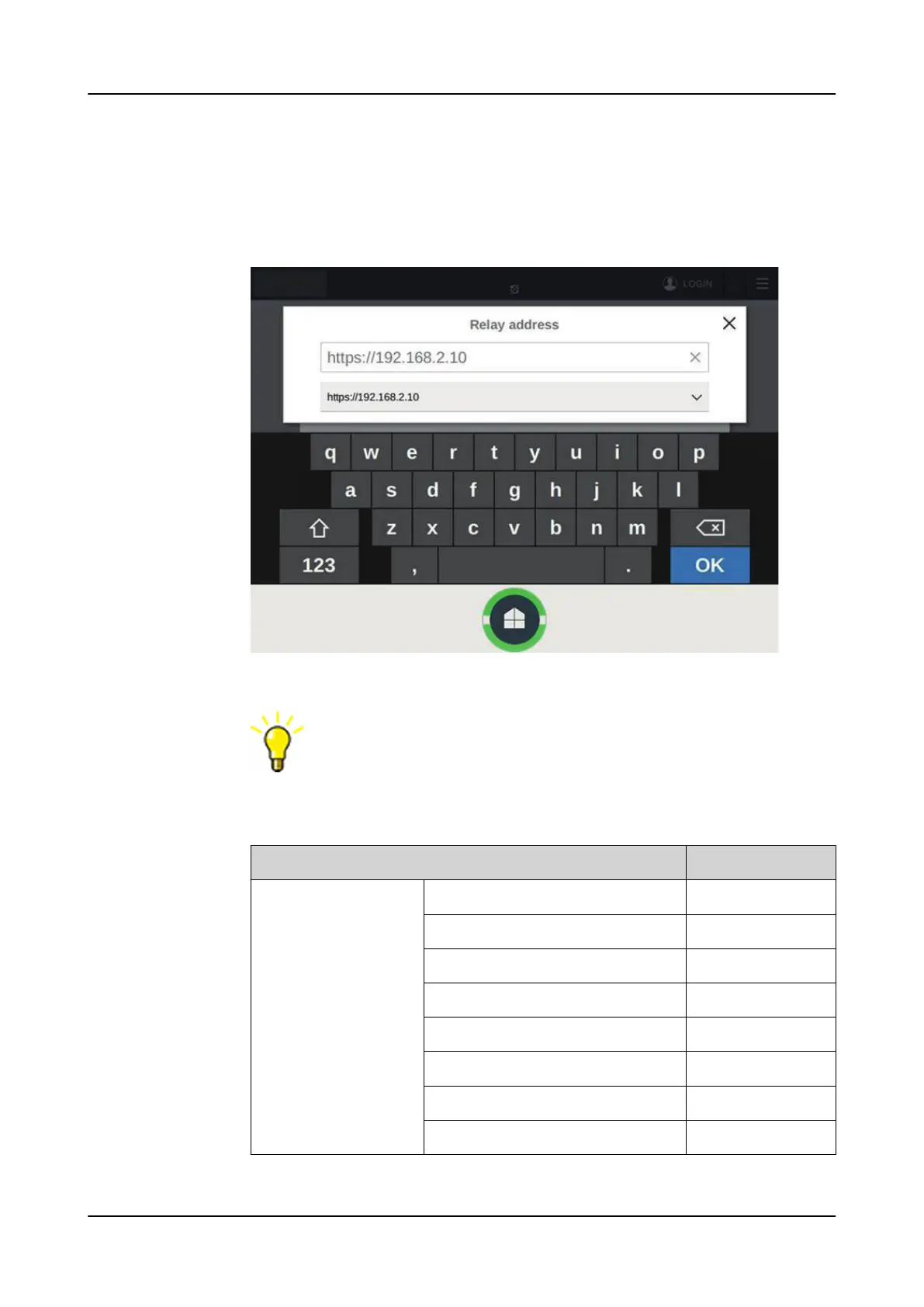
6. In the Relay address dialog box, type the IP address of one of the relays that
belongs to the switchgear HMI configuration and tap OK.
The relay's address can be found in Configuration> Communication>
Ethernet> Network1 address. The SHMI connects to the relay through the
station port and automatically fetches information for the rest of the relays.
Figure 111: Typing the relay IP address
If the relays within the same switchgear have mismatching
switchgear configurations, the SHMI always uploads the newest
updated configuration.
Table 26: Example of communication settings for switchgear HMI connection
through station network
Parameter
Value
HMI communication pa-
rameter
Main Unit Port/Automatic Address Not checked
Main Unit Port/Address 192.168.2.123
Main Unit Port/Netmask 255.255.255.0
Main Unit Port/Gateway Not checked
Main Unit Port/Gateway Address -
Service Port/Address 192.168.1.1
Service Port/Netmask 255.255.255.0
Service Port/Enable DHCP server Checked
Table continues on the next page
1MRS759118 D Commissioning
REX640
Operation Manual
133










 To Next Page