Commissioning
42/18-85-EN TZIDC-200, TZIDC-210, TZIDC-220 35
7.2.2 Request information
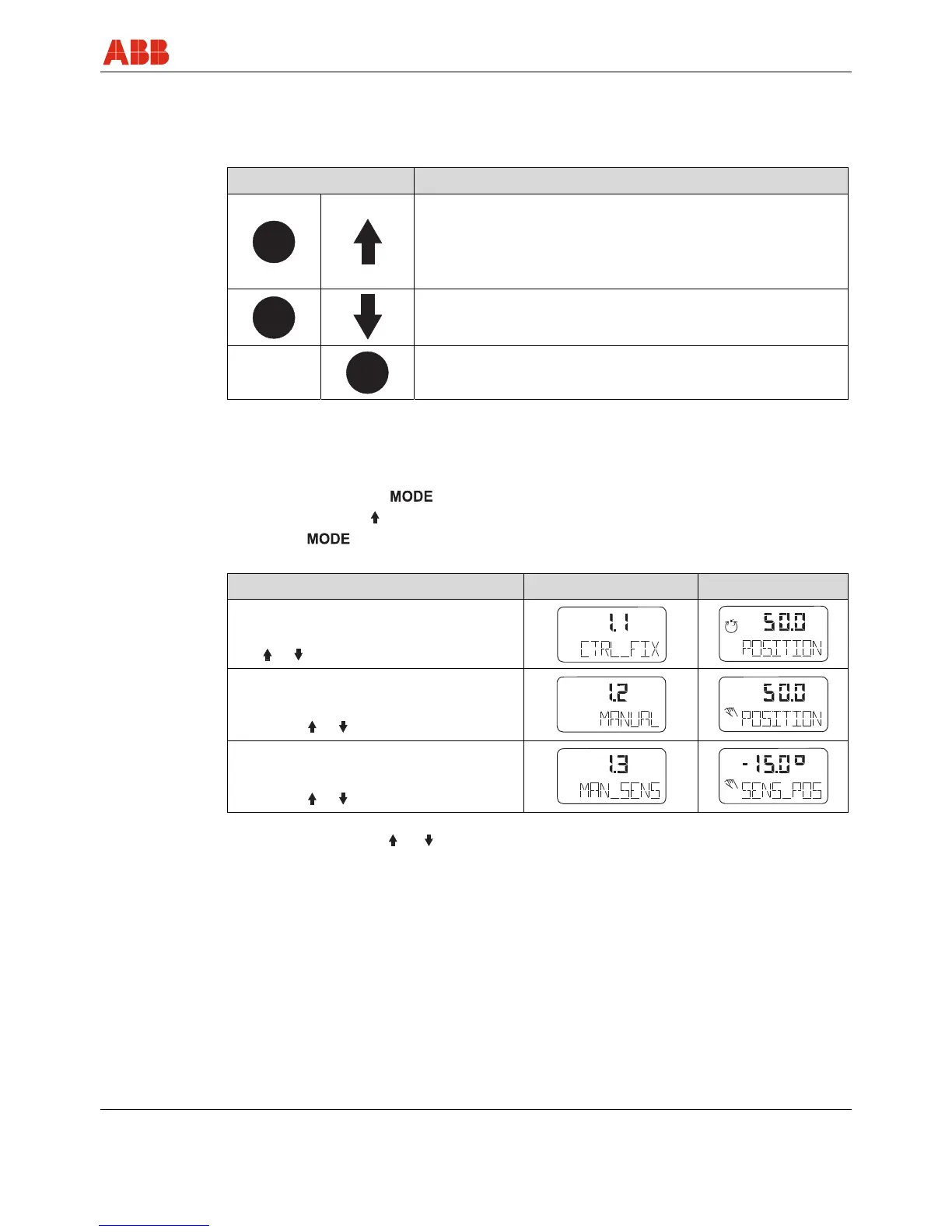
When the unit is in bus operation, a variety of information can be called up.
Press the following control buttons to access this information:
Control buttons Action
Cyclic communication:
Displays the setpoint in % and the setpoint status.
Acyclic communication:
Displays the communication status.
Displays the bus address and operating mode.
ENTER
Displays the software revision.
7.2.3 Operating modes
Selection from the operating level:
• Press and hold down
• Press and release as often as required to display the selected operating mode
• Release
• The position is displayed in % or as a rotation angle
Operating mode Mode indicator Position indicator
1.1
Positioning with fixed setpoint
Use or to adjust the setpoint
1.2
Manual adjustment
1)
in the operating range
Adjust with or
2)
1.3
Manual adjustment
1)
in the sensor range
Adjust with or
2)
1) Positioning not active.
2) for high-speed mode: Press and simultaneously.
conf
mA
%
C
°
conf
mA
%
C
°
conf
mA
%
C
°
conf
mA
%
C
°
conf
mA
%
C
°
conf
mA
%
C
°



 To Next Page