59
• Nowtheinitialisationdrivestartsmovingtowards„Locked”.Thisprocedure
isonlycarriedoutonceincomparisontotheunlockedinitialisationdrive.
Inthiscaseyoucanalsomakeadjustmentsin90°stepsi.e.whenonly”1x
Locking” is requested when locking. This saves on battery capacity and
facilitatesfasterlockingandunlocking.
Setting „Lock“ position:
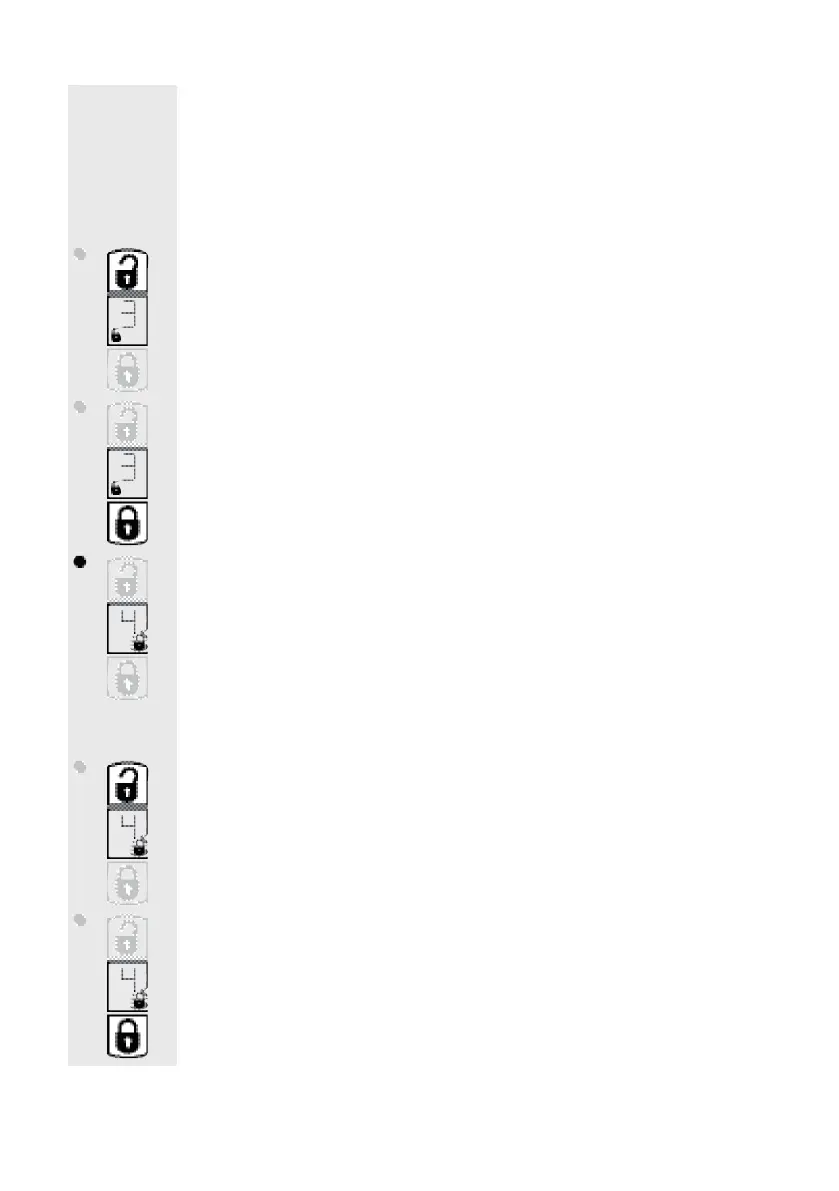
• Press”Unlock”buttonbriey,thedrivemoves90°respectivelytowards”Un-
lock”(thismovementcanberepeatedanumerousamountoftimes).
• Press„Lock”buttonbriey;thedrivemoves90°respectivelytowards„Lock“
(thismovementcanberepeatedanumerousamountoftimes)
• Press”Setup”key.Thedrivebeginstotheprogrammedsetting”Unlocked”
”4”appearsinthedisplaysignifyingmenuitem4(”holdtimefordoorcatch”
setting).Theunlockingsymbolashes.
Nowyoucansettheholdtimeofthedoorcatchforthe”DoorOpener“function.
Pleasenotethatthe battery consumption increases with lengthenedhold
times.
Hold time setting
• Brieypress”Unlock”button:
Lengthenedholdtime(approx.2.5seconds)
• Brieypress”Lock”button:
Shortholdtime


 To Next Page