4-1
PH530
Condential
Chapter 4
Function Test & Alignment Procedure
4-1 Test Equipment Needed
- IBM PC with 720P resolution (Color Video Signal & Pattern Generator)
- DVD player with Multi-system (NTSC/PAL/SECAM), equipped “Component”, “S-Video”
and “Composite”
- HDTV Tuner or Source (480P, 720P, 1080i)
- Minolta CL-100
- Quantum Data 802B or CHROMA2327
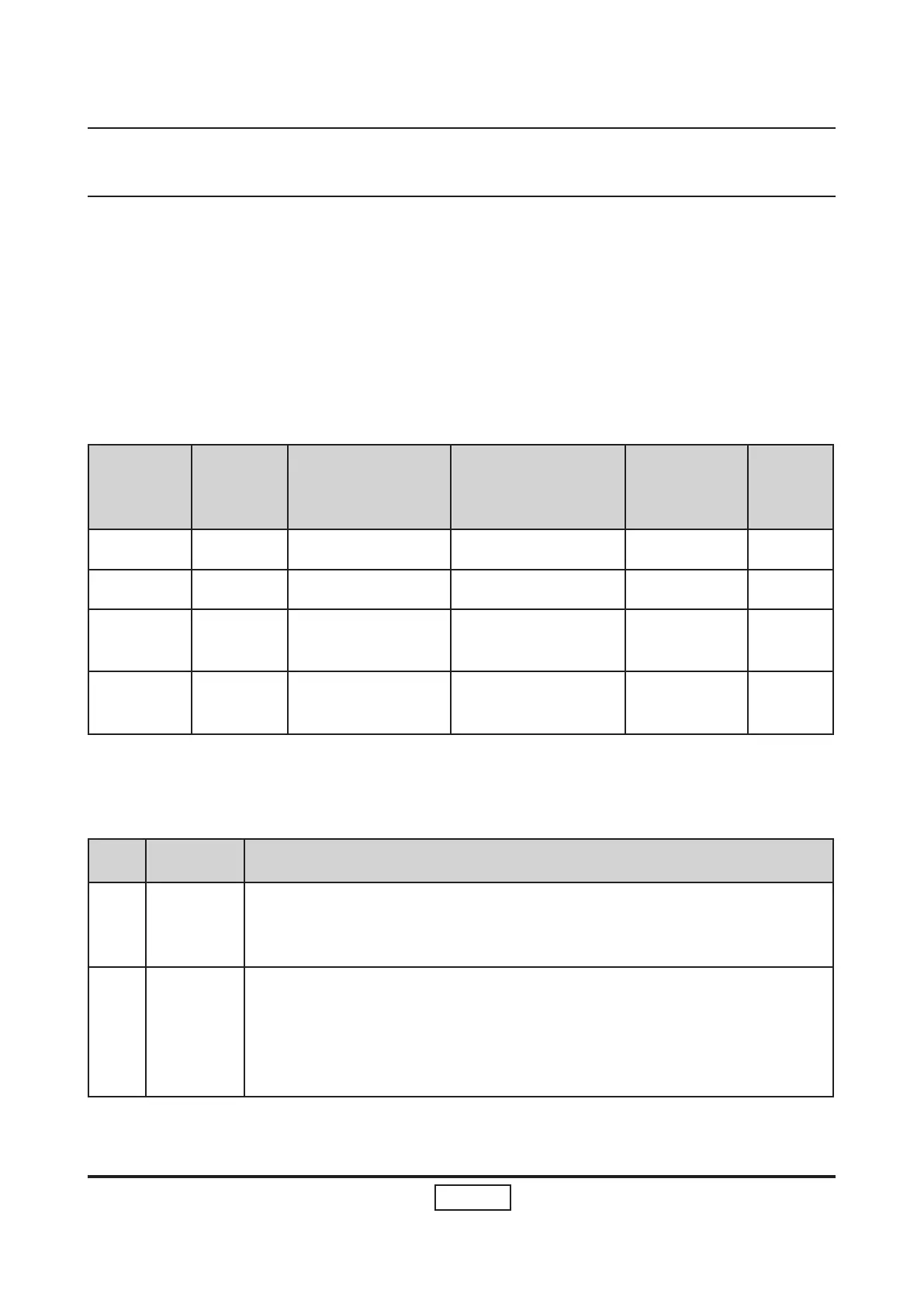
- After changing parts, check the information below.
Charge
Parts/
Update
Version
Update
Color Wheel
Index
Reset Lamp Use
Time
Factory
Reset
EDID
M/B v v v v
FW v v
Color
Wheel
v
Lamp
Module
v
4-2 Service Mode
No Item Step
1 Service
Mode
1. Turn on the projector and input the signal.
2. Press these buttons sequentially: Power, Source, Source, Up.
2 Factory
Reset
After nal QC step, we have to erase all saved change again and
restore the factory defaults. The following actions will allow you to
erase all end-users’ settings and restore the original setting:
1. Please enter Menu.
2. Use OSD to reset.


 To Next Page