EasyManua.ls Logo

Acer PH530 - Firmware Upgrade Procedure

Acer PH530
78 pages
Print Icon
To Next Page IconTo Next Page
To Previous Page IconTo Previous Page
Loading...
PH5305-6
Condential
No Step Procedure Photo
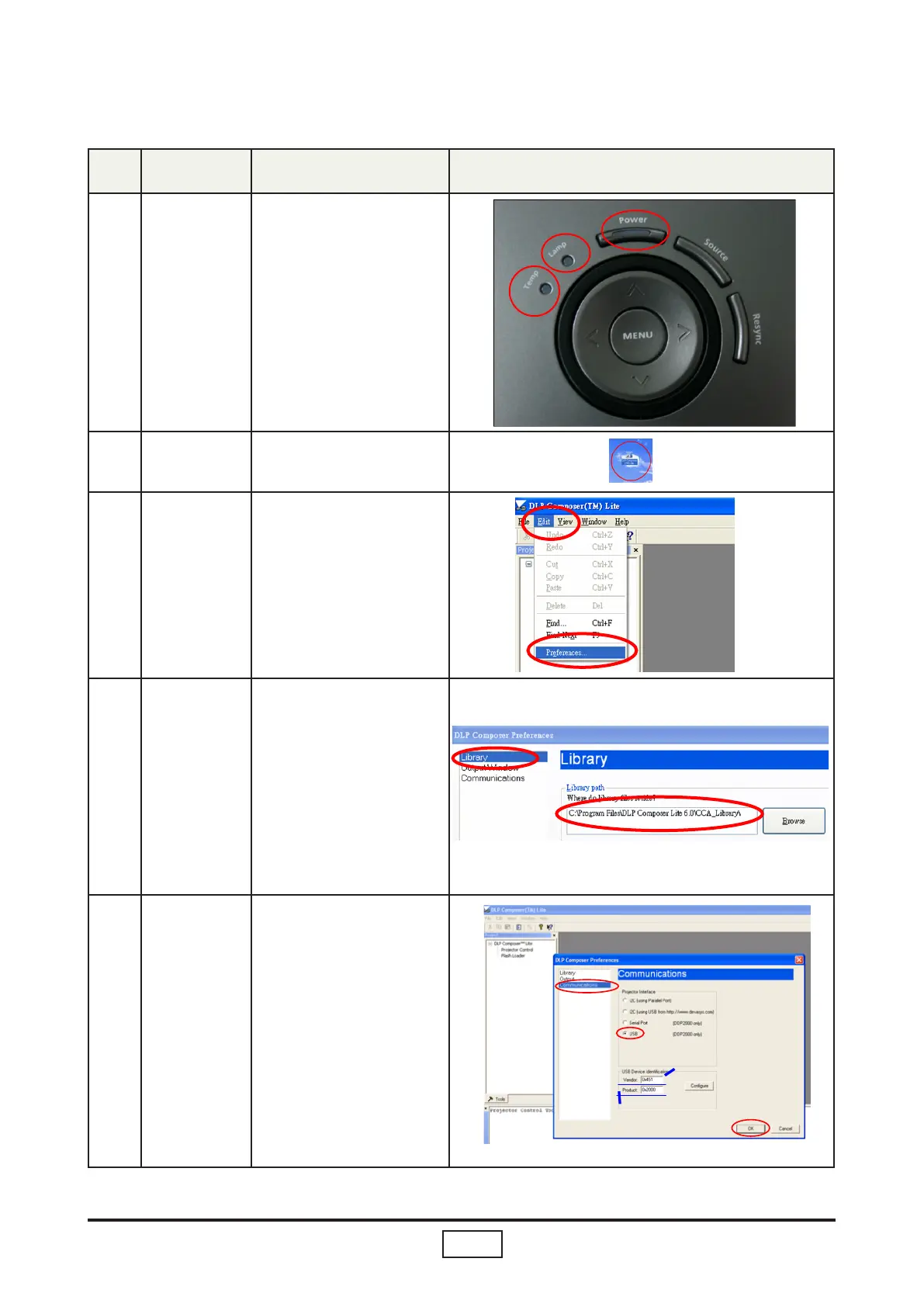
1 Set-up
1. Enter rmware mode.
(Refer to rst page to
enter rmware mode)
2. Once Power, Lamp,
Temp LED light up,
plug in USB Cable
into the Projector and
link to PC USB.
2
Execute the “DLP Com-
pose
TM”
le.
.
3
Click “Edit” and “Prefer-
ences”.
4
1. Click “Library”.
2. The library path
located in the default
installation directory
is C:\Program Files\
DLP Composer Lite
6.0\CCA_Library\
If not, press “Browse” to
select the right path.
5
1. Select “Edit\Prefer
ences\Communi
cations” and choose
“USB”.
2. Click “OK”.
Firmware Upgrade Procedure
1
2
USB
OK
Vendor: 0x451
Product: 0x2000
1
2
1
2

Related product manuals