EasyManua.ls Logo

Acer PH530 - Page 38

Acer PH530
78 pages
Print Icon
To Next Page IconTo Next Page
To Previous Page IconTo Previous Page
Loading...
4-3
PH530
Condential
No Step Specication Procedure Photo
3 Focus
The text in the
corner should
be clear after
adjust the focus
ring.
- Test Signal :
1280x720@60Hz
- Test Pattern : Ful-xga
- Adjust the center
clearly; meanwhile,
one slightly vague
corner in the image is
allowed.
4 HDMI No discolor
- Test Signal : 720p,
1080i
- Test Pattern : Any
Pattern
- Equipment:DVD
Player with HDMI
output
- Display type must be
set to 16:9
- Ensure if the image
is well performed and
the color can not
discolor.
5
Color
Performance
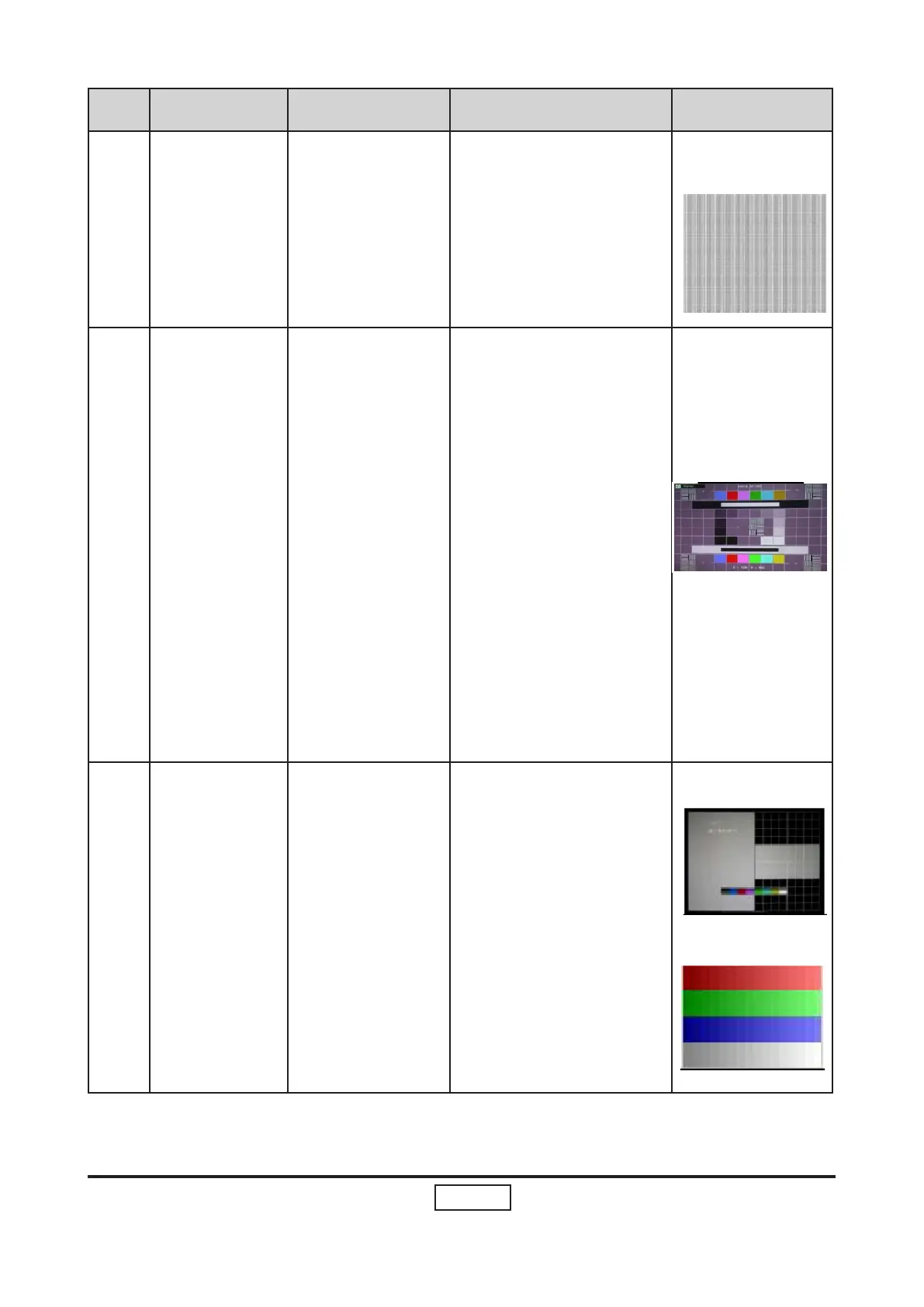
- Test Signal :
1280x720@60Hz
- Test Pattern : PANA-
ICON Pattern & 64
GRAYS RGBW
- Please check and
ensure if each color is
normal and distin-
guishable.
- If not, please adjust
color index of the
Engineering Mode.
- Fix OSD to re-sync or
track Frenquency.

Related product manuals