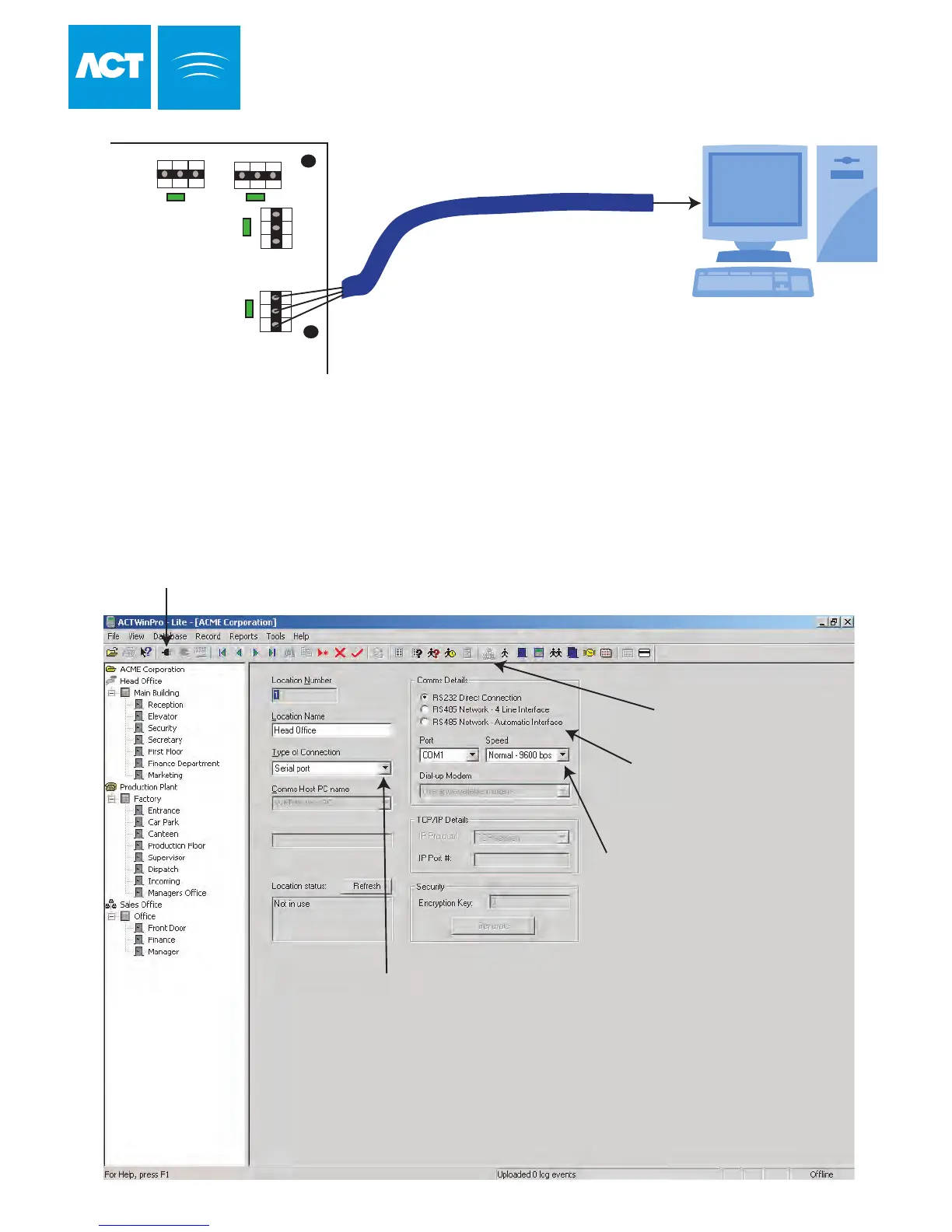
ACTWin pro Serial Configuration
ACTWin pro
From the Installer Menu on the keypad,
do the following:
1. Factory Default the controller.
2. For more than one controller an RS-485 network interface is required. Each
controller must be set to a unique address, starting at 1.
3. Connect the controller(s) to the PC.
4. From ACTWin pro, configure a new database.
5. Follow the database creation wizard.
6. Ensure that Comms is set up correctly.
7. Connect to the controllers.
Click here to configure Comms
Select if Direct Connect or
Networked
Select Serial Port
Select COM port and Speed
Click here to Connect
ACTpro 4000
36
Direct Connect Cable
For cable information
please see page 44
B 0V
TX
RX
NETWORK 1
DOORS
A
B
0V
SERIAL/PRINTER
0V
B 0V
NETWORK 2
A A



 To Next Page