ENGLISH
PSPIX² • User manual
50
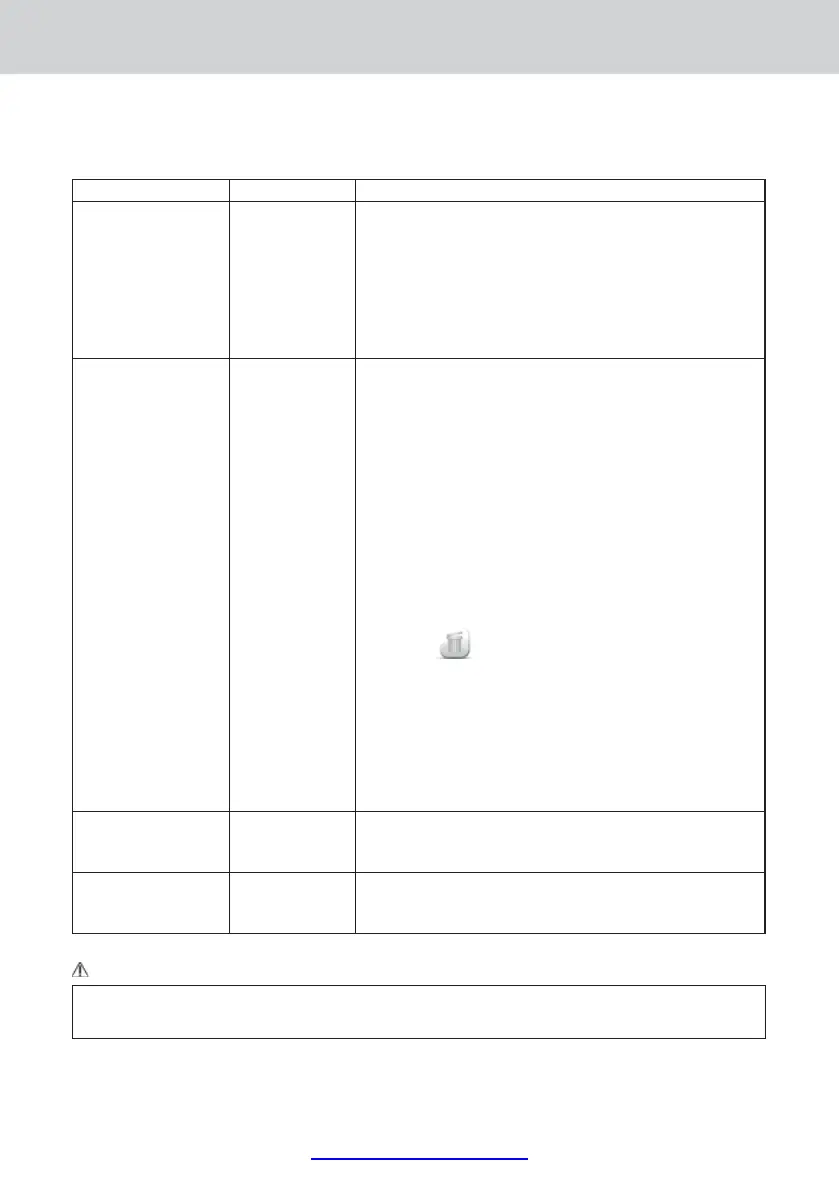
Warnings table:
WARNING CODE CAUSE SOLUTION
Warning 202 to 206 Defective Ethernet
Communications
-Ensure that the PSPIX system’s Ethernet cables and the computer are
properly connected to a network port.
-Ensure that the computer is switched on, the imaging software is
open and that both the patient fi le and the PSPIX acquisition module
are open.
- Check you network Ethernet Setup. To do this, please contact your
network administrator.
-Contact your approved reseller or SOPRO Customer Services.
Warning 207 Network outage,
computer failure or
a problem with the
imaging software
during the IP
reading.
The image could not be transferred to the computer and remains in
the PSPIX system memory.
You are offered three options:
-Attempt to reestablish the Ethernet connection with the computer to
automatically transfer the image.
To do this ensure that the Ethernet cable is correctly connected OR
ensure that the PSPIX acquisition module is correctly open.
If the Ethernet connection is reconnected then a new window
confi rming the reconnection will be displayed during the image
transfer.
-OR Delete the X-ray image from the memory by clicking on the
“Trash” icon
. Confi rm the deletion by pressing the OK button.
-OR Collect the image from the PSPIX acquisition module from
another computer connected to the PSPIX system (in the case of a
multi-user confi guration). Take care to open the correct patient fi le
in the imaging software, then access the “Setup” menu, then the
“Image” tab in the PSPIX acquisition module. Finally click on the
“Retrieve the Last Scanned Image” button.
Warning 601 Ambient
temperature too
low
-Check and increase the temperature in the room where the PSPIX
system is located.
Warning 602 Ambient
temperature too
high
-Check and lower the temperature in the room where the PSPIX
system is located.
WARNING:
Risk of electrocution and/or malfunction of the PSPIX system. No outside contractor shall be authroised
/ recommended to carry out the maintenance.















 To Next Page