NVR 3.0 User’s Manual
46
Set the Export Video Settings
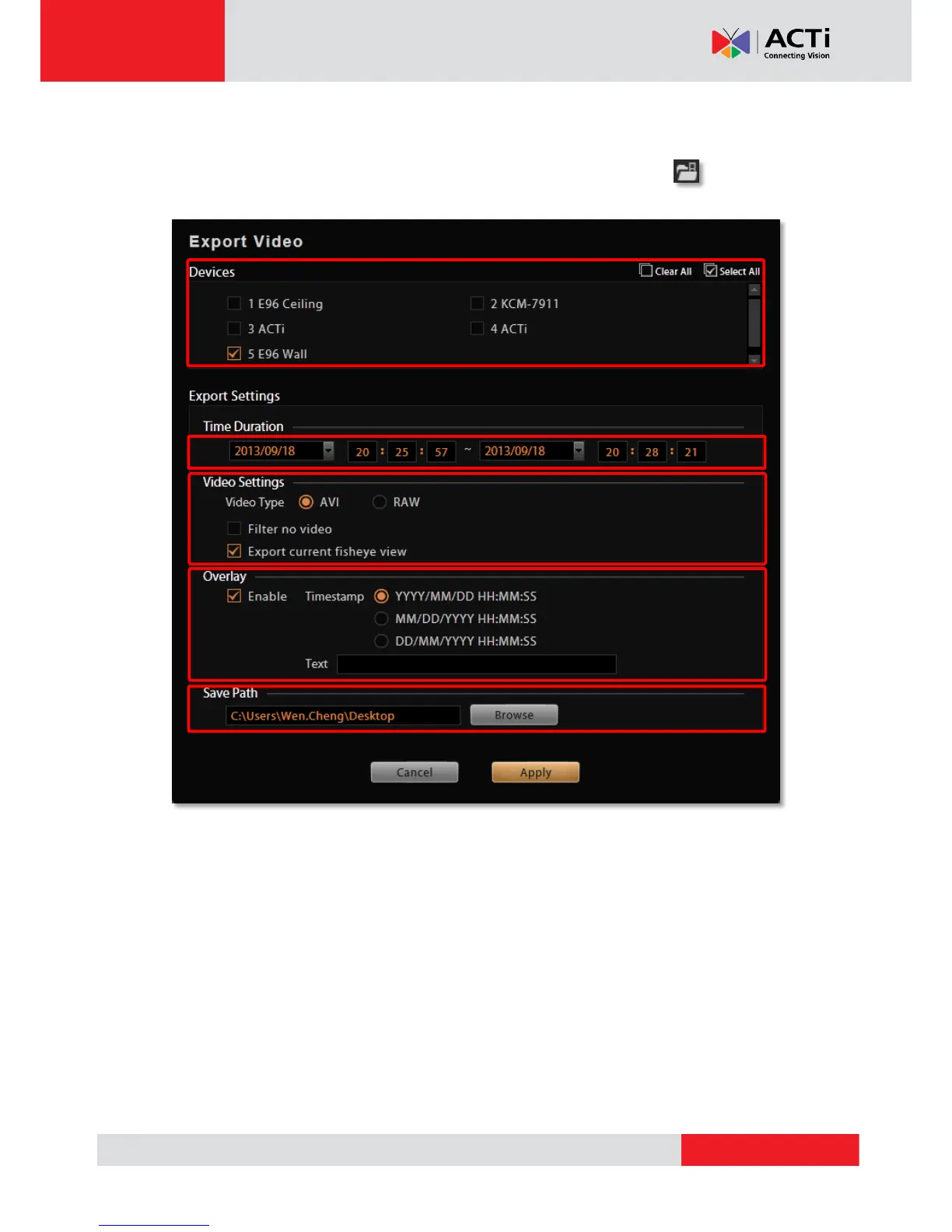
You may export video with or without defining the time duration beforehand since you can
configure all the settings on Export Setting window. On Control panel, click to enter the
window.
1. Select the devices. If more than one device are selected, you will get multiple recordings.
2. Set the time duration. The minimum duration is 10 seconds, maximum is 1 hour. (For
individual recording, if the total size is over 2 GB, or the video encoder type, frame rate,
resolution of this channel’s stream once altered during the selected Time Duration, this
file will be divided).
3. Choose the video format, you may enable the “Filter no video” function to skip the video
gaps. If this channel is a fisheye camera, make sure you select the desired fisheye view
from right-click menu “Fisheye Mode”, and check “Export current fisheye view” here.
The exported video will come in the view mode you are seeing now; otherwise, the default
fisheye view for exported video is Original View.
4. Set the overlay text if needed. The maximum number of characters for Text is 40.



 To Next Page